
基于 Dify 的工业数据处理工作流实战:多模态数据 GraphRag 格式转换 + OPC UA 协议实时数据查询
基于 Dify 的工业数据处理工作流实战:多模态数据 GraphRag 格式转换 + OPC UA 协议实时数据查询
基于 Dify 的工业数据处理工作流实战:多模态数据 GraphRag 格式转换 + OPC UA 协议实时数据查询
本文档包含:
1、多模态数据解析工作流:将文档和图片类数据解析为微软GraphRag支持的csv和txt格式。
2、OPC UA Server数据查询工作流:获取OPC UA Server转发的数据库实时数据,用于后续开发静态数据与动态数据结合的GraphRag知识图谱。
本项目仓库
- gitee仓库:https://gitee.com/huchenxi96/DataProcess
- github仓库:https://github.com/ChenXi-Hu/DataProcess
多模态数据解析工作流
- 本工作流将文档和图片类数据解析为微软
GraphRag支持的csv和txt格式
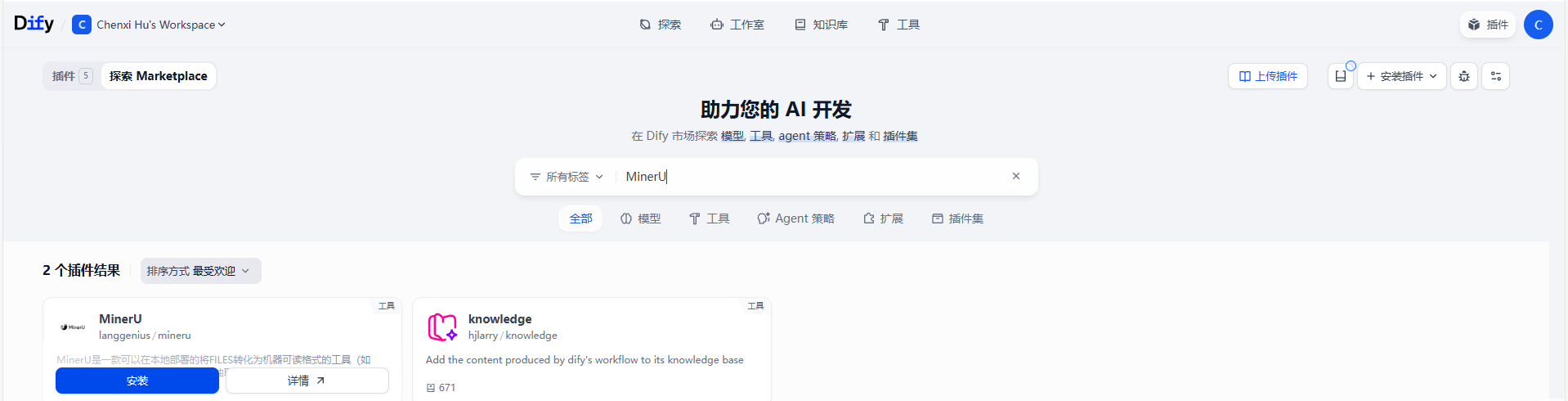
MinerU 插件安装
- 【
Dify】-> 【工具】-> 【Marketplace】,搜索MinerU插件并安装。
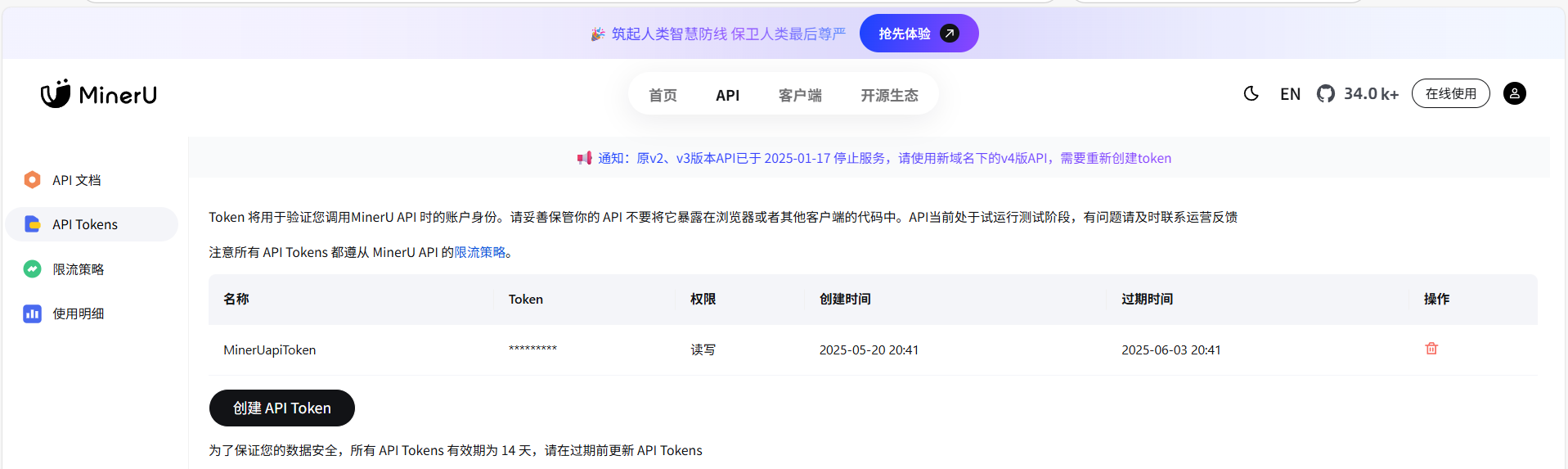
- 访问 MinerU 官网申请在线 API,审批通过后方可使用:https://mineru.net/apiManage
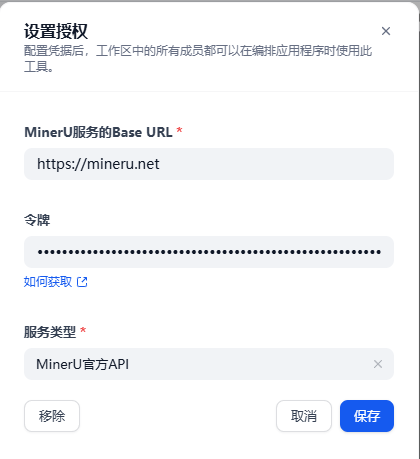
- 配置
MinerU插件参数
# MinerU服务的Base URL
https://mineru.net

# 令牌
MinerU 官网申请后自己创建的 API token

# 服务类型
MinerU官方API
- 打开
dify/docker/.env文件,修改FILES_URL配置项,将其设置为FILES_URL=http://api:5001(5001为dify-api的默认端口号)
在使用 Dify 的 MinerU 插件时,尤其是在处理文件上传时,如果不配置此步骤,会遇到报错:

Failed to transform tool message: PluginInvokeError: {"args":{},"error_type":"Exception","message":"Error extracting page from PDF: Request URL is missing an 'http://' or 'https://' protocol."}

这是因为 Dify 的 API 服务无法正确访问其自身的文件服务。
工作流搭建
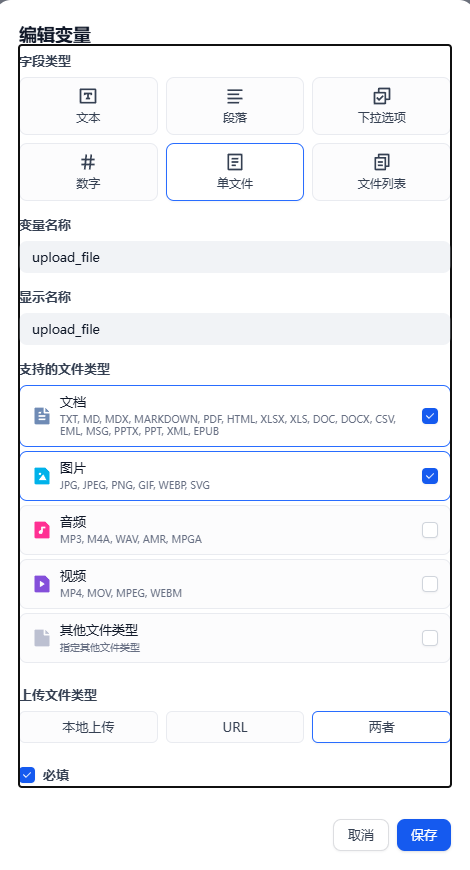
开始节点
- 功能:上传要解析的文件
- 节点配置参数:
- 输入字段:
upload_file(单文件类型)
- 输入字段:
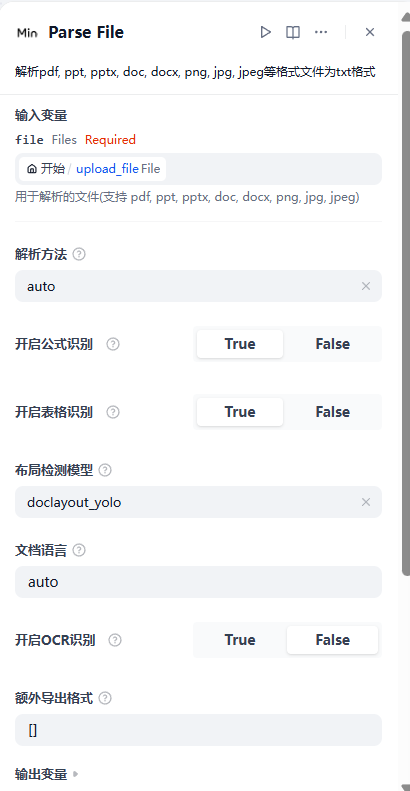
Parse File 节点
- 功能:
MinerU插件解析pdf, ppt, pptx, doc, docx, png, jpg, jpeg等格式文件为txt格式 - 节点配置参数:
- 输入变量:选择开始节点的输入字段变量
upload_file - 解析方法:
auto - 开启公式识别:
True - 开启表格识别:
True - 布局检测模型:
doclayout_yolo - 开启
OCR识别:False(根据使用场景是否需要图像识别选择True或False)
- 输入变量:选择开始节点的输入字段变量
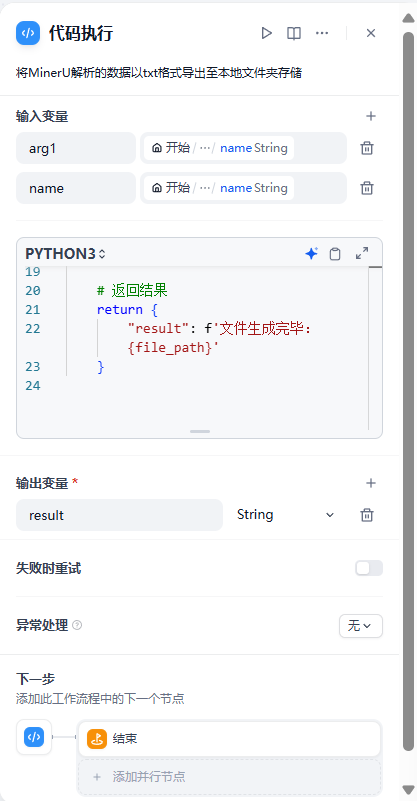
代码执行节点
-
功能:将
MinerU解析的数据以txt/csv格式导出至本地文件夹dify\docker\volumes\sandbox\file存储 -
原理解析:
Dify的代码执行环境是基于沙箱(Sandbox)的,沙箱环境限制了代码对本地文件系统和外部网络的直接访问,因此无法直接将生成的内容导出到本地或线上存储。-
解决方法:
- 在工作流中添加代码节点,将生成内容写入到
sandbox的临时环境下 - 在宿主机建立与镜像位置的映射,将沙箱文件映射到宿主机,免于进入
docker镜像查看
- 在工作流中添加代码节点,将生成内容写入到
-
具体步骤:
- 创建
file文件夹,并给予可写入权限
# 进入本地sandbox目录 cd /dify/docker/volumes/sandbox/ # 创建file文件夹 mkdir file # 给予此文件夹可写入权限 icacls /dify/docker/volumes/sandbox/file /grant Everyone:F /T- 建立宿主机映射:打开
/dify/docker/docker-compose.yaml文件,修改volumes
volumes: - ./volumes/sandbox/dependencies:/dependencies - ./volumes/sandbox/conf:/conf # ./volumes/sandbox/file 是宿主机目录下的地址 # /var/sandbox/sandbox-python/tmp/file:rw 是容器中的地址 赋予读写权限 - ./volumes/sandbox/file:/var/sandbox/sandbox-python/tmp/file:rw - 创建
-
-
节点配置参数:
- 输入变量:
arg1:Parse File节点的输出变量textname: 开始节点的输入字段变量upload_file - name
PYTHON3:
- 输入变量:
import os
import json

def main(arg1: list, name: str) -> dict:
    # 定义文件路径
    file_path = f'/tmp/file/{name}_To_.txt' # 本示例将 MinerU 解析的数据以 txt 格式导出
    # file_path = f'/tmp/file/{name}_To_.csv' # 本示例将 MinerU 解析的数据以 csv 格式导出
    # 获取目录路径
    directory = os.path.dirname(file_path)
    # 如果目录不存在,则创建目录
    if not os.path.exists(directory):
        os.makedirs(directory)

    # 将 JSON 对象序列化为字符串
    json_str = json.dumps(arg1, ensure_ascii=False, indent=4)

    # 打开文件并写入内容
    with open(file_path, 'w', encoding='utf-8') as f:
        f.write(json_str)

    # 返回结果
    return {
        "result": f'文件生成完毕:{file_path}'
    }
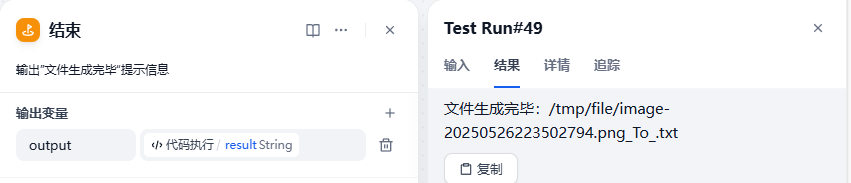
结束节点
- 功能:输出
文件生成完毕提示信息 - 节点配置参数
- 输出变量:变量名为
output,变量值选择代码执行节点的输出变量result
- 输出变量:变量名为
完整工作流
app:
  description: 将文档和图片类数据解析为微软GraphRag支持的csv和txt格式
  icon: 🤖
  icon_background: '#FFEAD5'
  mode: workflow
  name: 文档和图片类数据解析
  use_icon_as_answer_icon: false
dependencies:
- current_identifier: null
  type: marketplace
  value:
    marketplace_plugin_unique_identifier: langgenius/mineru:0.2.0@5ec4527d658becf0b3c0946c2a6f4328fa43fd270e2d1f1713af4a6748ac4b61
kind: app
version: 0.3.0
workflow:
  conversation_variables: []
  environment_variables: []
  features:
    file_upload:
      allowed_file_extensions:
      - .JPG
      - .JPEG
      - .PNG
      - .GIF
      - .WEBP
      - .SVG
      allowed_file_types:
      - image
      allowed_file_upload_methods:
      - local_file
      - remote_url
      enabled: false
      fileUploadConfig:
        audio_file_size_limit: 50
        batch_count_limit: 5
        file_size_limit: 15
        image_file_size_limit: 10
        video_file_size_limit: 100
        workflow_file_upload_limit: 10
      image:
        enabled: false
        number_limits: 3
        transfer_methods:
        - local_file
        - remote_url
      number_limits: 3
    opening_statement: ''
    retriever_resource:
      enabled: true
    sensitive_word_avoidance:
      enabled: false
    speech_to_text:
      enabled: false
    suggested_questions: []
    suggested_questions_after_answer:
      enabled: false
    text_to_speech:
      enabled: false
      language: ''
      voice: ''
  graph:
    edges:
    - data:
        isInIteration: false
        isInLoop: false
        sourceType: start
        targetType: tool
      id: 1748093430945-source-1748093440260-target
      source: '1748093430945'
      sourceHandle: source
      target: '1748093440260'
      targetHandle: target
      type: custom
      zIndex: 0
    - data:
        isInLoop: false
        sourceType: tool
        targetType: code
      id: 1748093440260-source-1748164544503-target
      selected: false
      source: '1748093440260'
      sourceHandle: source
      target: '1748164544503'
      targetHandle: target
      type: custom
      zIndex: 0
    - data:
        isInLoop: false
        sourceType: code
        targetType: end
      id: 1748164544503-source-1748160317965-target
      source: '1748164544503'
      sourceHandle: source
      target: '1748160317965'
      targetHandle: target
      type: custom
      zIndex: 0
    nodes:
    - data:
        desc: 上传要解析的文件
        selected: false
        title: 开始
        type: start
        variables:
        - allowed_file_extensions: []
          allowed_file_types:
          - image
          - document
          allowed_file_upload_methods:
          - local_file
          - remote_url
          label: upload_file
          max_length: 5
          options: []
          required: true
          type: file
          variable: upload_file
      height: 116
      id: '1748093430945'
      position:
        x: 81
        y: 282
      positionAbsolute:
        x: 81
        y: 282
      selected: false
      sourcePosition: right
      targetPosition: left
      type: custom
      width: 243
    - data:
        desc: 解析pdf, ppt, pptx, doc, docx, png, jpg, jpeg等格式文件为txt/csv格式
        is_team_authorization: true
        output_schema:
          properties:
            full_zip_url:
              description: The zip URL of the complete parsed result
              type: string
            images:
              description: The images extracted from the file
              items:
                type: object
              type: array
          type: object
        paramSchemas:
        - auto_generate: null
          default: null
          form: llm
          human_description:
            en_US: the file to be parsed(support pdf, ppt, pptx, doc, docx, png, jpg,
              jpeg)
            ja_JP: 解析するファイル(pdf、ppt、pptx、doc、docx、png、jpg、jpegをサポート)
            pt_BR: the file to be parsed(support pdf, ppt, pptx, doc, docx, png, jpg,
              jpeg)
            zh_Hans: 用于解析的文件(支持 pdf, ppt, pptx, doc, docx, png, jpg, jpeg)
          label:
            en_US: file
            ja_JP: file
            pt_BR: file
            zh_Hans: file
          llm_description: the file to be parsed (support pdf, ppt, pptx, doc, docx,
            png, jpg, jpeg)
          max: null
          min: null
          name: file
          options: []
          placeholder: null
          precision: null
          required: true
          scope: null
          template: null
          type: file
        - auto_generate: null
          default: auto
          form: form
          human_description:
            en_US: (For local deployment service)Parsing method, can be auto, ocr,
              or txt. Default is auto. If results are not satisfactory, try ocr
            ja_JP: (ローカルデプロイメントサービス用)解析方法は、auto、ocr、またはtxtのいずれかです。デフォルトはautoです。結果が満足できない場合は、ocrを試してください
            pt_BR: (For local deployment service)Parsing method, can be auto, ocr,
              or txt. Default is auto. If results are not satisfactory, try ocr
            zh_Hans: (用于本地部署服务)解析方法,可以是auto, ocr, 或 txt。默认是auto。如果结果不理想,请尝试ocr
          label:
            en_US: parse method
            ja_JP: 解析方法
            pt_BR: parse method
            zh_Hans: 解析方法
          llm_description: Parsing method, can be auto, ocr, or txt. Default is auto.
            If results are not satisfactory, try ocr
          max: null
          min: null
          name: parse_method
          options:
          - label:
              en_US: auto
              ja_JP: auto
              pt_BR: auto
              zh_Hans: auto
            value: auto
          - label:
              en_US: ocr
              ja_JP: ocr
              pt_BR: ocr
              zh_Hans: ocr
            value: ocr
          - label:
              en_US: txt
              ja_JP: txt
              pt_BR: txt
              zh_Hans: txt
            value: txt
          placeholder: null
          precision: null
          required: false
          scope: null
          template: null
          type: select
        - auto_generate: null
          default: 1
          form: form
          human_description:
            en_US: (For official API) Whether to enable formula recognition
            ja_JP: (公式API用)数式認識を有効にするかどうか
            pt_BR: (For official API) Whether to enable formula recognition
            zh_Hans: (用于官方API)是否开启公式识别
          label:
            en_US: Enable formula recognition
            ja_JP: 数式認識を有効にする
            pt_BR: Enable formula recognition
            zh_Hans: 开启公式识别
          llm_description: (For official API) Whether to enable formula recognition
          max: null
          min: null
          name: enable_formula
          options: []
          placeholder: null
          precision: null
          required: false
          scope: null
          template: null
          type: boolean
        - auto_generate: null
          default: 1
          form: form
          human_description:
            en_US: (For official API) Whether to enable table recognition
            ja_JP: (公式API用)表認識を有効にするかどうか
            pt_BR: (For official API) Whether to enable table recognition
            zh_Hans: (用于官方API)是否开启表格识别
          label:
            en_US: Enable table recognition
            ja_JP: 表認識を有効にする
            pt_BR: Enable table recognition
            zh_Hans: 开启表格识别
          llm_description: (For official API) Whether to enable table recognition
          max: null
          min: null
          name: enable_table
          options: []
          placeholder: null
          precision: null
          required: false
          scope: null
          template: null
          type: boolean
        - auto_generate: null
          default: doclayout_yolo
          form: form
          human_description:
            en_US: '(For official API) Optional values: doclayout_yolo, layoutlmv3,
              default value is doclayout_yolo. doclayout_yolo is a self-developed
              model with better effect'
            ja_JP: (公式API用)オプション値:doclayout_yolo、layoutlmv3、デフォルト値は doclayout_yolo。doclayout_yolo
              は自己開発モデルで、効果がより良い
            pt_BR: '(For official API) Optional values: doclayout_yolo, layoutlmv3,
              default value is doclayout_yolo. doclayout_yolo is a self-developed
              model with better effect'
            zh_Hans: (用于官方API)可选值:doclayout_yolo、layoutlmv3,默认值为 doclayout_yolo。doclayout_yolo
              为自研模型,效果更好
          label:
            en_US: Layout model
            ja_JP: レイアウト検出モデル
            pt_BR: Layout model
            zh_Hans: 布局检测模型
          llm_description: '(For official API) Optional values: doclayout_yolo, layoutlmv3,
            default value is doclayout_yolo. doclayout_yolo is a self-developed model
            withbetter effect'
          max: null
          min: null
          name: layout_model
          options:
          - label:
              en_US: doclayout_yolo
              ja_JP: doclayout_yolo
              pt_BR: doclayout_yolo
              zh_Hans: doclayout_yolo
            value: doclayout_yolo
          - label:
              en_US: layoutlmv3
              ja_JP: layoutlmv3
              pt_BR: layoutlmv3
              zh_Hans: layoutlmv3
            value: layoutlmv3
          placeholder: null
          precision: null
          required: false
          scope: null
          template: null
          type: select
        - auto_generate: null
          default: auto
          form: form
          human_description:
            en_US: '(For official API) Specify document language, default ch, can
              be set to auto, when auto, the model will automatically identify document
              language, other optional value list see: https://paddlepaddle.github.io/PaddleOCR/latest/ppocr/blog/multi_languages.html#5'
            ja_JP: (公式API用)ドキュメント言語を指定します。デフォルトはchで、autoに設定できます。autoの場合、モデルはドキュメント言語を自動的に識別します。他のオプション値リストについては、次を参照してください:https://paddlepaddle.github.io/PaddleOCR/latest/ppocr/blog/multi_languages.html#5
            pt_BR: '(For official API) Specify document language, default ch, can
              be set to auto, when auto, the model will automatically identify document
              language, other optional value list see: https://paddlepaddle.github.io/PaddleOCR/latest/ppocr/blog/multi_languages.html#5'
            zh_Hans: (用于官方API)指定文档语言,默认 ch,可以设置为auto,当为auto时模型会自动识别文档语言,其他可选值列表详见:https://paddlepaddle.github.io/PaddleOCR/latest/ppocr/blog/multi_languages.html#5
          label:
            en_US: Document language
            ja_JP: ドキュメント言語
            pt_BR: Document language
            zh_Hans: 文档语言
          llm_description: '(For official API) Specify document language, default
            ch, can be set to auto, when auto, the model will automatically identify
            document language, other optional value list see: https://paddlepaddle.github.io/PaddleOCR/latest/ppocr/blog/multi_languages.html#5'
          max: null
          min: null
          name: language
          options: []
          placeholder: null
          precision: null
          required: false
          scope: null
          template: null
          type: string
        - auto_generate: null
          default: 0
          form: form
          human_description:
            en_US: (For official API) Whether to enable OCR recognition
            ja_JP: (公式API用)OCR認識を有効にするかどうか
            pt_BR: (For official API) Whether to enable OCR recognition
            zh_Hans: (用于官方API)是否开启OCR识别
          label:
            en_US: Enable OCR recognition
            ja_JP: OCR認識を有効にする
            pt_BR: Enable OCR recognition
            zh_Hans: 开启OCR识别
          llm_description: (For official API) Whether to enable OCR recognition
          max: null
          min: null
          name: enable_ocr
          options: []
          placeholder: null
          precision: null
          required: false
          scope: null
          template: null
          type: boolean
        - auto_generate: null
          default: '[]'
          form: form
          human_description:
            en_US: '(For official API) Example: ["docx","html"], markdown, json are
              the default export formats, no need to set, this parameter only supports
              one or more of docx, html, latex'
            ja_JP: (公式API用)例:["docx","html"]、markdown、jsonはデフォルトのエクスポート形式であり、設定する必要はありません。このパラメータは、docx、html、latexの3つの形式のいずれかまたは複数のみをサポートします
            pt_BR: '(For official API) Example: ["docx","html"], markdown, json are
              the default export formats, no need to set, this parameter only supports
              one or more of docx, html, latex'
            zh_Hans: (用于官方API)示例:["docx","html"],markdown、json为默认导出格式,无须设置,该参数仅支持docx、html、latex三种格式中的一个或多个
          label:
            en_US: Extra export formats
            ja_JP: 追加のエクスポート形式
            pt_BR: Extra export formats
            zh_Hans: 额外导出格式
          llm_description: '(For official API) Example: ["docx","html"], markdown,
            json are the default export formats, no need to set, this parameter only
            supports one or more of docx, html, latex'
          max: null
          min: null
          name: extra_formats
          options: []
          placeholder: null
          precision: null
          required: false
          scope: null
          template: null
          type: string
        params:
          enable_formula: ''
          enable_ocr: ''
          enable_table: ''
          extra_formats: ''
          file: ''
          language: ''
          layout_model: ''
          parse_method: ''
        provider_id: langgenius/mineru/mineru
        provider_name: langgenius/mineru/mineru
        provider_type: builtin
        selected: false
        title: Parse File
        tool_configurations:
          enable_formula: 1
          enable_ocr: 0
          enable_table: 1
          extra_formats: '[]'
          language: auto
          layout_model: doclayout_yolo
          parse_method: auto
        tool_description: 一个用于解析文本,表格和图片的工具,支持pdf,pptx,docx等多种格式。支持英语,中文等多种语言
        tool_label: Parse File
        tool_name: parse-file
        tool_parameters:
          file:
            type: variable
            value:
            - '1748093430945'
            - upload_file
        type: tool
      height: 288
      id: '1748093440260'
      position:
        x: 386
        y: 282
      positionAbsolute:
        x: 386
        y: 282
      selected: false
      sourcePosition: right
      targetPosition: left
      type: custom
      width: 243
    - data:
        desc: 输出”文件生成完毕“提示信息
        outputs:
        - value_selector:
          - '1748164544503'
          - result
          variable: output
        selected: false
        title: 结束
        type: end
      height: 116
      id: '1748160317965'
      position:
        x: 1117
        y: 258
      positionAbsolute:
        x: 1117
        y: 258
      selected: false
      sourcePosition: right
      targetPosition: left
      type: custom
      width: 243
    - data:
        code: "import os\nimport json\n\ndef main(arg1: list, name: str) -> dict:\n\
          \    # 定义文件路径\n    file_path = f'/tmp/file/{name}_To_.txt'\n    # 获取目录路径\n\
          \    directory = os.path.dirname(file_path)\n    # 如果目录不存在,则创建目录\n    if\
          \ not os.path.exists(directory):\n        os.makedirs(directory)\n    \n\
          \    # 将 JSON 对象序列化为字符串\n    json_str = json.dumps(arg1, ensure_ascii=False,\
          \ indent=4)\n    \n    # 打开文件并写入内容\n    with open(file_path, 'w', encoding='utf-8')\
          \ as f:\n        f.write(json_str)\n    \n    # 返回结果\n    return {\n   \
          \     \"result\": f'文件生成完毕:{file_path}'\n    }\n"
        code_language: python3
        desc: 将MinerU解析的数据以txt/csv格式导出至本地文件夹存储
        outputs:
          result:
            children: null
            type: string
        selected: true
        title: 代码执行
        type: code
        variables:
        - value_selector:
          - '1748093430945'
          - upload_file
          - name
          variable: arg1
        - value_selector:
          - '1748093430945'
          - upload_file
          - name
          variable: name
      height: 96
      id: '1748164544503'
      position:
        x: 817
        y: 258
      positionAbsolute:
        x: 817
        y: 258
      selected: true
      sourcePosition: right
      targetPosition: left
      type: custom
      width: 243
    viewport:
      x: -10.433565629179952
      y: -44.20003065385602
      zoom: 0.8010698775896222
OPC UA Server数据查询工作流
- 本工作流用于获取
OPC UA Server转发的数据库数据
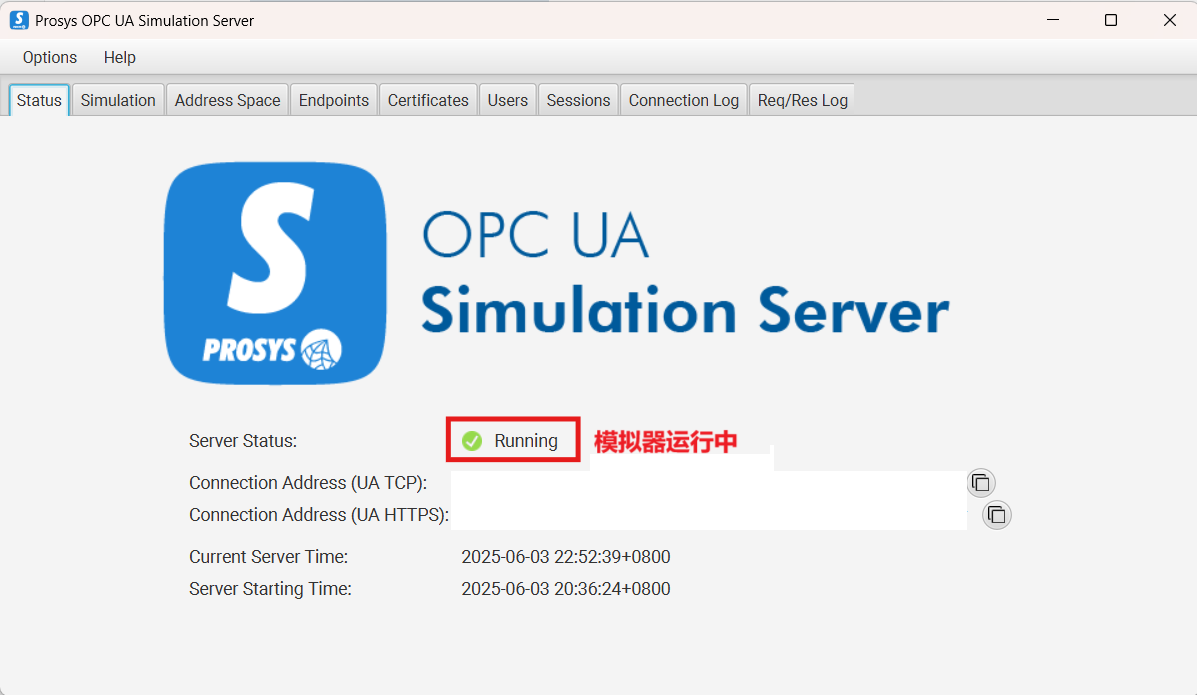
OPC UA Server模拟器安装
# 在本地安装仓库中的Prosys OPC UA Server模拟器软件
# 软件功能:模拟一个标准的OPC UA服务器,提供数据生成、节点管理等功能。
# 软件用途:用于测试和验证OPC UA客户端的连接和数据交互能力。
git clone https://gitcode.com/open-source-toolkit/0a79c
OPC UA 自然语言查询 API 开发
- 基于
FastAPI框架构建的RESTful API,允许用户通过自然语言查询OPC UA服务器的单个/多个节点值或子节点列表。系统能够理解自然语言指令,自动解析节点名称和查询意图,并返回结构化的结果。
项目结构
opcua-gateway/         📁 根目录
├─ main.py             📄 API主程序
├─ .env                📄 环境配置文件
├─ README.md		   📄 API简介
└─ 节点映射.xlsx        📄 Excel节点映射配置
环境要求
Python 3.10+OPC UA服务器(如Prosys OPC UA Simulation Server)
安装依赖
# fastapi:用于快速构建 API 的框架
# uvicorn:基于 ASGI(异步服务器网关接口)的 Web 服务器,是 FastAPI 的推荐运行环境。
# opcua:OPC UA 协议的 Python 实现,用于工业自动化系统中的设备通信
# pandas:数据处理与分析库,提供高性能的 DataFrame 结构
# Python-dotenv:从.env文件加载环境变量,避免硬编码敏感信息(如 API 密钥)
# asyncio:Python 实现高性能异步编程的核心库,适合处理大量并发的 IO 操作
pip install fastapi uvicorn opcua pandas python-dotenv asyncio
节点映射配置
-
在项目目录创建
节点映射.xlsx文件 -
包含两列数据:
-
DisplayName- 节点显示名称 -
NodeID- 完整节点 ID
-
| DisplayName | NodeID |
|---|---|
| Counter | ns=3;s=Counter |
| Expression | ns=3;s=Expression |
| Random | ns=3;s=Random |
| Sawtooth | ns=3;s=Sawtooth |
| Sinusoid | ns=3;s=Sinusoid |
| Square | ns=3;s=Square |
| Triangle | ns=3;s=Triangle |
环境变量配置(可选)
# .env 文件
# opc.tcp://your-server:port/path 指OPC UA Server的Connection Address(UA TCP)
OPCUA_SERVER_URL=opc.tcp://your-server:port/path
启动服务
uvicorn main:app --reload --host 0.0.0.0 --port 3000
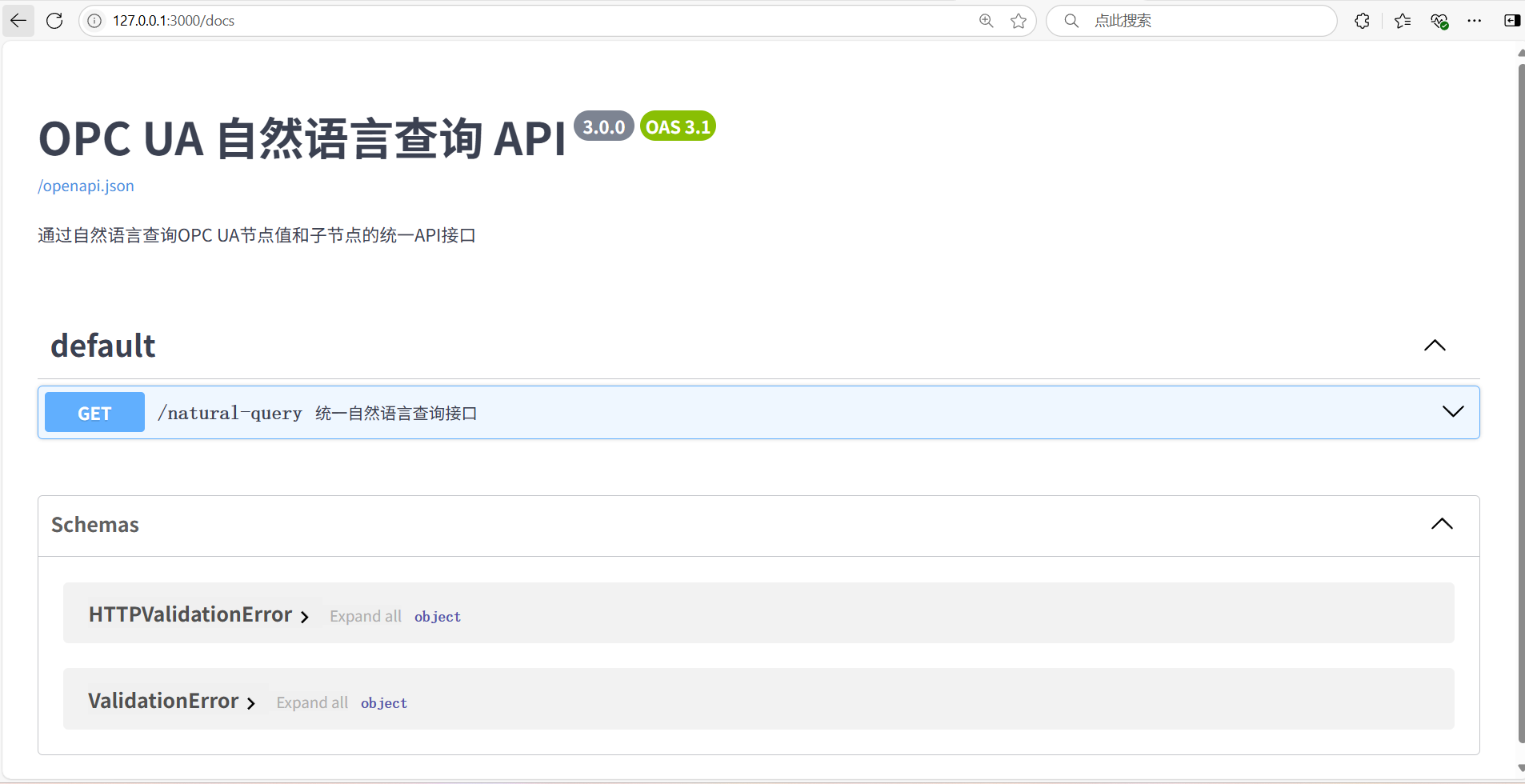
访问交互式文档:http://localhost:3000/docs(Swagger UI)
API端点
-
端点:
GET /natural-query -
参数:
-
query: 自然语言查询(必需) -
intent: 查询意图(可选,“value"或"children”)
-
示例请求:
# 查询单个节点值
curl "http://localhost:3000/natural-query?query=查询Counter的值"

# 查询多个节点值
curl "http://localhost:3000/natural-query?query=获取Random和Sinusoid的数值"

# 查询子节点
curl "http://localhost:3000/natural-query?query=查询Counter的子节点"
响应示例(节点值查询):
{
  "intent": "value",
  "query": "查询Counter的值",
  "results": [
    {
      "node_name": "Counter",
      "node_id": "ns=3;s=Counter",
      "value": 42,
      "data_type": "int",
      "status": "success"
    }
  ]
}
响应示例(子节点查询):
{
  "intent": "children",
  "query": "查询Counter的子节点",
  "results": [
    {
      "parent_node": "Counter",
      "parent_node_id": "ns=3;s=Counter",
      "children": [
        {
          "node_id": "ns=4;s=Counter/4:SimulationConfiguration",
          "display_name": "SimulationConfiguration",
          "node_class": "Object",
          "value": null,
          "data_type": null
        }
      ]
    }
  ]
}
自然语言查询示例
节点值查询
- 查询Counter
- 获取Random的数值
- 读取Sawtooth
- Sinusoid的值是多少
- 给我Square的数据
- Triangle当前值
- 查询Counter和Random
- 获取Random,Sinusoid,Sawtooth的数值
- 读取Sawtooth, Triangle 和 Square
子节点查询
- 查询Counter的子节点
- 获取Random和Sinusoid的子节点
- 读取Sawtooth, Triangle 和 Square 的子节点
- 给我Counter, Random, Square的子节点
完整API代码
# 导入必要的库
from fastapi import FastAPI, HTTPException  # FastAPI框架及异常处理
from opcua import Client  # OPC UA客户端,用于工业自动化系统通信
from contextlib import asynccontextmanager  # 用于创建异步上下文管理器
import asyncio  # 异步编程支持
import os  # 操作系统接口,用于环境变量读取
import pandas as pd  # 数据处理与分析
from typing import List, Dict, Any, Optional  # 类型提示
import re  # 正则表达式,用于文本处理

# 配置OPC UA服务器地址,优先从环境变量获取,否则使用默认值
server_url = os.getenv("OPCUA_SERVER_URL", "opc.tcp://your-server:port/path")

# 全局变量:存储OPC UA客户端实例和节点映射表
opcua_client = None
node_mapping = {}

# 从Excel文件加载节点映射表(DisplayName → NodeID)
def load_node_mapping():
    try:
        # 读取Excel文件中的节点映射数据
        df = pd.read_excel("./节点映射.xlsx", sheet_name="Sheet1")

        # 创建映射字典,键为显示名称,值为节点ID
        mapping_dict = {}
        for _, row in df.iterrows():
            display_name = row["DisplayName"]
            node_id = row["NodeID"]
            mapping_dict[display_name] = node_id

        print(f"✅ 已加载 {len(mapping_dict)} 个节点映射")
        return mapping_dict
    except Exception as e:
        print(f"❌ 加载节点映射失败: {str(e)}")
        return {}

# 从自然语言查询中提取节点名称(单个)
def extract_node_name(query: str) -> str:
    """
    从自然语言查询中提取节点名称
    支持多种查询格式,如:"查询Counter"、"获取Random的数值"等
    """
    # 预处理查询文本:转为小写并移除常见查询动词和修饰词
    query = query.lower()
    remove_phrases = ["查询", "获取", "读取", "给我", "的数值", "的值", "数据", "是多少", "当前值", "的", "子节点", "children"]
    for phrase in remove_phrases:
        query = query.replace(phrase, "")

    # 使用正则表达式提取第一个英文单词作为节点名称
    match = re.search(r'[a-zA-Z]+', query)
    if match:
        return match.group().capitalize()  # 首字母大写以匹配映射表

    # 若未找到英文单词,返回处理后的整个查询字符串
    return query.strip().capitalize()

# 从自然语言查询中提取多个节点名称(逗号、空格或"和"分隔)
def extract_multiple_node_names(query: str) -> List[str]:
    """
    从自然语言查询中提取多个节点名称
    支持格式如:"查询Counter和Random"、"获取A,B,C的值"等
    """
    # 预处理查询文本
    query = query.lower()
    remove_phrases = ["查询", "获取", "读取", "给我", "的数值", "的值", "数据", "是多少", "当前值", "的", "子节点", "children"]
    for phrase in remove_phrases:
        query = query.replace(phrase, "")

    # 使用正则表达式提取所有英文单词
    matches = re.findall(r'[a-zA-Z]+', query)

    # 去重并统一首字母大写
    unique_nodes = list(set(matches))
    return [name.capitalize() for name in unique_nodes]

# 判断查询意图(查询值还是子节点)
def determine_query_intent(query: str) -> str:
    """
    判断查询意图:
    - "children": 查询子节点
    - "value": 查询节点值(默认)
    """
    query_lower = query.lower()
    if "子节点" in query_lower or "children" in query_lower:
        return "children"
    return "value"

# 应用生命周期管理(启动和关闭时执行)
@asynccontextmanager
async def lifespan(app: FastAPI):
    global opcua_client, node_mapping
    try:
        # 加载节点映射表
        node_mapping = load_node_mapping()

        # 创建OPC UA客户端并异步连接
        opcua_client = Client(server_url)
        await asyncio.to_thread(opcua_client.connect)  # 同步操作转为异步
        print(f"✅ 已连接到 OPC UA 服务器: {server_url}")

        # 在此处 yield,让应用开始运行
        yield
    except Exception as e:
        print(f"❌ 初始化失败: {str(e)}")
        raise
    finally:
        # 应用关闭时断开OPC UA连接
        if opcua_client:
            await asyncio.to_thread(opcua_client.disconnect)
            print("⚠️ 已断开与 OPC UA 服务器的连接")

# 创建FastAPI应用实例,配置生命周期管理
app = FastAPI(
    title="OPC UA 自然语言查询 API",
    description="通过自然语言查询OPC UA节点值和子节点的统一API接口",
    version="3.0.0",
    lifespan=lifespan
)

# 安全执行同步OPC UA操作的辅助函数(转为异步执行)
async def run_opcua_sync(func, *args):
    global opcua_client
    if not opcua_client:
        raise HTTPException(status_code=503, detail="OPC UA 客户端未连接")

    try:
        return await asyncio.to_thread(func, *args)  # 在单独线程执行同步操作
    except Exception as e:
        raise HTTPException(status_code=500, detail=f"OPC UA 操作失败: {str(e)}")

# 获取指定节点的值
async def get_node_value(node_id: str) -> Any:
    node = await run_opcua_sync(opcua_client.get_node, node_id)
    return await run_opcua_sync(node.get_value)

# 获取指定节点的子节点列表及信息
async def get_child_nodes(parent_node_id: str) -> List[Dict[str, Any]]:
    parent_node = await run_opcua_sync(opcua_client.get_node, parent_node_id)
    children = await run_opcua_sync(parent_node.get_children)

    child_nodes = []
    for child in children:
        try:
            # 获取子节点的基本信息
            node_id = await run_opcua_sync(lambda: child.nodeid.to_string())
            display_name = await run_opcua_sync(lambda: child.get_display_name().Text)
            node_class = await run_opcua_sync(lambda: child.get_node_class().name)

            # 尝试获取值(仅适用于变量节点)
            value = None
            data_type = None
            if node_class == "Variable":
                try:
                    value = await run_opcua_sync(child.get_value)
                    data_type = str(type(value).__name__)
                except Exception:
                    pass

            child_nodes.append({
                "node_id": node_id,
                "display_name": display_name,
                "node_class": node_class,
                "value": value,
                "data_type": data_type
            })
        except Exception as e:
            print(f"⚠️ 获取子节点信息失败: {str(e)}")

    return child_nodes

# ----------------------------
# API端点
# ----------------------------

@app.get("/natural-query",
         summary="统一自然语言查询接口",
         description="支持查询单个/多个节点值或子节点列表")
async def unified_natural_query(
    query: str,
    intent: Optional[str] = None
):
    """
    统一自然语言查询接口,支持多种查询类型:
    1. 查询单个/多个节点值
    2. 查询单个/多个节点的子节点
    """
    # 确定查询意图(若未显式指定,则自动判断)
    if not intent:
        intent = determine_query_intent(query)

    # 提取查询中的节点名称
    node_names = extract_multiple_node_names(query)

    if not node_names:
        raise HTTPException(
            status_code=400,
            detail="未能在查询中找到有效的节点名称"
        )

    results = []

    # 处理节点值查询
    if intent == "value":
        for node_name in node_names:
            node_id = node_mapping.get(node_name)
            if not node_id:
                results.append({
                    "node_name": node_name,
                    "error": "未找到节点映射",
                    "status": "error"
                })
                continue

            try:
                value = await get_node_value(node_id)
                results.append({
                    "node_name": node_name,
                    "node_id": node_id,
                    "value": value,
                    "data_type": str(type(value).__name__),
                    "status": "success"
                })
            except Exception as e:
                results.append({
                    "node_name": node_name,
                    "node_id": node_id,
                    "error": f"读取失败: {str(e)}",
                    "status": "error"
                })

    # 处理子节点查询
    elif intent == "children":
        for node_name in node_names:
            node_id = node_mapping.get(node_name)
            if not node_id:
                results.append({
                    "parent_node": node_name,
                    "error": "未找到节点映射",
                    "children": None
                })
                continue

            try:
                children = await get_child_nodes(node_id)
                results.append({
                    "parent_node": node_name,
                    "parent_node_id": node_id,
                    "children": children
                })
            except Exception as e:
                results.append({
                    "parent_node": node_name,
                    "parent_node_id": node_id,
                    "error": str(e),
                    "children": None
                })

    # 返回结构化查询结果
    return {
        "intent": intent,
        "query": query,
        "results": results
    }

# 应用独立运行时启动服务器
if __name__ == "__main__":
    import uvicorn
    uvicorn.run(app, host="0.0.0.0", port=3000)
工作流搭建
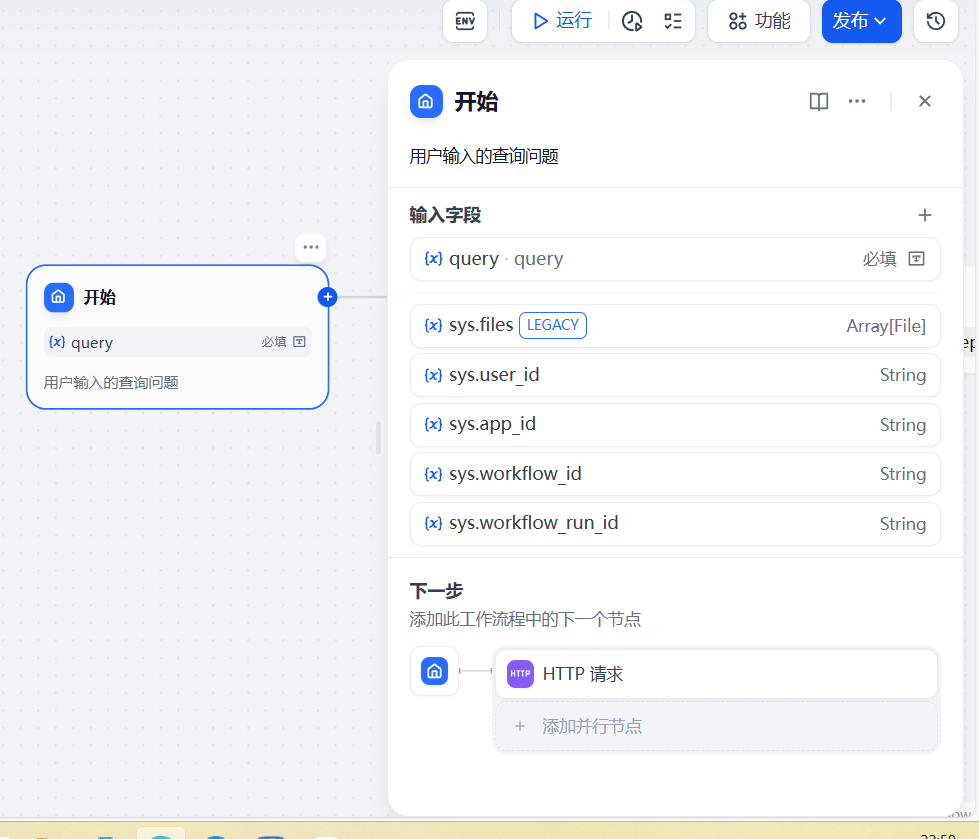
开始节点
- 功能:用户输入的查询问题
- 节点配置参数:
- 输入字段:
query(文本类型)
- 输入字段:
HTTP请求节点
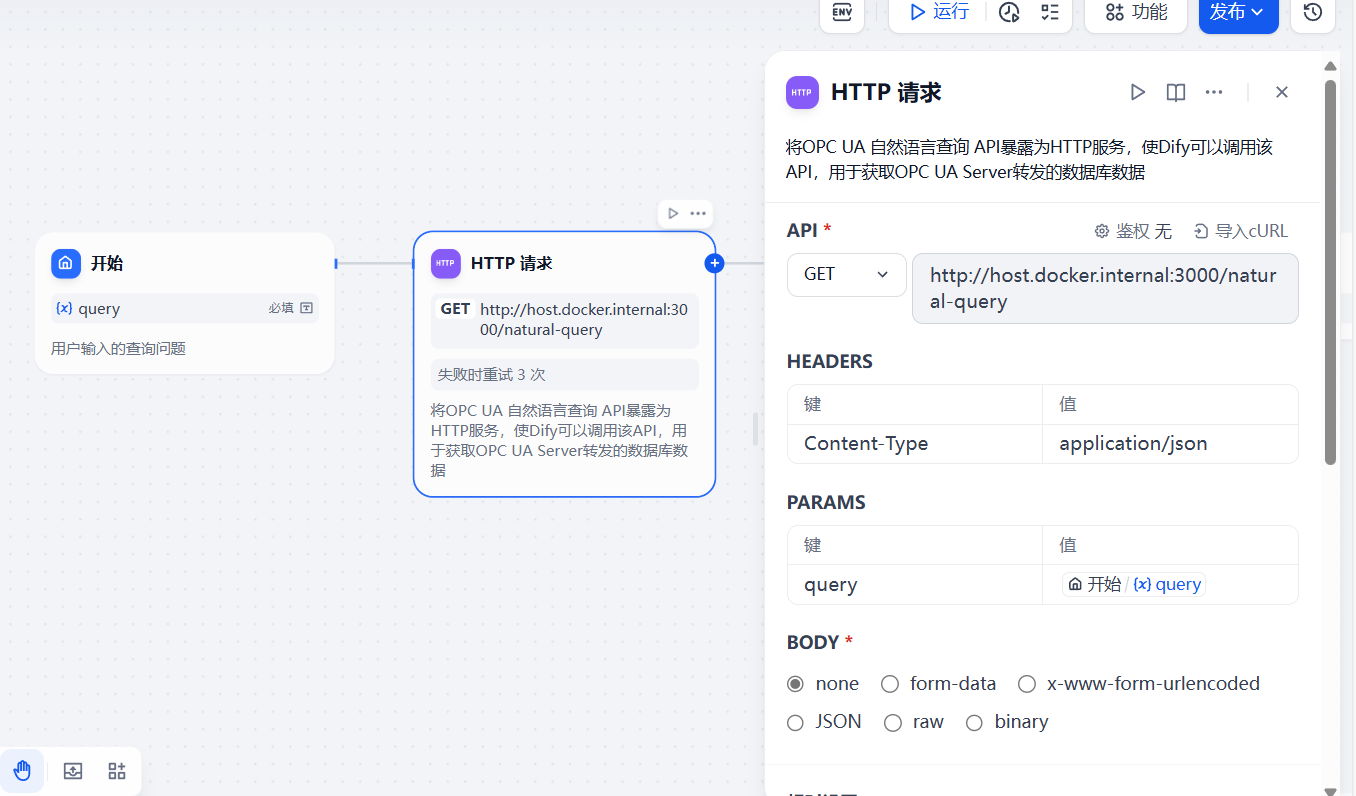
- 功能:将
OPC UA 自然语言查询 API暴露为HTTP服务,使Dify可以调用该API,用于获取OPC UA Server转发的数据库数据 - 节点配置参数:
API:添加GET请求,链接为 http://host.docker.internal:3000/natural-query (GET请求用于获取数据, http://host.docker.internal:3000 允许在docker中运行的Dify访问主机localhost:3000上运行的OPC UA 自然语言查询 API服务)- 请求头
HEADERS:键为Content-Type,值为application/json,表明客户端期望发送或接收的数据格式为JSON - 请求参数
PARAMS:键为query,值为开始节点的输入字段参数query,表明向服务器传递查询的具体内容 - 请求体
BODY:值为none,表明该HTTP请求没有携带请求体,也就是没有向服务器发送额外的具体数据内容。如在执行一个简单的搜索操作时,只需要将搜索关键词作为请求参数传递给服务器,而不需要额外的请求体数据
LLM节点
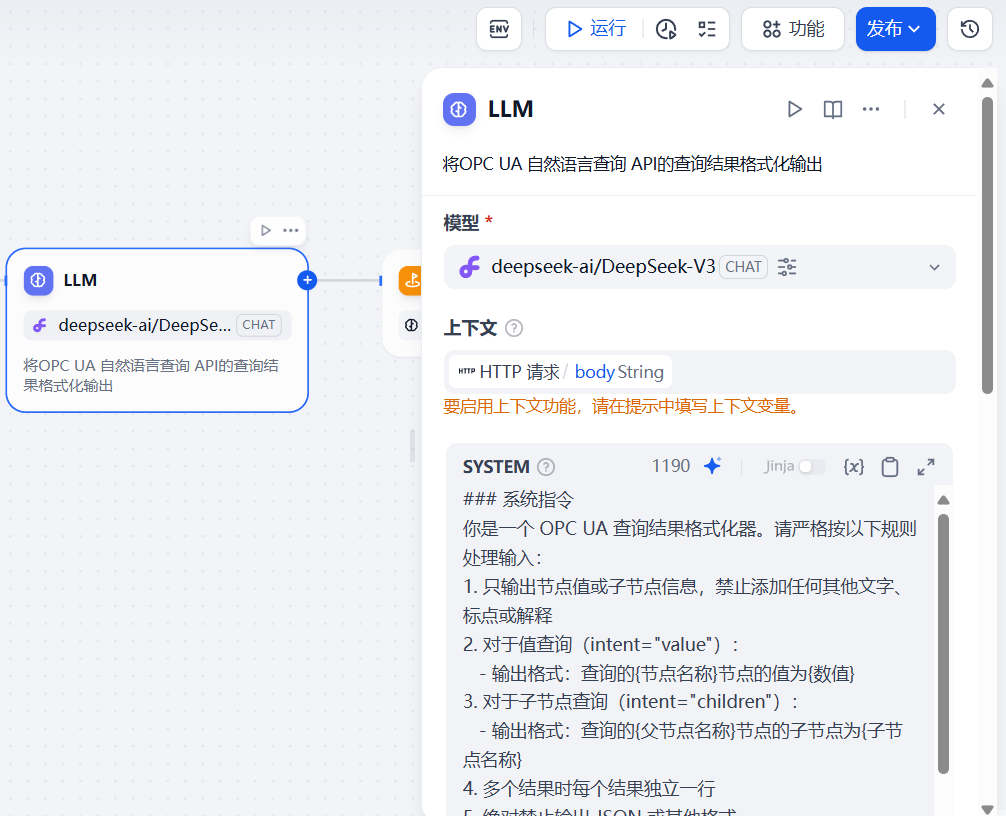
-
功能:将
OPC UA 自然语言查询 API的查询结果格式化输出节点配置参数:-
模型:模型供应商为硅基流动的模型
deepseek-ai/DeepSeek-V3 -
上下文:选择
HTTP请求节点的输出变量body(响应内容)作为LLM模型的上下文 -
SYSTEM:### 系统指令 你是一个 OPC UA 查询结果格式化器。请严格按以下规则处理输入: 1. 只输出节点值或子节点信息,禁止添加任何其他文字、标点或解释 2. 对于值查询(intent="value"): - 输出格式:查询的{节点名称}节点的值为{数值} 3. 对于子节点查询(intent="children"): - 输出格式:查询的{父节点名称}节点的子节点为{子节点名称} 4. 多个结果时每个结果独立一行 5. 绝对禁止输出 JSON 或其他格式 ### 处理规则 if intent == "value": for result in results: if status == "success": 输出 = "查询的" + result.node_name + "节点的值为" + str(result.value) else: 输出 = "查询" + result.node_name + "节点失败" elif intent == "children": for result in results: if children exists: 子节点名称 = 所有子节点的 display_name 用逗号连接 输出 = "查询的" + result.parent_node + "节点的子节点为" + 子节点名称 else: 输出 = "查询" + result.parent_node + "节点失败" ### 输入示例 1 { "intent": "children", "results": [{ "parent_node": "Counter", "children": [{"display_name": "SimulationConfiguration"}] }] } 输出:查询的Counter节点的子节点为SimulationConfiguration ### 输入示例 2 { "intent": "value", "results": [{ "node_name": "Counter", "value": 46, "status": "success" }] } 输出:查询的Counter节点的值为46 ### 输入示例 3(错误情况) { "intent": "value", "results": [{ "node_name": "InvalidNode", "status": "error" }] } 输出:查询InvalidNode节点失败 ### 当前输入 {{#1749041842377.body#}}
-
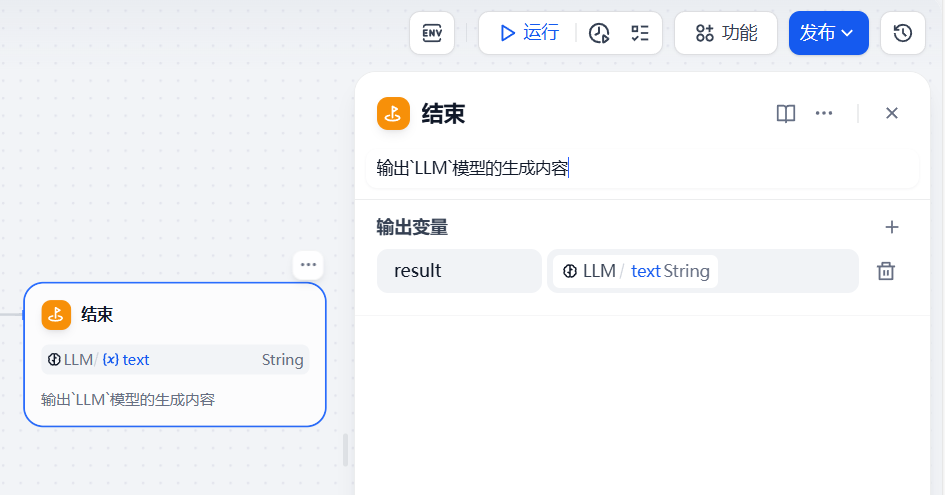
结束节点
- 功能:输出
LLM模型的生成内容 - 节点配置参数:
- 输出变量:变量名为
result,变量值选择LLM模型的输出变量text(生成内容)
- 输出变量:变量名为
完整工作流
app:
  description: 获取OPC UA Server转发的数据库数据
  icon: 🤖
  icon_background: '#FFEAD5'
  mode: workflow
  name: OPCUA Server数据查询
  use_icon_as_answer_icon: false
dependencies:
- current_identifier: null
  type: marketplace
  value:
    marketplace_plugin_unique_identifier: langgenius/siliconflow:0.0.13@017674061f437a0ee6d072aea93c34611e455257f5a2ae1ef0f88c4c483bc014
kind: app
version: 0.3.0
workflow:
  conversation_variables: []
  environment_variables: []
  features:
    file_upload:
      allowed_file_extensions:
      - .JPG
      - .JPEG
      - .PNG
      - .GIF
      - .WEBP
      - .SVG
      allowed_file_types:
      - image
      allowed_file_upload_methods:
      - local_file
      - remote_url
      enabled: false
      fileUploadConfig:
        audio_file_size_limit: 50
        batch_count_limit: 5
        file_size_limit: 15
        image_file_size_limit: 10
        video_file_size_limit: 100
        workflow_file_upload_limit: 10
      image:
        enabled: false
        number_limits: 3
        transfer_methods:
        - local_file
        - remote_url
      number_limits: 3
    opening_statement: ''
    retriever_resource:
      enabled: true
    sensitive_word_avoidance:
      enabled: false
    speech_to_text:
      enabled: false
    suggested_questions: []
    suggested_questions_after_answer:
      enabled: false
    text_to_speech:
      enabled: false
      language: ''
      voice: ''
  graph:
    edges:
    - data:
        isInIteration: false
        isInLoop: false
        sourceType: start
        targetType: http-request
      id: 1749041802437-source-1749041842377-target
      selected: false
      source: '1749041802437'
      sourceHandle: source
      target: '1749041842377'
      targetHandle: target
      type: custom
      zIndex: 0
    - data:
        isInIteration: false
        isInLoop: false
        sourceType: http-request
        targetType: llm
      id: 1749041842377-source-1749046420192-target
      selected: false
      source: '1749041842377'
      sourceHandle: source
      target: '1749046420192'
      targetHandle: target
      type: custom
      zIndex: 0
    - data:
        isInIteration: false
        isInLoop: false
        sourceType: llm
        targetType: end
      id: 1749046420192-source-1749042003433-target
      selected: false
      source: '1749046420192'
      sourceHandle: source
      target: '1749042003433'
      targetHandle: target
      type: custom
      zIndex: 0
    nodes:
    - data:
        desc: 用户输入的查询问题
        selected: false
        title: 开始
        type: start
        variables:
        - label: query
          max_length: 256
          options: []
          required: true
          type: text-input
          variable: query
      height: 116
      id: '1749041802437'
      position:
        x: 88
        y: 203
      positionAbsolute:
        x: 88
        y: 203
      selected: false
      sourcePosition: right
      targetPosition: left
      type: custom
      width: 243
    - data:
        authorization:
          config: null
          type: no-auth
        body:
          data: []
          type: none
        desc: 将OPC UA 自然语言查询 API暴露为HTTP服务,使Dify可以调用该API,用于获取OPC UA Server转发的数据库数据
        headers: Content-Type:application/json
        method: get
        params: query:{{#1749041802437.query#}}
        retry_config:
          max_retries: 3
          retry_enabled: true
          retry_interval: 100
        selected: false
        ssl_verify: true
        timeout:
          max_connect_timeout: 0
          max_read_timeout: 0
          max_write_timeout: 0
        title: HTTP 请求
        type: http-request
        url: http://host.docker.internal:3000/natural-query
        variables: []
      height: 214
      id: '1749041842377'
      position:
        x: 392
        y: 203
      positionAbsolute:
        x: 392
        y: 203
      selected: false
      sourcePosition: right
      targetPosition: left
      type: custom
      width: 243
    - data:
        desc: 输出`LLM`模型的生成内容
        outputs:
        - value_selector:
          - '1749046420192'
          - text
          variable: result
        selected: true
        title: 结束
        type: end
      height: 116
      id: '1749042003433'
      position:
        x: 996
        y: 203
      positionAbsolute:
        x: 996
        y: 203
      selected: true
      sourcePosition: right
      targetPosition: left
      type: custom
      width: 243
    - data:
        context:
          enabled: true
          variable_selector:
          - '1749041842377'
          - body
        desc: 将OPC UA 自然语言查询 API的查询结果格式化输出
        model:
          completion_params: {}
          mode: chat
          name: deepseek-ai/DeepSeek-V3
          provider: langgenius/siliconflow/siliconflow
        prompt_template:
        - id: 329f1958-7b6d-445c-bc26-ae86401909b2
          role: system
          text: "### 系统指令\n你是一个 OPC UA 查询结果格式化器。请严格按以下规则处理输入:\n1. 只输出节点值或子节点信息,禁止添加任何其他文字、标点或解释\n\
            2. 对于值查询(intent=\"value\"):\n   - 输出格式:查询的{节点名称}节点的值为{数值}\n3. 对于子节点查询(intent=\"\
            children\"):\n   - 输出格式:查询的{父节点名称}节点的子节点为{子节点名称}\n4. 多个结果时每个结果独立一行\n5.\
            \ 绝对禁止输出 JSON 或其他格式\n\n### 处理规则\nif intent == \"value\":\n  for result\
            \ in results:\n    if status == \"success\":\n      输出 = \"查询的\" + result.node_name\
            \ + \"节点的值为\" + str(result.value)\n    else:\n      输出 = \"查询\" + result.node_name\
            \ + \"节点失败\"\n\nelif intent == \"children\":\n  for result in results:\n\
            \    if children exists:\n      子节点名称 = 所有子节点的 display_name 用逗号连接\n  \
            \    输出 = \"查询的\" + result.parent_node + \"节点的子节点为\" + 子节点名称\n    else:\n\
            \      输出 = \"查询\" + result.parent_node + \"节点失败\"\n\n### 输入示例 1\n{\n\
            \  \"intent\": \"children\",\n  \"results\": [{\n    \"parent_node\":\
            \ \"Counter\",\n    \"children\": [{\"display_name\": \"SimulationConfiguration\"\
            }]\n  }]\n}\n输出:查询的Counter节点的子节点为SimulationConfiguration\n\n### 输入示例 2\n\
            {\n  \"intent\": \"value\",\n  \"results\": [{\n    \"node_name\": \"\
            Counter\",\n    \"value\": 46,\n    \"status\": \"success\"\n  }]\n}\n\
            输出:查询的Counter节点的值为46\n\n### 输入示例 3(错误情况)\n{\n  \"intent\": \"value\",\n\
            \  \"results\": [{\n    \"node_name\": \"InvalidNode\",\n    \"status\"\
            : \"error\"\n  }]\n}\n输出:查询InvalidNode节点失败\n\n### 当前输入\n{{#1749041842377.body#}}"
        selected: false
        title: LLM
        type: llm
        variables: []
        vision:
          enabled: false
      height: 132
      id: '1749046420192'
      position:
        x: 696
        y: 203
      positionAbsolute:
        x: 696
        y: 203
      selected: false
      sourcePosition: right
      targetPosition: left
      type: custom
      width: 243
    viewport:
      x: -240.17453623114557
      y: 24.89383947587288
      zoom: 0.9086635933034949
参考资料
在 Dify MinerU插件中配置MinerU官方在线 API 服务
MinerU教程第一弹丨Dify插件超详细配置攻略和工作流搭建案例,不允许还有人不会_run failed: failed to transform tool message: plug-CSDN博客
Dify工作流中生成的内容写为文件导出

电影级数字人,免显卡端渲染SDK,十行代码即可调用,工业级demo免费开源下载!
更多推荐
 20
20 0
0- 0


 已为社区贡献1条内容

所有评论(0)