
conda添加镜像源与channels以及pip install:no space left
和channels都是.condarc文件中用于配置软件包源的选项,但它们之间有一些不同。是一个字典,其中包含了自定义软件包源的名称和URL。当你运行等命令时,如果指定了自定义软件包源的名称,conda会使用中列出的对应URL进行搜索。需要注意的是,如果你在命令行中指定了软件包源,conda会优先使用指定的软件包源,而不是中列出的软件包源。是一个列表,其中包含了conda搜索软件包时需要使用的默认
一、conda下添加国内镜像源(window下)
1、为【channels】配置清华镜像通道
直接在anaconda prompt.exe的命令行窗口或者cmd命令行(前提是配置了anaconda环境变量)下输入以下代码即可。
为【channels】源添加通道
channels源
conda config --add channels https://mirrors.tuna.tsinghua.edu.cn/anaconda/pkgs/free/
conda config --add channels https://mirrors.tuna.tsinghua.edu.cn/anaconda/pkgs/main/
conda config --add channels https://mirrors.tuna.tsinghua.edu.cn/anaconda/cloud/conda-forge/

custom_channels源添加
conda config --add custom_channels https://mirrors.tuna.tsinghua.edu.cn/anaconda/cloud/conda-forge/

#设置搜索时显示通道地址
conda config --set show_channel_urls yes
2、设置搜索时显示通道地址
conda config --set show_channel_urls yes
3、显示【channels】源添加的所有通道
conda config --show channels

显示所有源的channels:
conda config --show-sources
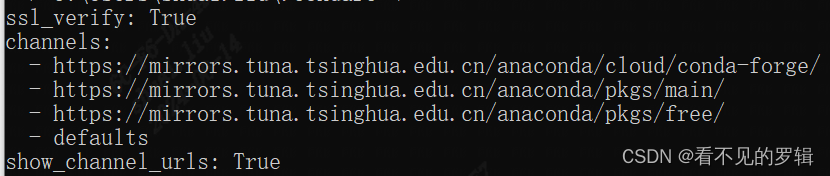
4、删除【channels】源,换回默认源【default】
conda config --remove-key channels
二、pip配置国内镜像源(window下,临时修改)
1、配置pip镜像源
可以在使用pip的时候加参数-i https://pypi.tuna.tsinghua.edu.cn/simple/
pip install numpy -i 镜像源网址
pip install numpy -i https://mirrors.aliyun.com/pypi/simple/
国内常用源镜像地址,可自行替换。
清华:https://pypi.tuna.tsinghua.edu.cn/simple/
阿里云:https://mirrors.aliyun.com/pypi/simple/
中国科技大学: https://pypi.mirrors.ustc.edu.cn/simple/
豆瓣:https://pypi.douban.com/simple/
三、conda源的定义
custom_channels、default_channels和channels都是.condarc文件中用于配置软件包源的选项,但它们之间有一些不同。
custom_channels是一个字典,其中包含了自定义软件包源的名称和URL。当你运行conda install等命令时,如果指定了自定义软件包源的名称,conda会使用custom_channels中列出的对应URL进行搜索。需要注意的是,如果你在命令行中指定了软件包源,conda会优先使用指定的软件包源,而不是custom_channels中列出的软件包源。
default_channels是一个列表,其中包含了conda搜索软件包时需要使用的默认软件包源。当你运行conda install等命令时,如果没有指定软件包源,conda会使用default_channels中列出的软件包源进行搜索。和custom_channels不同的是,default_channels中列出的软件包源是conda内置的、预定义的软件包源。
channels也是一个列表,其中包含了conda搜索软件包时需要使用的软件包源。和default_channels不同的是,channels列出的软件包源会覆盖default_channels中列出的软件包源。当你运行conda install等命令时,如果指定了软件包源,conda会使用channels中列出的软件包源进行搜索。
四、QA
问题:
ERROR: Could not install packages due to an OSError: [Errno 28] No space left on device: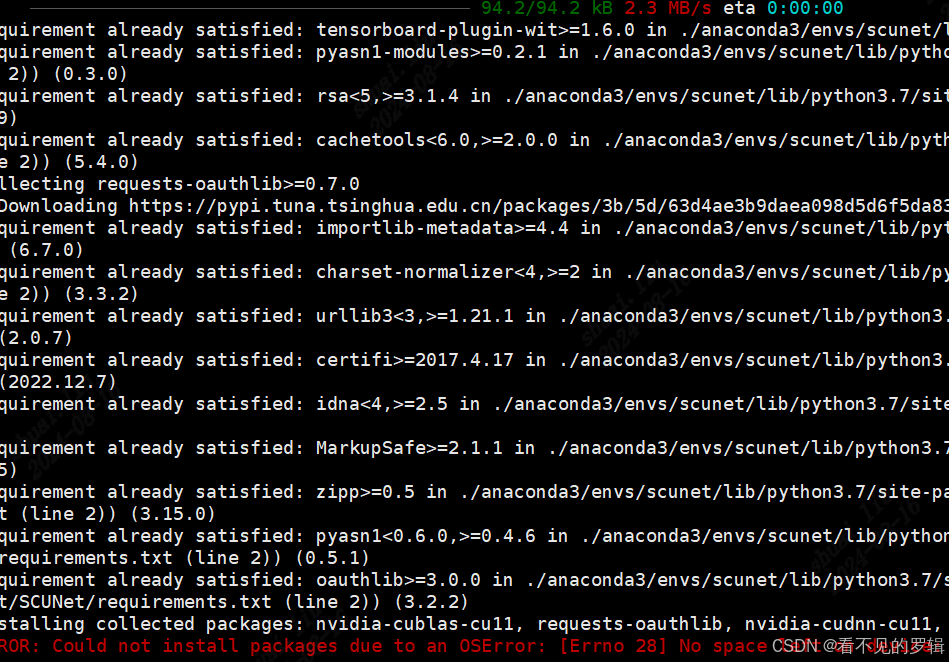
pip install错误,No space left on device:
如果磁盘空间足够,就使用cache_dir
pip install -r requirements.txt --cache-dir=./tmp -i https://pypi.tuna.tsinghua.edu.cn/simple/
注意:cache_dir一定要足够大
有时候只能安装一个库,清空tmp,再下另一个库

电影级数字人,免显卡端渲染SDK,十行代码即可调用,工业级demo免费开源下载!
更多推荐

 8
8 0
0- 0


 已为社区贡献1条内容

所有评论(0)