
vllm安装使用及问题
vllm使用
本地安装使用
本地环境为windows,无法直接安装vllm,需要使用wsl环境才行。
进入wsl,创建虚拟环境或进入未安装vllm的docker环境(如无法拉取vllm镜像),pip install vllm
启动大模型server:vllm serve 模型路径 --gpu_memory_utilization 0.7,
例如:vllm serve Qwen3-8B --gpu_memory_utilization 0.7
--gpu_memory_utilization:使用gpu的比例,默认0.9,要根据实际调整,应为这个空间被占满,如果gpu不足,会启动失败。
报错1:缺少gcc
(EngineCore_DP0 pid=631) torch._inductor.exc.InductorError: RuntimeError: Failed to find C compiler. Please specify via CC environment variable or set triton.knobs.build.impl. (EngineCore_DP0 pid=631) (EngineCore_DP0 pid=631) Set TORCHDYNAMO_VERBOSE=1 for the internal stack trace (please do this especially if you're reporting a bug to PyTorch). For even more developer context, set TORCH_LOGS="+dynamo" (EngineCore_DP0 pid=631) [rank0]:
可检查gcc:which gcc,通常在 /usr/bin 中,如返回为空则需要安装,执行如下命令:
apt upgrade
apt install build-essential
报错2:缺少python开发头
/tmp/tmp160r55rs/cuda_utils.c:5:10: fatal error: Python.h: No such file or directory
5 | #include <Python.h>
| ^~~~~~~~~~
compilation terminated.
系统缺少 Python 开发头文件。Python.h 文件是 Python 开发包的一部分,编译 C 扩展或者嵌入 Python 代码时需要用到它。
Ubuntu/Debian: sudo apt-get install python3-dev
CentOS/Fedora::sudo yum install python3-devel 或 sudo dnf install python3-devel
MacOS:brew install python
成功启动,显示如下信息:
(APIServer pid=2551) INFO: Started server process [2551]
(APIServer pid=2551) INFO: Waiting for application startup.
(APIServer pid=2551) INFO: Application startup complete.
调用vllm大模型:
curl http://localhost:8000/v1/completions \
-H "Content-Type: application/json" \
-d '{
"model": "Qwen3-8B",
"prompt": "你好,请介绍一下你自己。",
"max_tokens": 100,
"temperature": 0.7
}'
注意: model 的名称和vllm serve Qwen3-8B一致,例如:如果使用 “Qwen/Qwen3-8B” 则要使用这个名称。
import requests
url = "http://localhost:8000/v1/completions"
data = {
# "model": "Qwen3-8B",
"prompt": "你好,请介绍一下你自己。",
"max_tokens": 100,
"temperature": 0.7
}
response = requests.post(url, json=data)
result = response.json()
启动server时,可使用--host 0.0.0.0 --port 8000 设置请求地址和端口,上述时默认值,使用本地IP
调用模型时的请求模式
模式一:vllm 原生API Server
启动方式: python3 -m vllm.entrypoints.api_server --model Qwen3-8B --gpu_memory_utilization 0.7
此时可以使用 http://localhost:8000/generate 接口发送请求
模式二:兼容OpenAI Server
python3 -m vllm.entrypoints.openai.api_server --model Qwen3-8B --gpu-memory-utilization 0.7 或 vllm serve /path/to/your/model --gpu-memory-utilization 0.7
/v1/completions
{
"prompt": "介绍一下牛顿第一定律",
"max_tokens": 100,
"stream": true
}
/v1/chat/completions
{
"messages": [
{"role": "user", "content": "介绍一下牛顿第一定律"}
],
"stream": true
}
上述API 接口时固定的,且相互不可同时使用,上述Qwen3-8B就在当前执行命令的目录下,设置gpu memory使用下划线和横杠都可以。
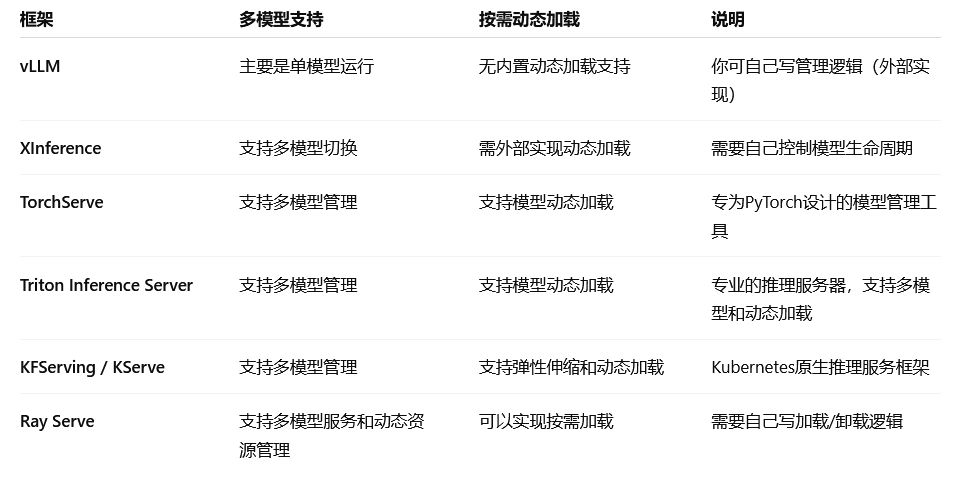
多模型支持情况
-
vLLM:单模型高速推理,没有内置动态加载和多模型管理功能,需要你在外层服务做调度和管理,比如启动多个vLLM进程,收到请求启动模型,空闲时关闭进程。
-
XInference(百度开源):支持多模型推理,但动态加载卸载需要自己管理,可以结合容器编排或进程管理实现。

电影级数字人,免显卡端渲染SDK,十行代码即可调用,工业级demo免费开源下载!
更多推荐


 15
15 0
0- 0


 已为社区贡献1条内容

所有评论(0)