
VMware Workstation Pro 17.6.1 可以下载
Note:官网下载地址:https://softwareupdate.vmware.com/cds/vmw-desktop/ws/17.6.1/24319023/windows/core/VMware-workstation-17.6.1-24319023.exe.tarhttps://softwareupdate.vmware.com/cds/vmw-desktop/ws/17.6.1/2431
Updated on 8June 2025
看到消息中这个发文有回应。 大概是今年3月, BroadCom (VMware 所有者) 变更了软件下载方式,所有软件要通过 Broadcom 入口下载。之前的 FTP 貌似停了。 下面提供另一个入口, 但需要注册 Broadcom 用户后,方可用下用的链接找到并下载 VWware Workstaion Pro.
Please select your identity provider. - Support Portal
博通也同时停掉了升级服务器:https://softwareupdate.broadcom.com/cds 这个连接现在是不可用的已经有几个月。好消息是这段时间,软件一直没有升级。
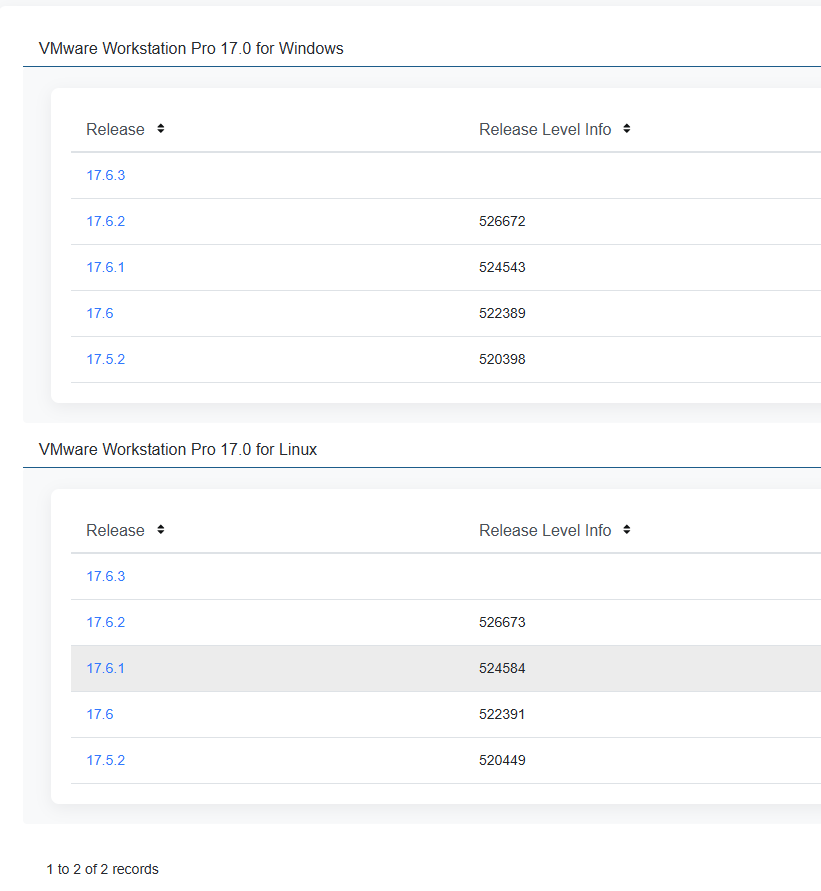
不知道,以后如何升级?毕竟它要兼容 新的 OS 还有新的硬件。
++++++++++++++++++++++++++++++++++++++++++++++++++++++++++++++分割线+++
Note:
官网下载地址:
 https://softwareupdate.vmware.com/cds/vmw-desktop/ws/17.6.1/24319023/windows/core/VMware-workstation-17.6.1-24319023.exe.tar
Known Issues
-
The multi-monitor feature might not work correctly in specific topologies
In specific situations, based on different hardware and topologies, the multi-monitor feature does not work as expected. You might see issues like reverting the topology to a single screen, or not cycling through monitors.
Workaround: None.
Resolved Issues
-
When creating a new virtual machine from an ISO image file, VMware Workstation does not recognize Windows 11 24H2
If you create a virtual machine from a Windows 11242 ISO image file, VMware Workstation recognizes a Windows Server 2025 iso file instead.
-
Powering on a virtual machine fails with
VMware Workstation 17.6 - unrecoverable error: (svga) svga Exception 0xc0000005errorPowering on a virtual machine with the 3D graphics feature deactivated and activated Allow hardware acceleration for all virtual machine consoles from the VMware Workstation preferences fails with
VMware Workstation 17.6 - unrecoverable error: (svga) svga Exception 0xc0000005error. -
Cannot install or upgrade VMware Workstation 17.6 on a non-English host system
If you try to install or upgrade VMware Workstation on a host system in a different locale than English, an MSI pop-up error appears.
-
CentOS 9 Stream with kernel versions later than 5.14.0-432 is not supported on Workstation Pro 17.6 as a host
CentOS 9 Stream with kernel versions later than 5.14.0-432 is not supported on Workstation Pro 17.6 as a host.
未知问题
在特定拓扑中,多显示器功能可能无法正常工作
在特定情况下,基于不同的硬件和拓扑,多显示器功能不会按预期工作。您可能会看到诸如将拓扑恢复为单个屏幕或不循环切换显示器等问题。
解决方法:无。
已解决的问题
从 ISO 映像文件创建新虚拟机时,VMware Workstation 无法识别 Windows 11 24H2
如果您从 Windows 11242 ISO 映像文件创建虚拟机,VMware Workstation 会改为识别 Windows Server 2025 iso 文件。
启动虚拟机时发生故障,出现 VMware Workstation 17.6 - 不可恢复错误:(svga) svga 异常 0xc0000005 错误
启动虚拟机时,停用并启用 3D 图形功能,从 VMware Workstation 偏好设置中允许所有虚拟机控制台硬件加速,发生故障,出现 VMware Workstation 17.6 - 不可恢复错误:(svga) svga 异常 0xc0000005 错误。
无法在非英语主机系统上安装或升级 VMware Workstation 17.6
如果您尝试在非英语语言环境的主机系统上安装或升级 VMware Workstation,则会出现 MSI 弹出错误。
内核版本高于 5.14.0-432 的 CentOS 9 Stream 不支持在 Workstation Pro 17.6 上作为主机使用
内核版本高于 5.14.0-432 的 CentOS 9 Stream 不支持在 Workstation Pro 17.6 上作为主机使用。

电影级数字人,免显卡端渲染SDK,十行代码即可调用,工业级demo免费开源下载!
更多推荐

 32
32 0
0- 0


 已为社区贡献1条内容

所有评论(0)