
serial debug assistant脚本
同时显示HEX以及ASC,并显示时间戳。
·
同时显示HEX以及ASC,并显示时间戳
如下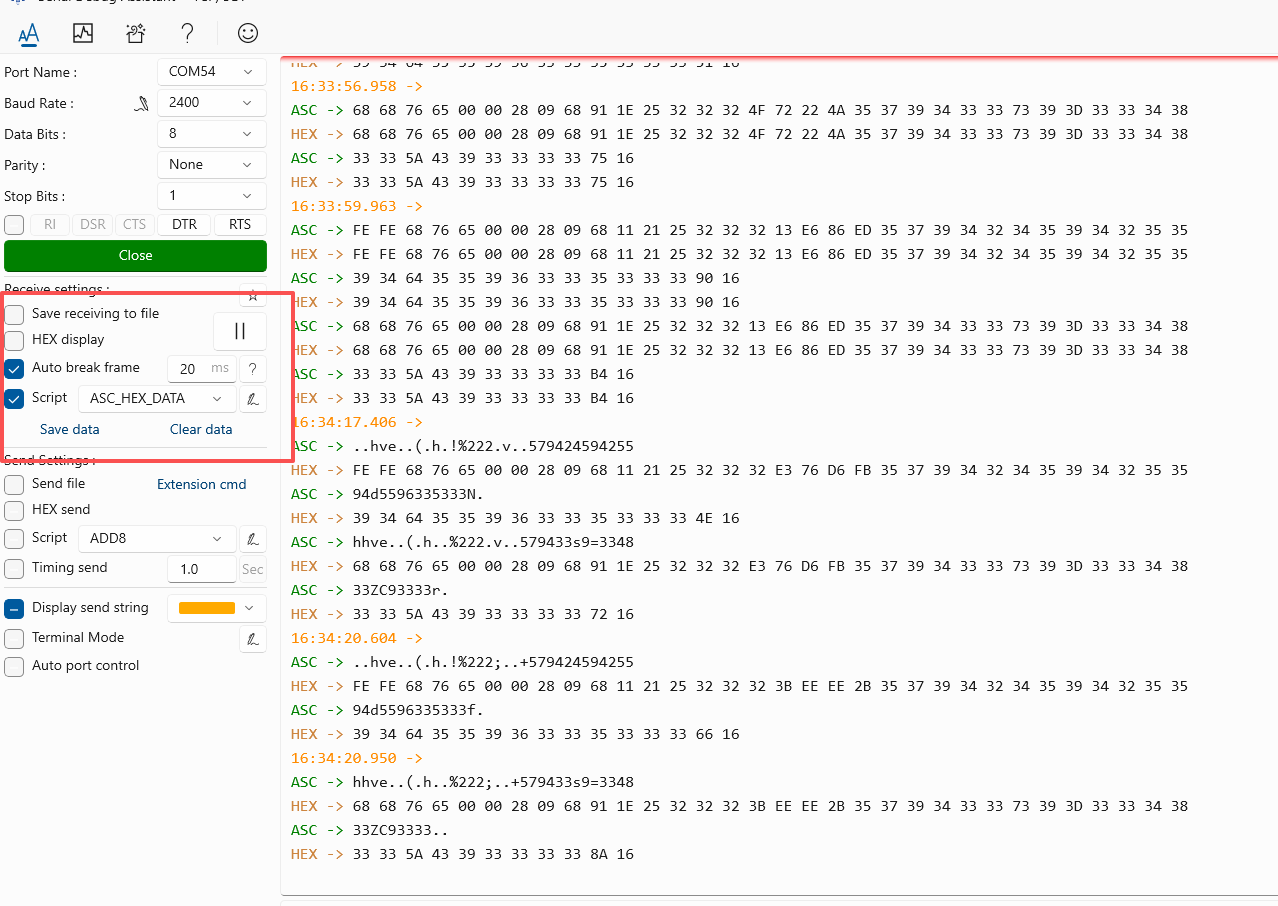
(function main() {
    // 时间戳显示逻辑(帧起始时添加,新增换行)
    if (receive.isFrameStart) {
        if (!receive.currentRowIsEmpty) {
            receive.write("\r\n"); // 非空行时换行分隔不同数据包
        }
        // 时间戳后添加 \n 实现换行(核心修改点)
        receive.write(timeToString() + " -> \n", "DarkOrange"); // 时间戳前缀+换行
    }

    // 读取原始数据
    let str = receive.get();       // ASCII字符串
    let buf = receive.getBytes();  // 字节数组

    // 1. 显示ASCII格式
    receive.write('ASC -> ', 'Green');
	receive.write(filterPrintableAscii(str)); // 过滤后显示ASCII
    if (!str.endsWith('\n')) {
        receive.write('\n'); // 确保ASCII行尾换行
    }

    // 2. 显示HEX格式(每行70字节)
    receive.write('HEX -> ', 'Peru');
    let hexLines = splitHexIntoLines(buf, 70); // 按70字节分割HEX
    for (let i = 0; i < hexLines.length; i++) {
        if (i > 0) {
            receive.write('       '); // 非首行缩进对齐前缀
        }
        receive.write(hexLines[i] + '\n');
    }
})();

// 时间戳格式化函数(时分秒.毫秒)
function timeToString() {
    let d = new Date();
    let h = d.getHours().toString().padStart(2, '0');
    let m = d.getMinutes().toString().padStart(2, '0');
    let s = d.getSeconds().toString().padStart(2, '0');
    let ms = d.getMilliseconds().toString().padStart(3, '0');
    return `${h}:${m}:${s}.${ms}`;
}

// 在ASCII显示前过滤不可见字符(保留可打印ASCII字符,其余替换为.)
function filterPrintableAscii(str) {
    return str.replace(/[^\x20-\x7E]/g, '.'); // 仅保留空格(0x20)到~(0x7E)的可打印字符
}

// HEX分行函数(每行70字节)
function splitHexIntoLines(bytes, bytesPerLine) {
    let hexLines = [];
    let currentLine = [];

    for (let i = 0; i < bytes.length; i++) {
        let hexByte = bytes[i].toString(16).toUpperCase().padStart(2, '0');
        currentLine.push(hexByte);

        if ((i + 1) % bytesPerLine === 0) {
            hexLines.push(currentLine.join(' '));
            currentLine = [];
        }
    }

    if (currentLine.length > 0) {
        hexLines.push(currentLine.join(' '));
    }

    return hexLines;
}
电影级数字人,免显卡端渲染SDK,十行代码即可调用,工业级demo免费开源下载!
更多推荐


 3
3 0
0- 0


 已为社区贡献1条内容

所有评论(0)