
前端工程化:配置 Git Hooks 与 Commit 规范的完整指南(Husky + lint-staged + commitlint)
本文介绍了使用Husky+lint-staged+commitlint搭建Git工作流的完整配置方案,包含以下核心内容:1)安装核心工具并初始化Husky;2)配置pre-commit和commit-msg钩子实现代码规范检查;3)详细说明commitlint配置规则和提交模板;4)提供lint-staged多文件类型检查配置;5)扩展高级功能如自定义提交类型、多项目管理等。该方案能有效规范团队提
·
我将详细介绍如何使用 Husky + lint-staged + commitlint 搭建专业的 Git 工作流,确保代码质量和提交规范。
完整配置步骤:
1. 安装必要依赖
# 安装核心工具
npm install husky lint-staged @commitlint/cli @commitlint/config-conventional --save-dev
2. 初始化 Husky
# 启用 Git 钩子目录
npx husky install

# 添加到 prepare 脚本(自动安装钩子)
npm pkg set scripts.prepare="husky install"
3. 配置 Pre-commit 钩子 (lint-staged)
# 创建 pre-commit 钩子
npx husky add .husky/pre-commit "npx lint-staged"
4. 配置 Commit-msg 钩子 (commitlint)
# 创建 commit-msg 钩子
npx husky add .husky/commit-msg 'npx --no-install commitlint --edit "$1"'
5. 配置 commitlint
创建 .commitlintrc.cjs文件:
/*
 * @Author: liujianya
 * @Date: 2025-09-10 18:06:46
 * @Description: commitlint 配置
 */
// .commitlintrc.cjs
module.exports = {
  extends: ["@commitlint/config-conventional"],
  rules: {
    // 自定义规则
    "type-enum": [
      2,
      "always",
      [
        "feat", // 新功能
        "fix", // 修复bug
        "docs", // 文档更新
        "style", // 代码样式调整
        "refactor", // 代码重构
        "perf", // 性能优化
        "test", // 测试相关
        "build", // 构建系统
        "ci", // CI配置
        "chore", // 其他杂项
        "revert" // 回滚提交
      ]
    ],
    "scope-case": [2, "always", "lower-case"],
    "subject-case": [2, "always", "sentence-case"],
    "subject-max-length": [2, "always", 72],
    "body-leading-blank": [2, "always"],
    "footer-leading-blank": [2, "always"]
  },
  prompt: {
    messages: {
      type: "Select the type of change that you're committing:",
      scope: "Denote the SCOPE of this change (optional):",
      customScope: "Denote the SCOPE of this change:",
      subject: "Write a SHORT, IMPERATIVE tense description of the change:\n",
      body: 'Provide a LONGER description of the change (optional). Use "|" to break new line:\n',
      breaking: 'List any BREAKING CHANGES (optional). Use "|" to break new line:\n',
      footerPrefixsSelect: "Select the ISSUES type of changeList by this change (optional):",
      customFooterPrefixs: "Input ISSUES prefix:",
      footer: "List any ISSUES by this change. E.g.: #31, #34:\n",
      confirmCommit: "Are you sure you want to proceed with the commit above?"
      // 中文版
      // type: "选择你要提交的类型 :",
      // scope: "选择一个提交范围(可选):",
      // customScope: "请输入自定义的提交范围 :",
      // subject: "填写简短精炼的变更描述 :\n",
      // body: '填写更加详细的变更描述(可选)。使用 "|" 换行 :\n',
      // breaking: '列举非兼容性重大的变更(可选)。使用 "|" 换行 :\n',
      // footerPrefixsSelect: "选择关联issue前缀(可选):",
      // customFooterPrefixs: "输入自定义issue前缀 :",
      // footer: "列举关联issue (可选) 例如: #31, #I3244 :\n",
      // confirmCommit: "是否提交或修改commit ?"
    },
    types: [
      {
        value: "feat",
        name: "feat:     🚀  A new feature",
        emoji: "🚀"
      },
      {
        value: "fix",
        name: "fix:      🧩  A bug fix",
        emoji: "🧩"
      },
      {
        value: "docs",
        name: "docs:     📚  Documentation only changes",
        emoji: "📚"
      },
      {
        value: "style",
        name: "style:    🎨  Changes that do not affect the meaning of the code",
        emoji: "🎨"
      },
      {
        value: "refactor",
        name: "refactor: ♻️   A code change that neither fixes a bug nor adds a feature",
        emoji: "♻️"
      },
      {
        value: "perf",
        name: "perf:     ⚡️  A code change that improves performance",
        emoji: "⚡️"
      },
      {
        value: "test",
        name: "test:     ✅  Adding missing tests or correcting existing tests",
        emoji: "✅"
      },
      {
        value: "build",
        name: "build:    📦️   Changes that affect the build system or external dependencies",
        emoji: "📦️"
      },
      {
        value: "ci",
        name: "ci:       🎡  Changes to our CI configuration files and scripts",
        emoji: "🎡"
      },
      {
        value: "chore",
        name: "chore:    🔨  Other changes that don't modify src or test files",
        emoji: "🔨"
      },
      {
        value: "revert",
        name: "revert:   ⏪️  Reverts a previous commit",
        emoji: "⏪️"
      },
      {
        value: "wip",
        name: "wip:      🕔  work in process",
        emoji: "🕔"
      },
      {
        value: "workflow",
        name: "workflow: 📋  workflow improvements",
        emoji: "📋"
      },
      {
        value: "type",
        name: "type:     🔰  type definition file changes",
        emoji: "🔰"
      }
      // 中文版
      // { value: "feat", name: "特性:   🚀  新增功能", emoji: "🚀" },
      // { value: "fix", name: "修复:   🧩  修复缺陷", emoji: "🧩" },
      // { value: "docs", name: "文档:   📚  文档变更", emoji: "📚" },
      // { value: "style", name: "格式:   🎨  代码格式(不影响功能,例如空格、分号等格式修正)", emoji: "🎨" },
      // { value: "refactor", name: "重构:   ♻️  代码重构(不包括 bug 修复、功能新增)", emoji: "♻️" },
      // { value: "perf", name: "性能:    ⚡️  性能优化", emoji: "⚡️" },
      // { value: "test", name: "测试:   ✅  添加疏漏测试或已有测试改动", emoji: "✅" },
      // { value: "build", name: "构建:   📦️  构建流程、外部依赖变更(如升级 npm 包、修改 webpack 配置等)", emoji: "📦️" },
      // { value: "ci", name: "集成:   🎡  修改 CI 配置、脚本", emoji: "🎡" },
      // { value: "revert", name: "回退:   ⏪️  回滚 commit", emoji: "⏪️" },
      // { value: "chore", name: "其他:   🔨  对构建过程或辅助工具和库的更改(不影响源文件、测试用例)", emoji: "🔨" },
      // { value: "wip", name: "开发:   🕔  正在开发中", emoji: "🕔" },
      // { value: "workflow", name: "工作流:   📋  工作流程改进", emoji: "📋" },
      // { value: "types", name: "类型:   🔰  类型定义文件修改", emoji: "🔰" }
    ],
    useEmoji: true,
    // scopes: [...scopes],
    customScopesAlign: "bottom",
    emptyScopesAlias: "empty",
    customScopesAlias: "custom",
    allowBreakingChanges: ["feat", "fix"]
  }
};
6. 配置 lint-staged
生成lint-staged.config.cjs文件
module.exports = {
  "*.{js,jsx,ts,tsx}": ["eslint --fix", "prettier --write"],
  "{!(package)*.json,*.code-snippets,.!(browserslist)*rc}": ["prettier --write--parser json"],
  "package.json": ["prettier --write"],
  "*.vue": ["eslint --fix", "prettier --write", "stylelint --fix"],
  "*.{scss,less,styl,html}": ["stylelint --fix", "prettier --write"],
  "*.md": ["prettier --write"]
};
7. 添加 commit 模板(可选但推荐)
创建 .gitmessage.txt文件:
# <类型>(<作用域>): <主题>

# 详细描述(可选)
# 说明变更背景、原因等

# 影响范围(可选)
# 列出受影响的模块或功能

# 关联问题(可选)
# Fixes #123, Closes #456

# -------------------- 提交说明结束 --------------------
# 类型: feat|fix|docs|style|refactor|perf|test|build|ci|chore|revert
# 作用域: 模块名或功能区域(可选)
# 主题: 简短描述(不超过72字符)
配置 Git 使用模板:
git config commit.template .gitmessage.txt.husky/commit-msg 文件内容
#!/usr/bin/env sh
. "$(dirname -- "$0")/_/husky.sh"

npx --no-install commitlint --edit "$1"
.husky/pre-commit 文件内容
#!/usr/bin/env sh
. "$(dirname -- "$0")/_/husky.sh"

npx lint-staged
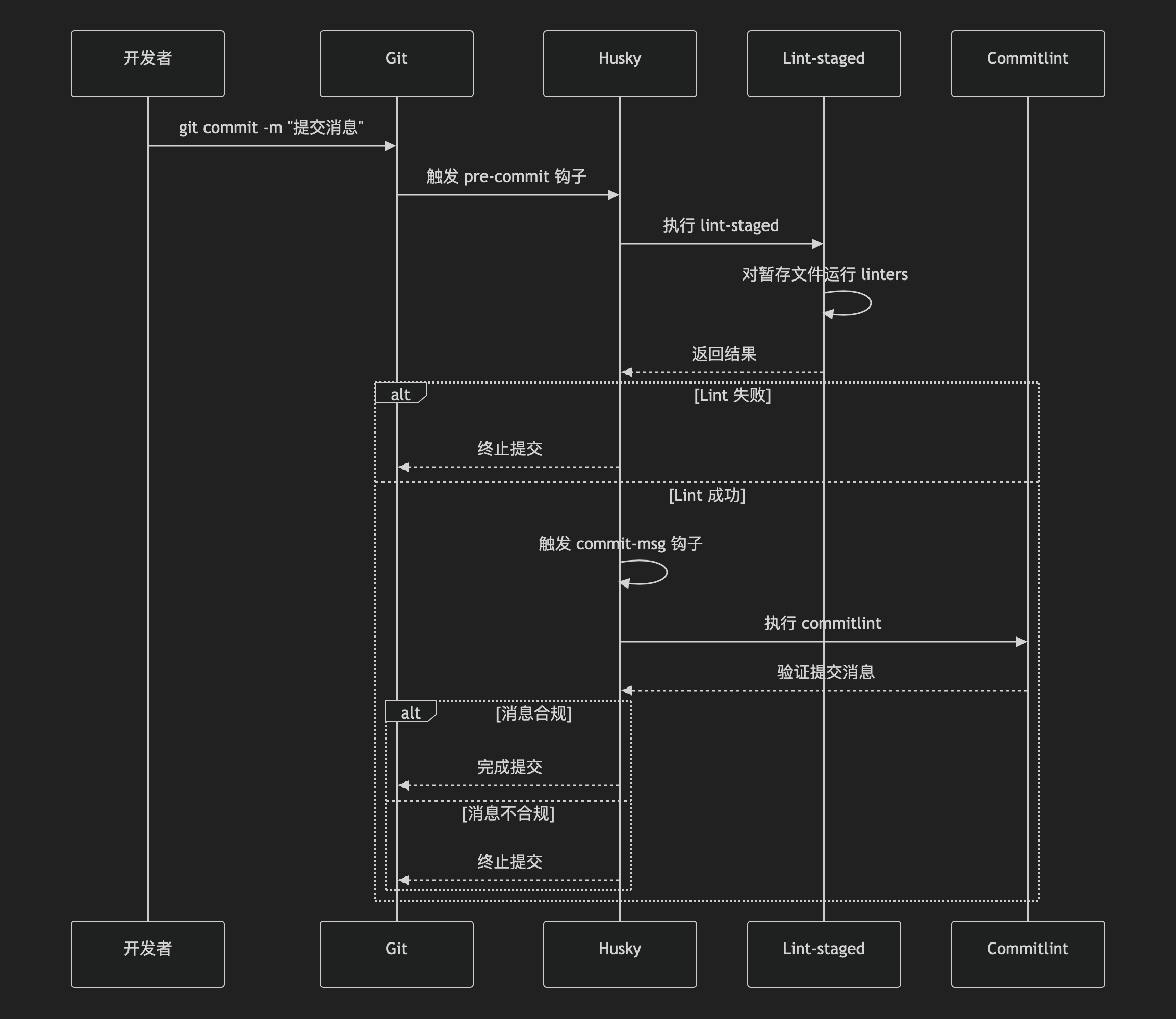
8. 工作流详解
提交流程
9. 高级配置技巧
1. 自定义提交类型
// .commitlintrc.js
module.exports = {
  // ...其他配置
  rules: {
    'type-enum': [
      2,
      'always',
      [
        // 添加自定义类型
        'security', // 安全相关
        'access'   // 可访问性改进
      ]
    ]
  }
};
2. 多项目管理配置
可以通过不同的scope进行多项目管理
// .commitlintrc.js
module.exports = {
  extends: ['@commitlint/config-conventional'],
  rules: {
    'scope-enum': [
      2,
      'always',
      [
        'frontend',
        'backend',
        'mobile',
        'ci',
        'docs'
      ]
    ]
  }
};
3. 自动生成变更日志
# 安装标准版本工具
npm install standard-version --save-dev

# 添加版本管理脚本
{
  "scripts": {
    "release": "standard-version"
  }
}
4. 团队协作增强(使用率高)
# 安装提交提示工具
npm install commitizen cz-conventional-changelog --save-dev
配置 package.json:
{
  "config": {
    "commitizen": {
      "path": "./node_modules/cz-conventional-changelog"
    }
  },
  "scripts": {
    "commit": "git-cz"
  }
}
使用交互式提交:
npm run commit10. 常见问题解决方案
问题1:lint-staged 不生效
解决:
-
确保文件已
git add -
检查
.husky/pre-commit可执行权限:
chmod +x .husky/pre-commit-
确认
lint-staged配置正确
问题2:提交消息中文乱码
解决:
# 设置 Git 编码
git config --global i18n.commitencoding utf-8
git config --global i18n.logoutputencoding utf-8
问题3:跳过钩子检查
临时跳过:
git commit -m "紧急修复" --no-verify问题4:Windows 兼容性问题
-
使用 Git Bash 代替 CMD
-
在
.husky文件中添加:
#!/usr/bin/env sh
# 确保使用 POSIX 兼容 shell
3. 安装 cross-env:
npm install cross-env --save-dev11. 完整工作流示例
1. 添加文件到暂存区
git add .2. 使用交互式提交
npm run commit3. 选择提交类型
? 选择更改类型:
❯ feat:     新功能
  fix:      修复bug
  docs:     文档更新
  style:    代码样式调整
  refactor: 代码重构
  perf:     性能优化
  test:     测试相关
(Move up and down to reveal more choices)
4. 填写提交信息
? 简短的变更描述: (最多 72 字符)
> feat(auth): 添加多因素身份验证

? 详细的变更描述: (按 [Enter] 跳过)
> - 添加基于TOTP的二次验证
> - 集成Google Authenticator支持

? 是否有破坏性变更? (y/N)
> n

? 此变更是否影响某些 issue? (y/N)
> y

? 列出相关 issue (例如 "fix #123", "closes #123, #124"):
> Fixes #123, Closes #456
电影级数字人,免显卡端渲染SDK,十行代码即可调用,工业级demo免费开源下载!
更多推荐
 6
6 0
0- 0


 已为社区贡献1条内容

所有评论(0)