
adb连接夜神模拟器失败——daemon not running; starting now at tcp:5037 could not read ok from ADB Server
失败前分析:在工作中测试Android项目,在测试过程中使用模拟器有问题,怀疑第一个模拟器创建有问题,于是创建第二个模拟器然后在连接的过程中发现使用 adb connect 127.0.0.1:62001 一直连接不上,并且报错!* daemon not running; starting now at tcp:5037could not read ok from ADB Server* fai.
失败前分析:
在工作中测试Android项目,在测试过程中使用模拟器有问题,怀疑第一个模拟器创建有问题,于是创建第二个模拟器
然后在连接的过程中发现使用 adb connect 127.0.0.1:62001 一直连接不上,并且报错!
* daemon not running; starting now at tcp:5037
could not read ok from ADB Server
* failed to start daemon
error: cannot connect to daemon
C:\Users\Guan>adb connect 127.0.0.1:62001
* daemon not running; starting now at tcp:5037
could not read ok from ADB Server
* failed to start daemon
error: cannot connect to daemon
有人怀疑是端口问题,我也尝试了一下
netstat -ano | findstr "5037"
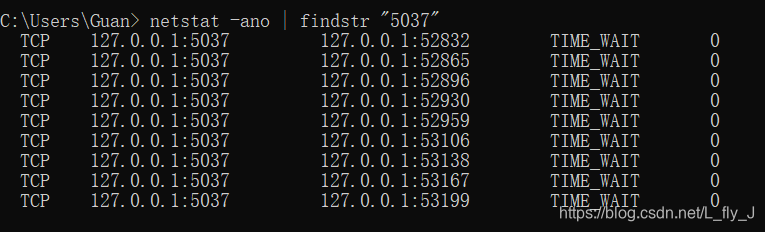
发现好多都是0,然后并没有发现有端口占用问题。
那么有可能是第一个模拟器的端口,第二个模拟器不能使用?
经过反复百度发现
夜神模拟器的端口是规律的,第一个模拟器端口是62001,第二个模拟器端口是62025,第三个是62025+1,依此类推。
模拟器1:地址:127.0.0.1:62001模拟器2: 地址:127.0.0.1:62025
模拟器3: 地址:127.0.0.1:62026
模拟器4: 地址:127.0.0.1:62027

更多连接模拟器 点击这里 adb连接更多模拟器

电影级数字人,免显卡端渲染SDK,十行代码即可调用,工业级demo免费开源下载!
更多推荐



 1
1 0
0- 0


 已为社区贡献1条内容

所有评论(0)