
PiscCode多模态人体分析系统:MediaPipe与YOLO的完美融合
本文提出了一种基于MediaPipe和YOLO的多模态人体分析系统,通过集成两大框架的优势实现全面的人体行为理解。系统采用YOLOv11-seg模型进行实时实例分割,结合MediaPipe的BlazePose、手部和面部关键点检测,构建了包含姿态估计、手势识别、面部检测和实例分割的多功能分析平台。创新性地设计了四屏可视化界面,支持原始画面、骨架分割、骨架叠加和纯分割视图的同步展示。系统采用模块化设
引言:计算机视觉的集成创新
在当今的计算机视觉领域,单一模型往往难以满足复杂应用场景的需求。本文深入探讨如何将Google的MediaPipe框架与Ultralytics的YOLO模型相结合,构建一个强大的多模态人体分析系统。这个系统不仅实现了实时的人体姿态估计、手势识别、面部检测和实例分割,还创新性地提供了四屏可视化界面,为人体行为分析设立了新的技术标准。

第一部分:YOLO技术深度解析
1.1 YOLO架构演进与核心原理
YOLO(You Only Look Once)革命性地改变了目标检测的范式,从传统的两阶段检测转向单阶段端到端检测。
1.1.1 YOLO的核心创新
# YOLO的基本检测流程
def yolo_detection_pipeline(image):
    # 1. 图像网格划分
    grid_cells = divide_into_grid(image, SxS)

    # 2. 每个网格预测多个边界框
    for each grid_cell:
        predictions = predict_bboxes(grid_cell, B_boxes)

    # 3. 非极大值抑制
    final_detections = nms(predictions)

return final_detections技术特点:
-
单次前向传播:相比R-CNN系列的两阶段方法,YOLO在单次推理中完成所有检测
-
全局上下文理解:由于处理整个图像,YOLO能更好地理解场景上下文
-
实时性能:优化后的版本可达100+ FPS
1.1.2 YOLOv11分割模型架构
在我们的系统中使用的YOLOv11-seg模型包含以下关键组件:
class YOLOv11Segmentation:
    def __init__(self):
        self.backbone = CSPDarknet53()  # 特征提取主干
        self.neck = PANet()            # 特征金字塔网络
        self.head = DetectionHead()    # 检测头
        self.mask_head = MaskHead()    # 掩码头

    def forward(self, x):
        # 多尺度特征提取
        features = self.backbone(x)
        # 特征融合
        fused_features = self.neck(features)
        # 检测预测
        detections = self.head(fused_features)
        # 分割掩码
        masks = self.mask_head(fused_features, detections)

        return detections, masks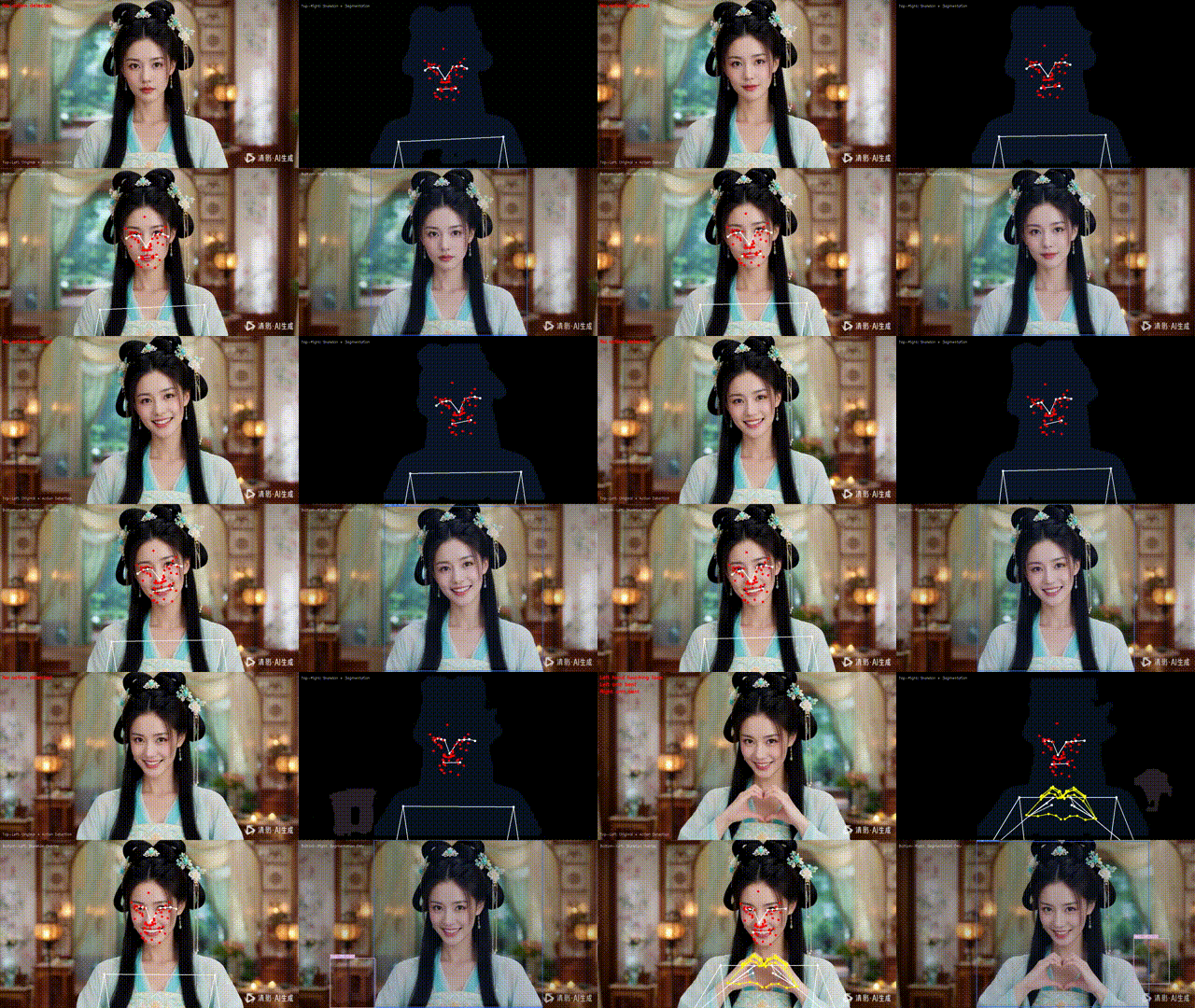
1.2 YOLO实例分割技术详解
1.2.1 掩码生成机制
def generate_masks(self, features, detections):
    """YOLO分割掩码生成流程"""
    # 1. 特征图采样
    roi_align = ROIAIign(features, detections.rois)

    # 2. 掩码预测
    mask_logits = self.mask_conv(roi_align)

    # 3. 后处理
    masks = torch.sigmoid(mask_logits)
    masks = resize_masks_to_original(masks, detections)

return masks技术优势:
-
原型掩码:YOLOv8/v11使用原型掩码技术,减少计算复杂度
-
实时分割:在保持高精度的同时实现实时性能
-
多类别支持:同时处理多个对象类别的分割
第二部分:MediaPipe框架深度剖析
2.1 MediaPipe架构设计哲学
MediaPipe是Google开源的跨平台多媒体机器学习框架,其核心设计理念是模块化和流水线化。
2.1.1 计算图架构
// MediaPipe计算图示例
CalculatorGraphConfig config = {
    node: {
        calculator: "ImageFrameToGpuBufferCalculator",
        input_stream: "INPUT:input_video",
        output_stream: "OUTPUT:gpu_buffer"
    },
    node: {
        calculator: "PoseLandmarkGpuCalculator",
        input_stream: "IMAGE:gpu_buffer",
        output_stream: "LANDMARKS:pose_landmarks"
    }
};关键特性:
-
数据流编程:将处理流程建模为有向图
-
跨平台支持:Android、iOS、桌面端和Web
-
硬件加速:充分利用CPU、GPU和DSP
2.2 MediaPipe人体分析模型
2.2.1 姿态估计模型(BlazePose)
class BlazePoseArchitecture:
    def __init__(self):
        self.heatmap_encoder = HeatmapCNN()      # 热图编码器
        self.regression_encoder = RegressionCNN() # 回归编码器
        self.keypoint_decoder = KeypointDecoder() # 关键点解码器

    def detect_pose(self, image):
        # 第一阶段:热图预测
        heatmaps = self.heatmap_encoder(image)

        # 第二阶段:精确回归
        initial_pose = decode_heatmaps(heatmaps)
        refined_pose = self.regression_encoder(image, initial_pose)

return refined_poseBlazePose创新点:
-
两阶段架构:热图检测 + 回归精炼
-
轻量级设计:在移动设备上实时运行
-
33个关键点:覆盖全身主要关节点
2.2.2 手部关键点检测
class HandLandmarkModel:
    def __init__(self):
        self.palm_detector = PalmDetector()    # 手掌检测
        self.landmark_regressor = HandCNN()    # 手部关键点回归

    def detect_hands(self, image):
        # 1. 手掌边界框检测
        palm_boxes = self.palm_detector(image)

        # 2. 手部区域裁剪和标准化
        hand_rois = extract_hand_rois(image, palm_boxes)

        # 3. 21个关键点预测
        landmarks = self.landmark_regressor(hand_rois)

return landmarks, palm_boxes技术特点:
-
21点手部模型:精确建模手部解剖结构
-
旋转不变性:对手部旋转具有鲁棒性
-
多手检测:支持同时检测多只手
2.2.3 面部网格检测
class FaceMeshModel:
    def __init__(self):
        self.face_detector = FaceDetector()      # 面部检测
        self.mesh_predictor = MeshPredictor()    # 网格预测

    def detect_face_landmarks(self, image):
        # 1. 面部边界框检测
        face_boxes = self.face_detector(image)

        # 2. 468个3D面部关键点预测
        landmarks_3d = self.mesh_predictor(image, face_boxes)

        # 3. 视线估计和表情分析
        gaze_direction = estimate_gaze(landmarks_3d)
        facial_expression = analyze_expression(landmarks_3d)

        return landmarks_3d, gaze_direction, facial_expression
第三部分:系统集成与创新设计
3.1 多模型协同架构
class MultiModelOrchestrator:
    def __init__(self):
        self.models = {
            'pose': PoseLandmarker(),
            'hands': HandLandmarker(),
            'face': FaceLandmarker(),
            'segmentation': YOLOSegmentation()
        }
        self.fusion_engine = FusionEngine()

    def process_frame(self, frame):
        # 并行推理
        with ThreadPoolExecutor() as executor:
            pose_future = executor.submit(self.models['pose'].detect, frame)
            hands_future = executor.submit(self.models['hands'].detect, frame)
            face_future = executor.submit(self.models['face'].detect, frame)
            seg_future = executor.submit(self.models['segmentation'].predict, frame)

        # 结果融合
        fused_results = self.fusion_engine.fuse(
            pose_future.result(),
            hands_future.result(),
            face_future.result(),
            seg_future.result()
        )

        return fused_results
3.2 智能行为识别算法集群
3.2.1 多层次行为分析
class BehaviorAnalyzer:
    def __init__(self):
        self.temporal_buffer = CircularBuffer(size=30)  # 时间序列缓冲
        self.spatial_analyzer = SpatialAnalyzer()       # 空间关系分析
        self.temporal_analyzer = TemporalAnalyzer()     # 时序模式分析

    def analyze_behavior(self, current_frame_data):
        # 1. 数据缓冲
        self.temporal_buffer.append(current_frame_data)

        # 2. 空间关系分析
        spatial_actions = self.spatial_analyzer.analyze(current_frame_data)

        # 3. 时序模式识别
        temporal_patterns = self.temporal_analyzer.analyze(self.temporal_buffer)

        # 4. 行为融合决策
        final_behavior = self.fuse_behaviors(spatial_actions, temporal_patterns)

        return final_behavior
3.2.2 高级行为检测算法
class AdvancedActionDetection:
    def detect_complex_actions(self, landmarks):
        actions = []

        # 基于运动学的动作分析
        kinematic_actions = self.kinematic_analysis(landmarks)
        actions.extend(kinematic_actions)

        # 基于接触的交互检测
        interaction_actions = self.interaction_analysis(landmarks)
        actions.extend(interaction_actions)

        # 基于时序的周期动作识别
        periodic_actions = self.periodic_analysis(landmarks)
        actions.extend(periodic_actions)

        return actions

    def kinematic_analysis(self, landmarks):
        """基于运动学原理的动作识别"""
        # 关节角度计算
        joint_angles = calculate_all_joint_angles(landmarks)

        # 运动速度分析
        velocities = calculate_limb_velocities(landmarks)

        # 动作模式匹配
        actions = match_kinematic_patterns(joint_angles, velocities)

        return actions
3.3 四屏可视化引擎
class QuadViewRenderer:
    def __init__(self):
        self.view_configs = {
            'original': OriginalView(),
            'skeleton_seg': SkeletonSegmentationView(),
            'skeleton_overlay': SkeletonOverlayView(),
            'segmentation': SegmentationView()
        }
        self.layout_engine = LayoutEngine()

    def render_quad_view(self, frame, analysis_results):
        views = {}

        # 并行渲染四个视图
        for view_name, renderer in self.view_configs.items():
            view_frame = renderer.render(frame.copy(), analysis_results)
            views[view_name] = view_frame

        # 布局合成
        final_display = self.layout_engine.compose_quad_layout(views)

        return final_display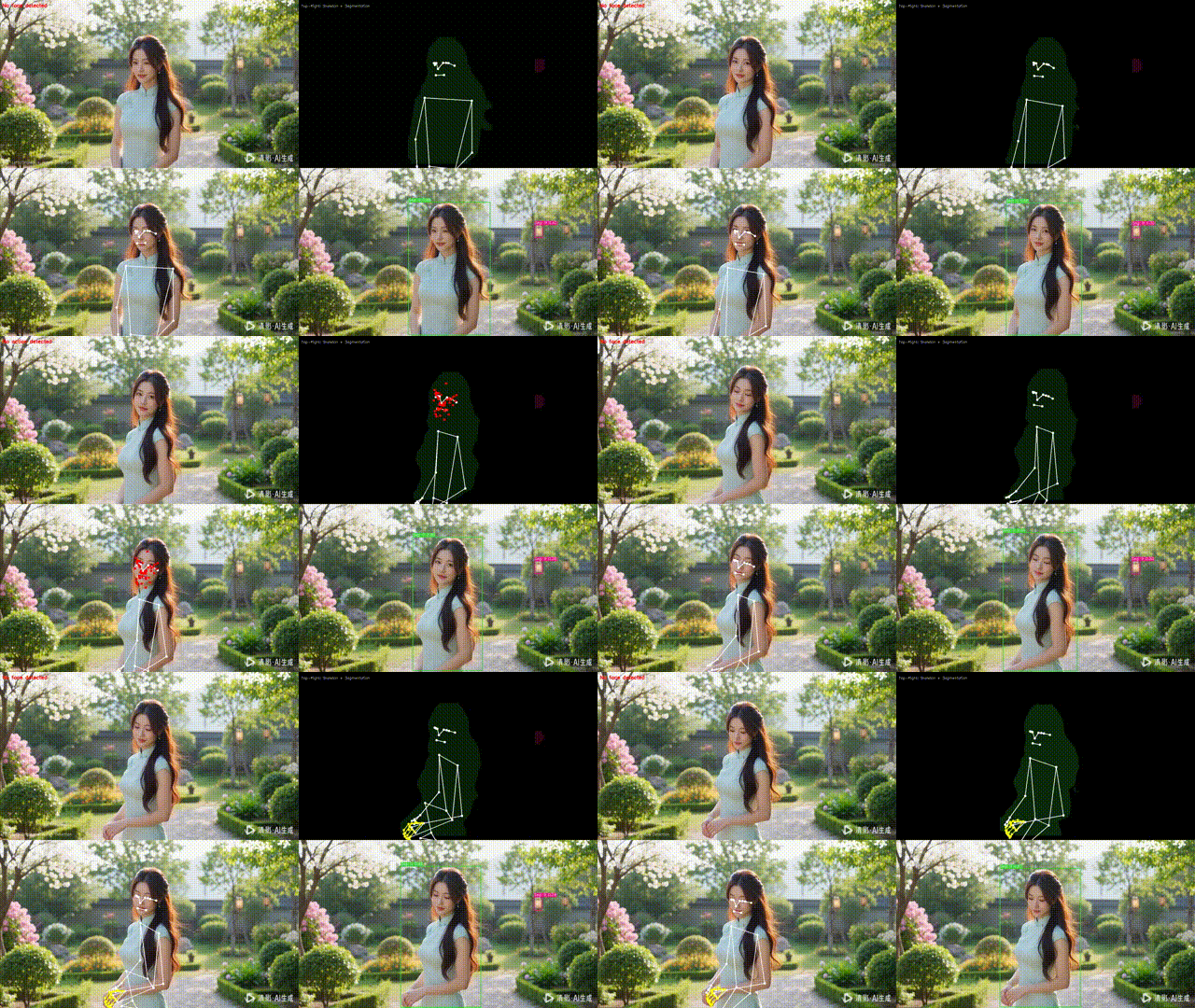
第四部分:应用场景与未来展望
4.1 行业应用案例
4.1.1 智能健身教练系统
class FitnessCoach:
    def analyze_exercise(self, user_pose, reference_pose):
        # 动作标准度评估
        form_score = self.calculate_form_score(user_pose, reference_pose)

        # 重复次数计数
        rep_count = self.count_repetitions(user_pose)

        # 实时反馈生成
        feedback = self.generate_feedback(form_score, rep_count)

        return feedback
4.1.2 医疗康复监测
class RehabilitationMonitor:
    def monitor_rehab_session(self, patient_data):
        # 运动范围分析
        rom_analysis = analyze_range_of_motion(patient_data)

        # 疼痛迹象检测
        pain_indicators = detect_pain_indicators(patient_data)

        # 进展跟踪
        progress_tracking = track_recovery_progress(patient_data)

        return comprehensive_report(rom_analysis, pain_indicators, progress_tracking)
4.2 技术发展趋势
-
多模态融合:结合语音、文本等多模态信息
-
自监督学习:减少对标注数据的依赖
-
边缘AI:在资源受限设备上部署复杂模型
-
个性化适配:根据用户特征自适应调整模型
import cv2
import numpy as np
import mediapipe as mp
from mediapipe import solutions
from mediapipe.tasks import python
from mediapipe.tasks.python import vision
import time
import random
from ultralytics import YOLO

class HumanMultiLandmarkerSegPose:
    def __init__(self,
                 pose_model="模型地址/pose_landmarker_heavy.task",
                 hand_model="模型地址/hand_landmarker.task",
                 face_model="模型地址/face_landmarker.task",
                 seg_model="yolo11n-seg.pt",
                 point_size=5,
                 line_thickness=2,
                 device="cuda"):
        """Load pose, hand, face models and YOLO segmentation model"""
        try:
            # 加载MediaPipe模型
            base_pose = python.BaseOptions(model_asset_path=pose_model)
            base_hand = python.BaseOptions(model_asset_path=hand_model)
            base_face = python.BaseOptions(model_asset_path=face_model)

            self.pose_detector = vision.PoseLandmarker.create_from_options(
                vision.PoseLandmarkerOptions(
                    base_options=base_pose,
                    num_poses=1,
                    running_mode=vision.RunningMode.IMAGE
                )
            )

            self.hand_detector = vision.HandLandmarker.create_from_options(
                vision.HandLandmarkerOptions(
                    base_options=base_hand,
                    num_hands=2,
                    running_mode=vision.RunningMode.IMAGE
                )
            )

            self.face_detector = vision.FaceLandmarker.create_from_options(
                vision.FaceLandmarkerOptions(
                    base_options=base_face,
                    num_faces=1,
                    running_mode=vision.RunningMode.IMAGE
                )
            )

            # 加载YOLO分割模型
            self.seg_model = YOLO(seg_model)
            self.seg_model.to(device)
            self.device = device

            print("All models loaded successfully!")
        except Exception as e:
            print(f"Model loading failed: {e}")
            # Create dummy detectors to avoid subsequent errors
            self.pose_detector = None
            self.hand_detector = None
            self.face_detector = None
            self.seg_model = None

        # Drawing parameters
        self.point_size = point_size
        self.line_thickness = line_thickness
        self.pose_connections = solutions.pose.POSE_CONNECTIONS
        self.hand_connections = solutions.hands.HAND_CONNECTIONS

        # Action detection related variables
        self.eye_closed_threshold = 0.2  # Adjusted eye closure threshold
        self.blink_threshold = 0.3  # Blink threshold
        self.blink_cooldown = 0.5  # Blink detection cooldown time (seconds)
        self.last_blink_time = 0  # Last blink time
        self.face_touch_threshold = 0.1  # Hand-face contact threshold
        self.leg_touch_threshold = 0.15  # Hand-leg contact threshold
        self.bend_threshold = 1.5  # Limb bending threshold (radians)

        # 分割模型颜色
        self.seg_colors = [(random.randint(0, 255), random.randint(0, 255), random.randint(0, 255))
                          for _ in range(100)]  # 预生成颜色

    def _draw_landmarks(self, frame, landmarks, connections=None, color=(0, 255, 0)):
        """General drawing function"""
        h, w, _ = frame.shape
        for lm in landmarks:
            cx, cy = int(lm.x * w), int(lm.y * h)
            cv2.circle(frame, (cx, cy), self.point_size, color, -1)

        if connections:
            for start, end in connections:
                if start < len(landmarks) and end < len(landmarks):
                    x1, y1 = int(landmarks[start].x * w), int(landmarks[start].y * h)
                    x2, y2 = int(landmarks[end].x * w), int(landmarks[end].y * h)
                    cv2.line(frame, (x1, y1), (x2, y2), color, self.line_thickness)

    def _draw_segmentation(self, frame, results, alpha=0.3):
        """绘制分割结果"""
        if not results or len(results) == 0:
            return frame

        frame_copy = frame.copy()
        res = results[0]

        # 绘制掩码
        if hasattr(res, 'masks') and res.masks is not None and res.masks.data is not None:
            masks = res.masks.data.cpu().numpy()
            for i, mask in enumerate(masks):
                # 调整掩码尺寸到原图大小
                mask_resized = cv2.resize(mask, (frame.shape[1], frame.shape[0]))
                mask_bool = mask_resized > 0.5

                # 为每个实例生成颜色
                color = self.seg_colors[i % len(self.seg_colors)]

                # 应用颜色掩码
                colored_mask = np.zeros_like(frame)
                colored_mask[mask_bool] = color

                # 融合到原图
                frame_copy = cv2.addWeighted(frame_copy, 1 - alpha, colored_mask, alpha, 0)

        # 绘制边界框和标签
        if hasattr(res, 'boxes') and res.boxes is not None:
            boxes = res.boxes.xyxy.cpu().numpy()
            confidences = res.boxes.conf.cpu().numpy() if res.boxes.conf is not None else []
            class_ids = res.boxes.cls.cpu().numpy() if res.boxes.cls is not None else []

            for i, box in enumerate(boxes):
                x1, y1, x2, y2 = map(int, box[:4])
                color = self.seg_colors[i % len(self.seg_colors)]

                # 绘制边界框
                cv2.rectangle(frame_copy, (x1, y1), (x2, y2), color, 2)

                # 添加标签
                class_id = int(class_ids[i]) if i < len(class_ids) else 0
                confidence = confidences[i] if i < len(confidences) else 0.0

                label = f"Seg: {class_id} {confidence:.2f}"
                label_size = cv2.getTextSize(label, cv2.FONT_HERSHEY_SIMPLEX, 0.5, 2)[0]

                # 标签背景
                cv2.rectangle(frame_copy, (x1, y1 - label_size[1] - 5),
                            (x1 + label_size[0], y1), color, -1)
                # 标签文本
                cv2.putText(frame_copy, label, (x1, y1 - 5),
                          cv2.FONT_HERSHEY_SIMPLEX, 0.5, (255, 255, 255), 1)

        return frame_copy

    def _draw_segmentation_on_skeleton(self, frame, results, alpha=0.2):
        """在骨架图上绘制分割掩码(透明度更低)"""
        if not results or len(results) == 0:
            return frame

        frame_copy = frame.copy()
        res = results[0]

        # 绘制掩码
        if hasattr(res, 'masks') and res.masks is not None and res.masks.data is not None:
            masks = res.masks.data.cpu().numpy()
            for i, mask in enumerate(masks):
                # 调整掩码尺寸到原图大小
                mask_resized = cv2.resize(mask, (frame.shape[1], frame.shape[0]))
                mask_bool = mask_resized > 0.5

                # 为每个实例生成颜色
                color = self.seg_colors[i % len(self.seg_colors)]

                # 应用颜色掩码(透明度更低)
                colored_mask = np.zeros_like(frame)
                colored_mask[mask_bool] = color

                # 融合到骨架图
                frame_copy = cv2.addWeighted(frame_copy, 1 - alpha, colored_mask, alpha, 0)

        return frame_copy

    def _calculate_distance(self, point1, point2):
        """Calculate Euclidean distance between two points"""
        return ((point1.x - point2.x) ** 2 + (point1.y - point2.y) ** 2) ** 0.5

    def _is_eye_closed(self, eye_landmarks):
        """Detect if eye is closed - using a simpler method"""
        if len(eye_landmarks) < 6:
            return False

        # Calculate distance between upper and lower eyelid keypoints
        upper_lid = eye_landmarks[1]  # Upper eyelid
        lower_lid = eye_landmarks[4]  # Lower eyelid

        # Calculate vertical distance
        vertical_dist = self._calculate_distance(upper_lid, lower_lid)

        # Calculate eye width
        left_corner = eye_landmarks[0]  # Left eye corner
        right_corner = eye_landmarks[3]  # Right eye corner
        horizontal_dist = self._calculate_distance(left_corner, right_corner)

        # Calculate eye aspect ratio
        ear = vertical_dist / horizontal_dist
        return ear < self.eye_closed_threshold

    def _is_hand_touching_face(self, hand_landmarks, face_landmarks):
        """Detect if hand is touching face"""
        if not hand_landmarks or not face_landmarks or len(face_landmarks) < 10:
            return False

        # Only check distance between fingertips and face center area
        fingertip_indices = [4, 8, 12, 16, 20]  # Fingertip keypoint indices
        face_center_indices = [1, 5, 6, 10, 152, 234]  # Face center area keypoints

        for tip_idx in fingertip_indices:
            if tip_idx >= len(hand_landmarks):
                continue
            hand_point = hand_landmarks[tip_idx]

            for face_idx in face_center_indices:
                if face_idx >= len(face_landmarks):
                    continue
                face_point = face_landmarks[face_idx]

                if self._calculate_distance(hand_point, face_point) < self.face_touch_threshold:
                    return True
        return False

    def _is_hand_touching_leg(self, hand_landmarks, pose_landmarks):
        """Detect if hand is touching leg"""
        if not hand_landmarks or not pose_landmarks or len(pose_landmarks) < 27:
            return False

        # Leg keypoint indices (MediaPipe Pose model)
        left_hip = pose_landmarks[23]  # Left hip
        right_hip = pose_landmarks[24]  # Right hip
        left_knee = pose_landmarks[25]  # Left knee
        right_knee = pose_landmarks[26]  # Right knee

        leg_points = [left_hip, right_hip, left_knee, right_knee]

        # Check distance between hand fingertip keypoints and leg keypoints
        fingertip_indices = [4, 8, 12, 16, 20]  # Fingertip keypoint indices

        for tip_idx in fingertip_indices:
            if tip_idx >= len(hand_landmarks):
                continue
            hand_point = hand_landmarks[tip_idx]

            for leg_point in leg_points:
                if self._calculate_distance(hand_point, leg_point) < self.leg_touch_threshold:
                    return True
        return False

    def _is_limb_bent(self, joint_landmarks):
        """Detect if limb is bent"""
        if len(joint_landmarks) < 3:
            return False

        # Calculate joint angle
        a = np.array([joint_landmarks[0].x, joint_landmarks[0].y])
        b = np.array([joint_landmarks[1].x, joint_landmarks[1].y])
        c = np.array([joint_landmarks[2].x, joint_landmarks[2].y])

        ba = a - b
        bc = c - b

        cosine_angle = np.dot(ba, bc) / (np.linalg.norm(ba) * np.linalg.norm(bc))
        angle = np.arccos(np.clip(cosine_angle, -1.0, 1.0))

        # If angle is less than threshold, consider limb bent
        return angle < self.bend_threshold

    def detect_actions(self, frame, pose_res, hand_res, face_res):
        """Detect various actions"""
        actions = []

        # Check if detection results are valid
        if not face_res or not hasattr(face_res, 'face_landmarks') or not face_res.face_landmarks:
            return ["No face detected"]

        # Eye action detection
        if face_res.face_landmarks:
            face_landmarks = face_res.face_landmarks[0]

            # Use simpler method to detect eyes
            # Left eye keypoints (simplified version)
            left_eye_indices = [33, 160, 158, 133, 153, 144]
            right_eye_indices = [362, 385, 387, 263, 373, 380]

            # Ensure indices don't go out of bounds
            left_eye = [face_landmarks[i] for i in left_eye_indices if i < len(face_landmarks)]
            right_eye = [face_landmarks[i] for i in right_eye_indices if i < len(face_landmarks)]

            if len(left_eye) >= 6 and len(right_eye) >= 6:
                left_eye_closed = self._is_eye_closed(left_eye)
                right_eye_closed = self._is_eye_closed(right_eye)

                if left_eye_closed and right_eye_closed:
                    actions.append("Both eyes closed")
                elif left_eye_closed:
                    actions.append("Left eye closed")
                elif right_eye_closed:
                    actions.append("Right eye closed")

                # Blink detection (requires time context)
                current_time = time.time()
                if (left_eye_closed or right_eye_closed) and current_time - self.last_blink_time > self.blink_cooldown:
                    actions.append("Blinking")
                    self.last_blink_time = current_time

        # Hand action detection
        left_hand_touching_face = False
        right_hand_touching_face = False

        if hand_res and hand_res.hand_landmarks and face_res.face_landmarks:
            for i, hand_landmarks in enumerate(hand_res.hand_landmarks):
                if i < len(hand_res.handedness) and len(hand_res.handedness[i]) > 0:
                    handedness = hand_res.handedness[i][0].category_name
                    is_touching_face = self._is_hand_touching_face(hand_landmarks, face_res.face_landmarks[0])

                    if handedness == "Left" and is_touching_face:
                        left_hand_touching_face = True
                    elif handedness == "Right" and is_touching_face:
                        right_hand_touching_face = True

        if left_hand_touching_face and right_hand_touching_face:
            actions.append("Both hands touching face")
        elif left_hand_touching_face:
            actions.append("Left hand touching face")
        elif right_hand_touching_face:
            actions.append("Right hand touching face")

        # Limb bending detection
        if pose_res and pose_res.pose_landmarks:
            pose_landmarks = pose_res.pose_landmarks[0]

            # Ensure keypoints exist
            if len(pose_landmarks) >= 29:
                # Left arm bending detection
                left_arm_bent = self._is_limb_bent([pose_landmarks[11], pose_landmarks[13], pose_landmarks[15]])
                # Right arm bending detection
                right_arm_bent = self._is_limb_bent([pose_landmarks[12], pose_landmarks[14], pose_landmarks[16]])

                if left_arm_bent:
                    actions.append("Left arm bent")
                if right_arm_bent:
                    actions.append("Right arm bent")

        # If no actions detected, show prompt
        if not actions:
            actions.append("No action detected")

        return actions

    def do(self, frame, device):
        """Four-screen display: Original + Action, Skeleton + Seg, Skeleton Overlay, Segmentation"""
        if frame is None:
            return None

        # Create copy for drawing
        display_frame = frame.copy()

        # Convert image format for MediaPipe
        rgb_frame = cv2.cvtColor(frame, cv2.COLOR_BGR2RGB)
        mp_image = mp.Image(image_format=mp.ImageFormat.SRGB, data=rgb_frame)

        # Initialize detection results
        pose_res, hand_res, face_res, seg_res = None, None, None, None

        # Detect pose
        if self.pose_detector:
            try:
                pose_res = self.pose_detector.detect(mp_image)
            except:
                pass

        # Detect hands
        if self.hand_detector:
            try:
                hand_res = self.hand_detector.detect(mp_image)
            except:
                pass

        # Detect face
        if self.face_detector:
            try:
                face_res = self.face_detector.detect(mp_image)
            except:
                pass

        # Detect segmentation
        if self.seg_model:
            try:
                seg_res = self.seg_model(frame, verbose=False, device=self.device)
            except Exception as e:
                print(f"Segmentation model failed: {e}")

        # Create skeleton images
        skeleton_only = np.zeros_like(frame)
        skeleton_overlay = frame.copy()
        segmentation_frame = frame.copy()

        # 绘制分割掩码到骨架图(右上角)
        skeleton_with_seg = np.zeros_like(frame)
        if seg_res:
            skeleton_with_seg = self._draw_segmentation_on_skeleton(skeleton_with_seg, seg_res)

        # Draw pose
        if pose_res and pose_res.pose_landmarks:
            for pose_landmarks in pose_res.pose_landmarks:
                self._draw_landmarks(skeleton_only, pose_landmarks,
                                     self.pose_connections, (255, 255, 255))
                self._draw_landmarks(skeleton_overlay, pose_landmarks,
                                     self.pose_connections, (255, 255, 255))
                self._draw_landmarks(skeleton_with_seg, pose_landmarks,
                                     self.pose_connections, (255, 255, 255))

        # Draw hands
        if hand_res and hand_res.hand_landmarks:
            for hand_landmarks in hand_res.hand_landmarks:
                self._draw_landmarks(skeleton_only, hand_landmarks,
                                     self.hand_connections, (0, 255, 255))
                self._draw_landmarks(skeleton_overlay, hand_landmarks,
                                     self.hand_connections, (0, 255, 255))
                self._draw_landmarks(skeleton_with_seg, hand_landmarks,
                                     self.hand_connections, (0, 255, 255))

        # Draw face (only points, avoid being too dense)
        if face_res and face_res.face_landmarks:
            for face_landmarks in face_res.face_landmarks:
                # Only draw some keypoints to avoid being too dense
                for i in range(0, len(face_landmarks), 10):
                    if i < len(face_landmarks):
                        self._draw_landmarks(skeleton_only, [face_landmarks[i]], None, (0, 0, 255))
                        self._draw_landmarks(skeleton_overlay, [face_landmarks[i]], None, (0, 0, 255))
                        self._draw_landmarks(skeleton_with_seg, [face_landmarks[i]], None, (0, 0, 255))

        # Draw segmentation (右下角)
        if seg_res:
            segmentation_frame = self._draw_segmentation(frame, seg_res)

        # Action detection
        actions = self.detect_actions(frame, pose_res, hand_res, face_res)

        # Display detected actions on the original video frame
        y_offset = 30
        for action in actions:
            cv2.putText(display_frame, action, (10, y_offset),
                        cv2.FONT_HERSHEY_SIMPLEX, 0.7, (0, 0, 255), 2)
            y_offset += 30

        # Add prompt information
        cv2.putText(display_frame, "Top-Left: Original + Action Detection", (10, display_frame.shape[0] - 20),
                    cv2.FONT_HERSHEY_SIMPLEX, 0.5, (255, 255, 255), 1)
        cv2.putText(skeleton_with_seg, "Top-Right: Skeleton + Segmentation", (10, 30),
                    cv2.FONT_HERSHEY_SIMPLEX, 0.5, (255, 255, 255), 1)
        cv2.putText(skeleton_overlay, "Bottom-Left: Skeleton Overlay", (10, 30),
                    cv2.FONT_HERSHEY_SIMPLEX, 0.5, (255, 255, 255), 1)
        cv2.putText(segmentation_frame, "Bottom-Right: Segmentation Only", (10, 30),
                    cv2.FONT_HERSHEY_SIMPLEX, 0.5, (255, 255, 255), 1)

        # Resize frames to same size for concatenation
        h, w = frame.shape[:2]
        display_frame = cv2.resize(display_frame, (w//2, h//2))
        skeleton_with_seg = cv2.resize(skeleton_with_seg, (w//2, h//2))
        skeleton_overlay = cv2.resize(skeleton_overlay, (w//2, h//2))
        segmentation_frame = cv2.resize(segmentation_frame, (w//2, h//2))

        # Create 2x2 grid
        top_row = np.concatenate([display_frame, skeleton_with_seg], axis=1)
        bottom_row = np.concatenate([skeleton_overlay, segmentation_frame], axis=1)
        quad_frame = np.concatenate([top_row, bottom_row], axis=0)

        return quad_frame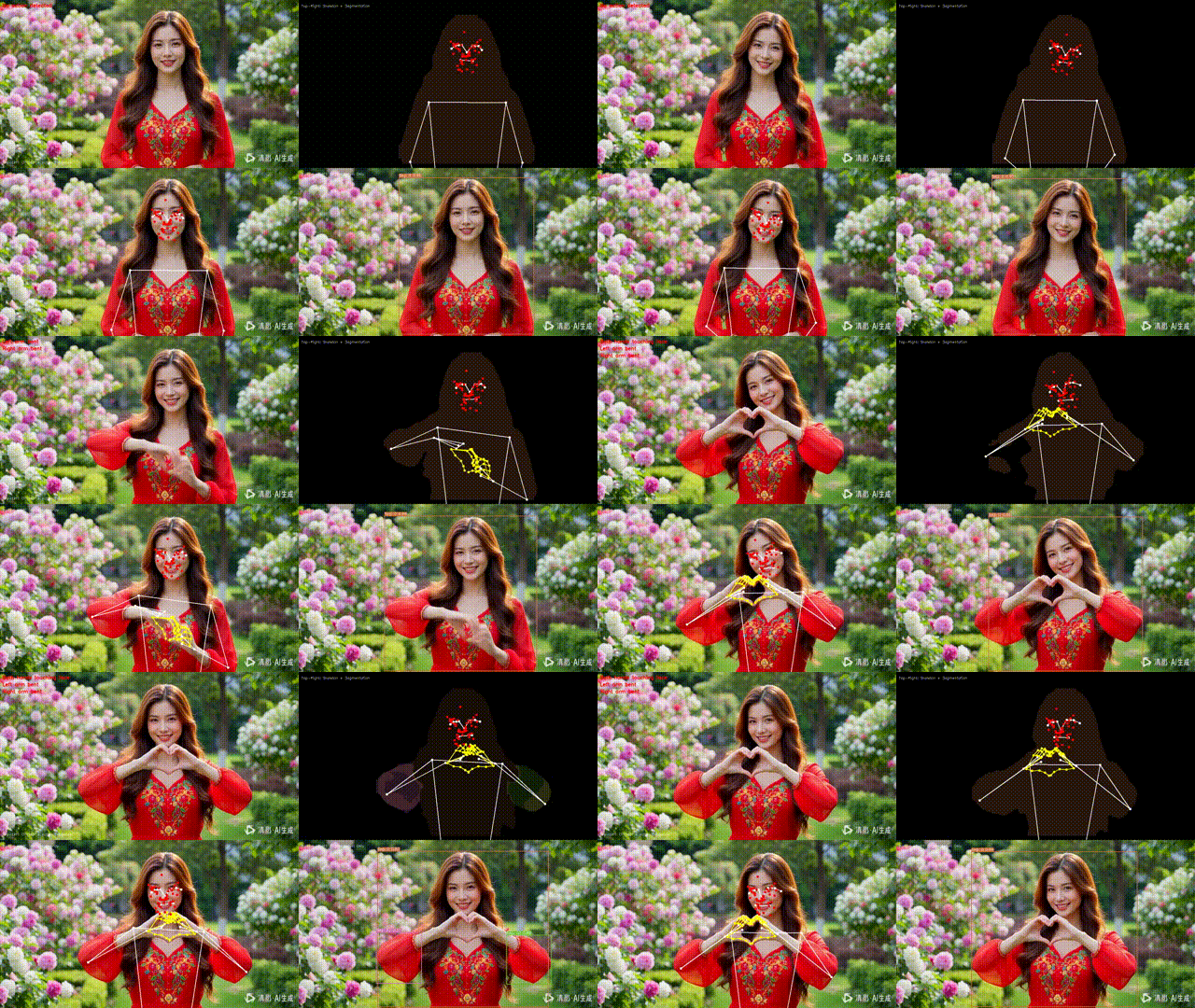
结论
本文详细解析了基于MediaPipe和YOLO的多模态人体分析系统的核心技术。通过深度集成两大框架的优势,我们实现了:
-
全面的感知能力:从宏观的姿态到微观的面部表情
-
实时的处理性能:优化后的系统可在消费级硬件上实时运行
-
灵活的扩展性:模块化设计支持快速功能扩展
-
广泛的应用前景:覆盖健身、医疗、安防等多个领域
这种多模型融合的方法代表了计算机视觉发展的未来方向,为构建更加智能、全面的人体行为理解系统提供了坚实的技术基础。随着算法的不断进步和硬件性能的提升,我们有理由相信,这样的综合视觉系统将在更多领域发挥重要作用。
对 PiscTrace or PiscCode感兴趣?更多精彩内容请移步官网看看~🔗 PiscTrace

电影级数字人,免显卡端渲染SDK,十行代码即可调用,工业级demo免费开源下载!
更多推荐

 15
15 0
0- 0


 已为社区贡献3条内容

所有评论(0)