
解决安装psutil时报错“使用 -std=c99 或 -std=gnu99 来编译您的代码 error: command ‘gcc‘ failed with exit status 1”
安装psutil时出现C99编译错误,提示for循环初始化声明需要在C99模式下使用。解决方法有两种:1)临时指定C99标准,使用命令"CFLAGS='-std=c99' pip install psutil";2)全局设置C99标准,将"export CFLAGS='-std=c99'"加入bashrc文件并执行。安装前需确保已安装python3-deve
一、问题描述
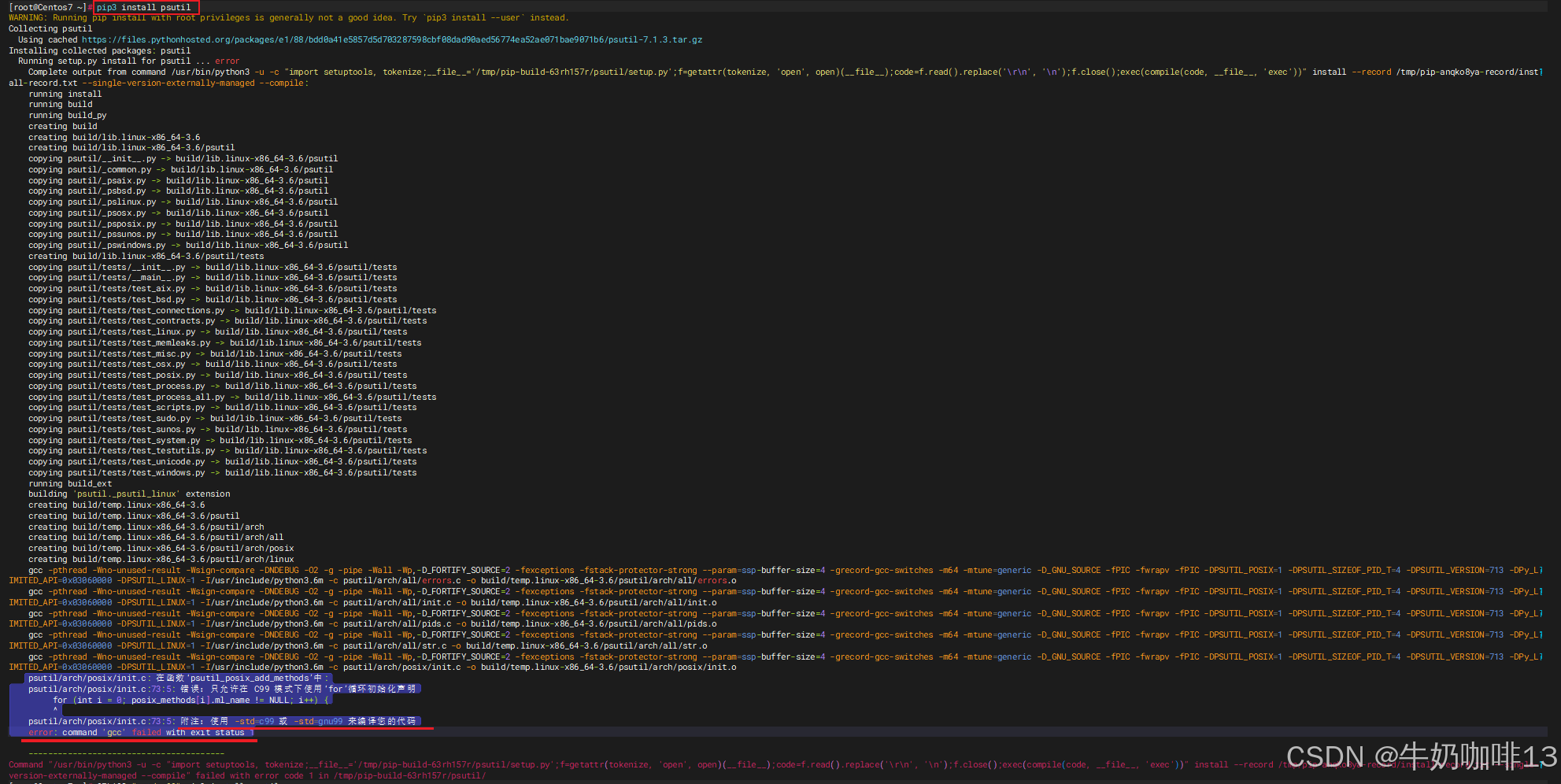
当我们在使用【pip3 install psutil】命令安装psutil时,最后报错“
psutil/arch/posix/init.c: 在函数‘psutil_posix_add_methods’中:
psutil/arch/posix/init.c:73:5: 错误:只允许在 C99 模式下使用‘for’循环初始化声明
for (int i = 0; posix_methods[i].ml_name != NULL; i++) {
^
psutil/arch/posix/init.c:73:5: 附注:使用 -std=c99 或 -std=gnu99 来编译您的代码
error: command 'gcc' failed with exit status 1
----------------------------------------
Command "/usr/bin/python3 -u -c "import setuptools, tokenize;__file__='/tmp/pip-build-63rh157r/psutil/setup.py';f=getattr(tokenize, 'open', open)(__file__);code=f.read().replace('\r\n', '\n');f.close();exec(compile(code, __file__, 'exec'))" install --record /tmp/pip-anqko8ya-record/install-record.txt --single-version-externally-managed --compile" failed with error code 1 in /tmp/pip-build-63rh157r/psutil/
”如下图所示:
二、问题分析
其实报错信息已经说的很清楚了就是“在psutil/arch/posix/init.c:73:5: 错误:只允许在 C99 模式下使用‘for’循环初始化声明
for (int i = 0; posix_methods[i].ml_name != NULL; i++) {
^
psutil/arch/posix/init.c:73:5: 附注:使用 -std=c99 或 -std=gnu99 来编译您的代码”
三、解决方法
3.1、方案一:临时指定C99标准(推荐)
在安装psutil时直接通过环境变量指定 gcc 使用 C99 标准:
#1-安装psutil时临时指定C99标准【首选】
CFLAGS="-std=c99" pip install psutil


#2-手动编译源码时可以直接给gcc指定C99【 -std=c99 或 -std=gnu99】
gcc -std=c99 -o psutil_module psutil/arch/posix/init.c [及其所需的依赖文件]
3.2、方案二:全局设置C99标准
#在Linux中设置全局C99标准后再次执行psutil安装
echo 'export CFLAGS="-std=c99"' >> ~/.bashrc
source ~/.bashrc

pip3 install psutil
3.3、其他注意事项
#在安装【psutil】前安装一些python3内容及其GCC
yum install python36-devel python36-pip -y
yum install gcc gcc-c++ kernel-devel -y
电影级数字人,免显卡端渲染SDK,十行代码即可调用,工业级demo免费开源下载!
更多推荐


 3
3 0
0- 0


 已为社区贡献2条内容

所有评论(0)