
M3部署vllm
macbookpro m3 安装vllm,实现vllm部署Qwen3-0.6B,流式请求会话时,持续返回token使用情况
·
本地环境
- macbookpro M3
- vllm main分支最新commit_id
315068eb4a4b87a54ea201898b2fb6267f147eb3
安装vllm
conda create -n vllm python=3.12 -y
conda activate vllm
git clone https://github.com/vllm-project/vllm.git
cd vllm
uv pip install -r requirements/cpu.txt
uv pip install -e .
vllm --version
不兼容报错
vllm --version
INFO 11-03 14:39:58 [importing.py:68] Triton not installed or not compatible; certain GPU-related functions will not be available.
[1]    41487 segmentation fault  vllm --version
更新torch版本到2.9.0 vim requirements/cpu.txt
diff --git a/requirements/cpu.txt b/requirements/cpu.txt
index ac0c4d20c..96440fe80 100644
--- a/requirements/cpu.txt
+++ b/requirements/cpu.txt
@@ -7,9 +7,9 @@ numba == 0.61.2; platform_machine != "s390x" # Required for N-gram speculative d
 packaging>=24.2
 setuptools>=77.0.3,<80.0.0
 --extra-index-url https://download.pytorch.org/whl/cpu
-torch==2.8.0+cpu; platform_machine == "x86_64" or platform_machine == "s390x"
-torch==2.8.0; platform_system == "Darwin"
-torch==2.8.0; platform_machine == "ppc64le" or platform_machine == "aarch64"
+torch==2.9.0+cpu; platform_machine == "x86_64" or platform_machine == "s390x"
+torch==2.9.0; platform_system == "Darwin"
+torch==2.9.0; platform_machine == "ppc64le" or platform_machine == "aarch64"

 # required for the image processor of minicpm-o-2_6, this must be updated alongside torch
 torchaudio; platform_machine != "ppc64le" and platform_machine != "s390x"

vllm chat
- 下载模型
git clone git@gitcode.com:hf_mirrors/Qwen/Qwen3-0.6B.git - vllm chat
要禁用编译,否则会报错 EngineCore failed to start.from vllm import LLM, SamplingParams llm = LLM( model="/Users/yanlp/downloads/Qwen3-0.6B", trust_remote_code=True, quantization=None, max_model_len=2048, max_num_batched_tokens=2048, dtype="float32", enforce_eager=True, # ✅ 禁用编译,关键 ) sampling_params = SamplingParams(temperature=0.5, top_p=0.95, max_tokens=1024) messages = [ {"role": "user", "content": "你好,你是谁,简单自我介绍一下"} ] output = llm.chat(messages, sampling_params=sampling_params) generated_text = output[0].outputs[0].text request_output = output[0] prompt_token_count = len(request_output.prompt_token_ids) generated_token_count = len(request_output.outputs[0].token_ids) total_token_count = prompt_token_count + generated_token_count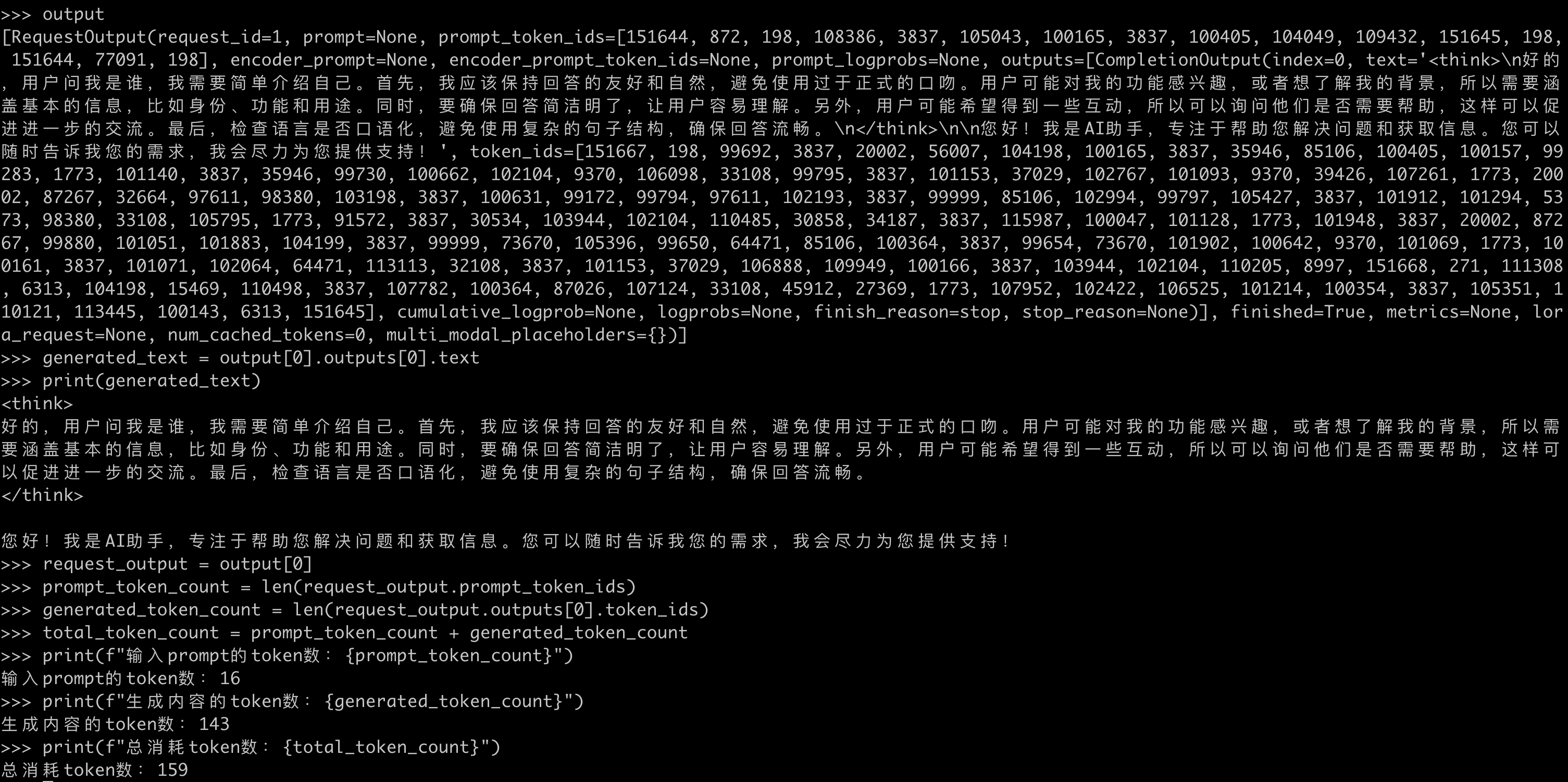
vllm serve
- serve
vllm serve --help=allvllm serve /Users/yanlp/downloads/Qwen3-0.6B \ --max-model-len 2048 \ --max-num-batched-tokens 2048 \ --dtype float32 \ --port 8001 \ --served-model-name yanlp-Qwen3-0.6B \ --enforce-eager - 查看模型列表
http://localhost:8001/v1/models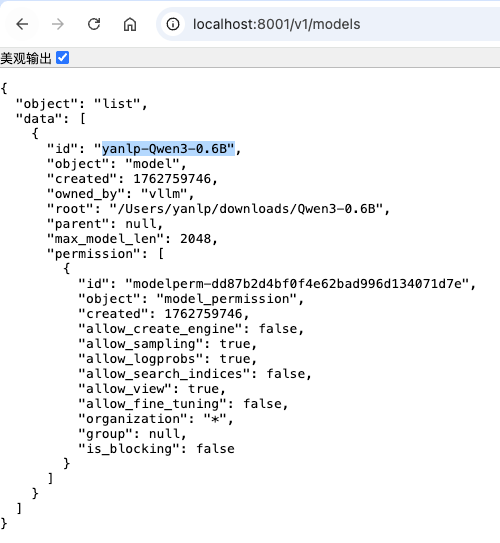
- 流式请求持续返回token使用情况
stream_options[continuous_usage_stats]=truecurl --location 'http://localhost:8001/v1/chat/completions' \ --header 'Content-Type: application/json' \ --data '{ "model": "yanlp-Qwen3-0.6B", "messages": [ { "role": "user", "content": "你好,你是谁,简单自我介绍一下" } ], "top_p": 0.95, "stream": true, "stream_options": { "include_usage": true, "continuous_usage_stats": true } }'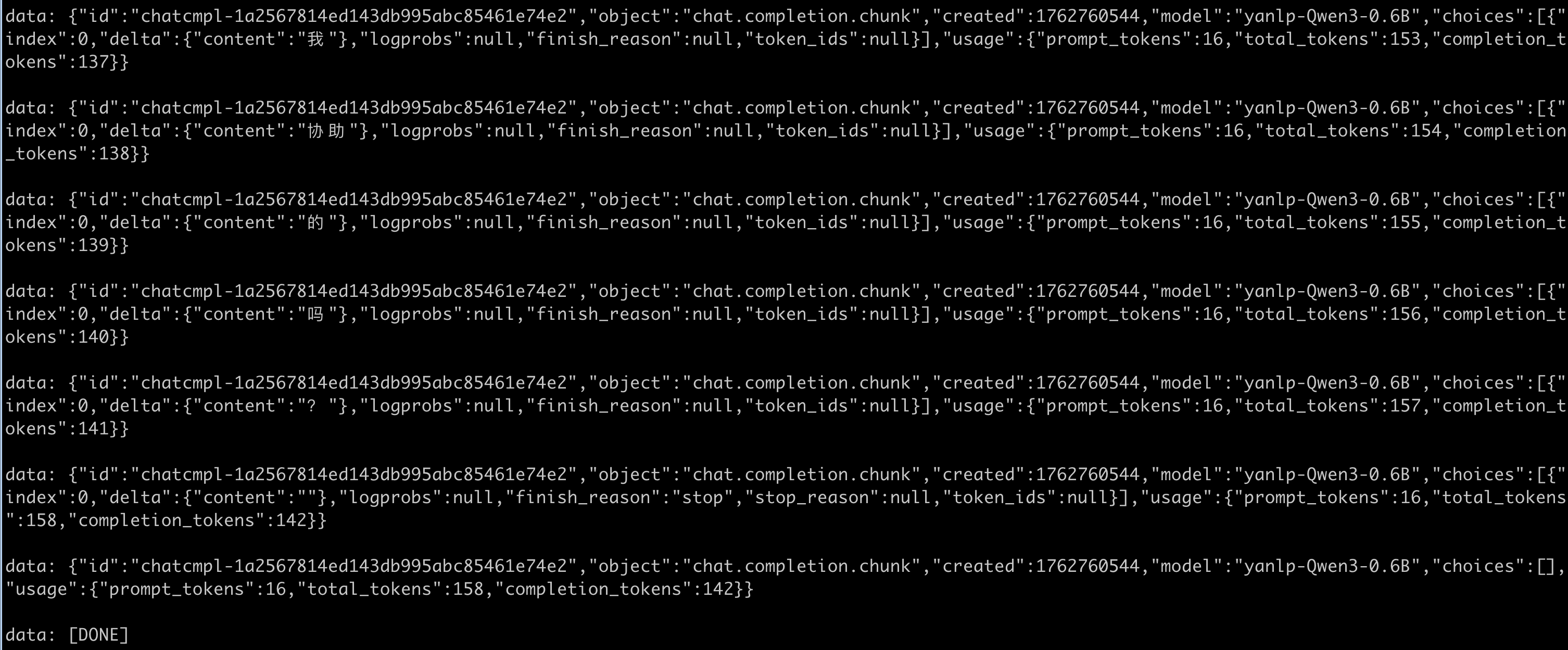

电影级数字人,免显卡端渲染SDK,十行代码即可调用,工业级demo免费开源下载!
更多推荐

 17
17 0
0- 0


 已为社区贡献2条内容

所有评论(0)