
具身交互智能实战:从零搭建Aino穿搭顾问数字人电商应用
一、摘要
随着具身交互智能技术的快速发展,数字人正从简单的形象展示走向深度业务场景融合。本文以 Aino・专属穿搭造型顾问为例,详细介绍如何基于魔珐星云 XmovAvatar SDK 的参数流架构,结合火山引擎豆包大模型与腾讯云 ASR 语音识别,从零搭建一个集成在电商服装网站中的 AI 数字人穿搭顾问。
Aino 不仅是一个视觉形象,更是一位能看、能听、能说的智能穿搭顾问——用户可通过文字或语音与它实时交流,获取个性化的穿搭建议。项目采用流式对话 + 首句即播报策略,将交互延迟压至 500ms 以内;数字人以透明背景悬浮于电商页面右下角,实现"边逛边问"的沉浸式购物体验。
魔珐星云PC端官方链接:https://xingyun3d.com?utm_campaign=daily&utm_source=CSDNwanfen3&utm_medium=&utm_term=&utm_content=
二、痛点分析
在服装电商领域,消费者和商家面临多重痛点:
消费者端:
- 选款困难:面对海量商品,用户常常不知道什么风格适合自己,缺乏专业的穿搭指导
- 搭配盲区:单件商品好看但不会搭配,缺少即时、专业的搭配建议
- 场景焦虑:通勤、约会、派对等不同场合不知道怎么穿,线上购物缺乏线下导购式的即时咨询
- 交互单一:传统电商只有图文展示,用户无法获得个性化、互动式的购物体验
商家端:
- 导购成本高:专业穿搭顾问人力有限,无法同时服务大量用户
- 转化率瓶颈:用户犹豫不决时缺少即时引导,导致购物车放弃率高
- 同质化严重:商品详情页千篇一律,缺乏差异化的交互体验来吸引和留住用户
行业底层痛点:传统电商交互只有图文、文字机器人,缺失完整具身交互智能,无法做到形象、语音、情绪、动作同步联动,难以留住用户、提升转化。
三、传统方案的局限
| 维度 | 传统图文导购 | 传统客服机器人 | Aino 数字人方案 |
|---|---|---|---|
| 交互形式 | 静态图文,单向输出 | 文字问答,缺乏温度 | 原生具身交互智能,有形象、有声音、有表情 |
| 响应速度 | 依赖人工,等待时间长 | 秒级响应但体验机械 | 流式对话 < 500ms响应,自然流畅 |
| 专业深度 | 依赖个人经验,水平参差 | 基于关键词匹配,理解浅 | 大模型驱动,深度理解穿搭场景与风格 |
| 场景融合 | 独立页面,割裂感强 | 弹窗式,打断浏览 | 悬浮叠加,边逛边问,无缝融入购物流程 |
| 服务规模 | 1对1,成本线性增长 | 可规模化但体验差 | 1对无限,边际成本趋零 |
| 情感连接 | 弱 | 极弱 | 强——有形象、有性格、有温度的 AI 顾问 |
四、前提准备
在开始项目搭建之前,需要先在魔珐星云平台完成数字人应用的创建与配置。以下是完整的操作流程:
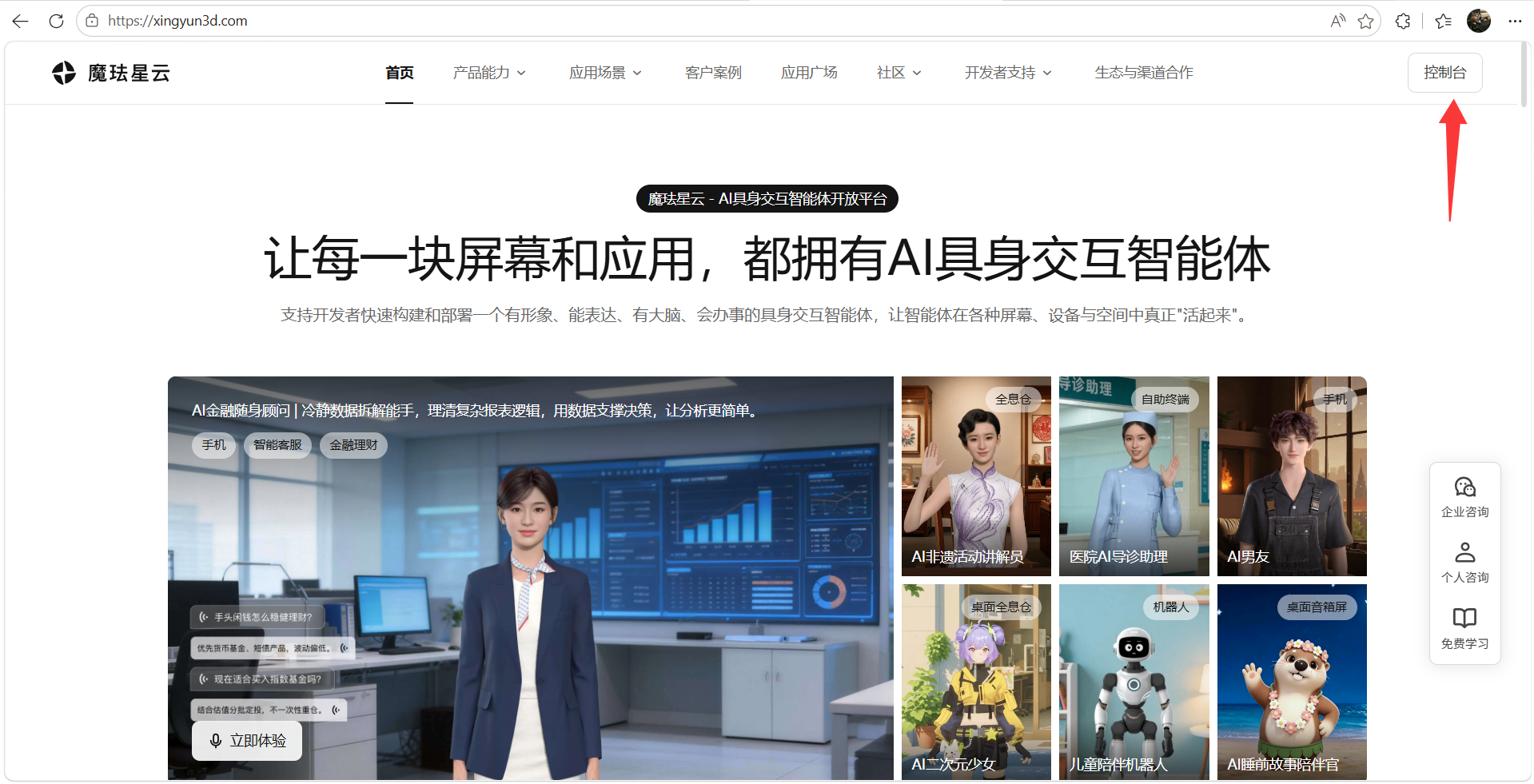
步骤一:登录魔珐星云平台
访问魔珐星云官网,登录账号后点击「控制台」进入应用管理界面。
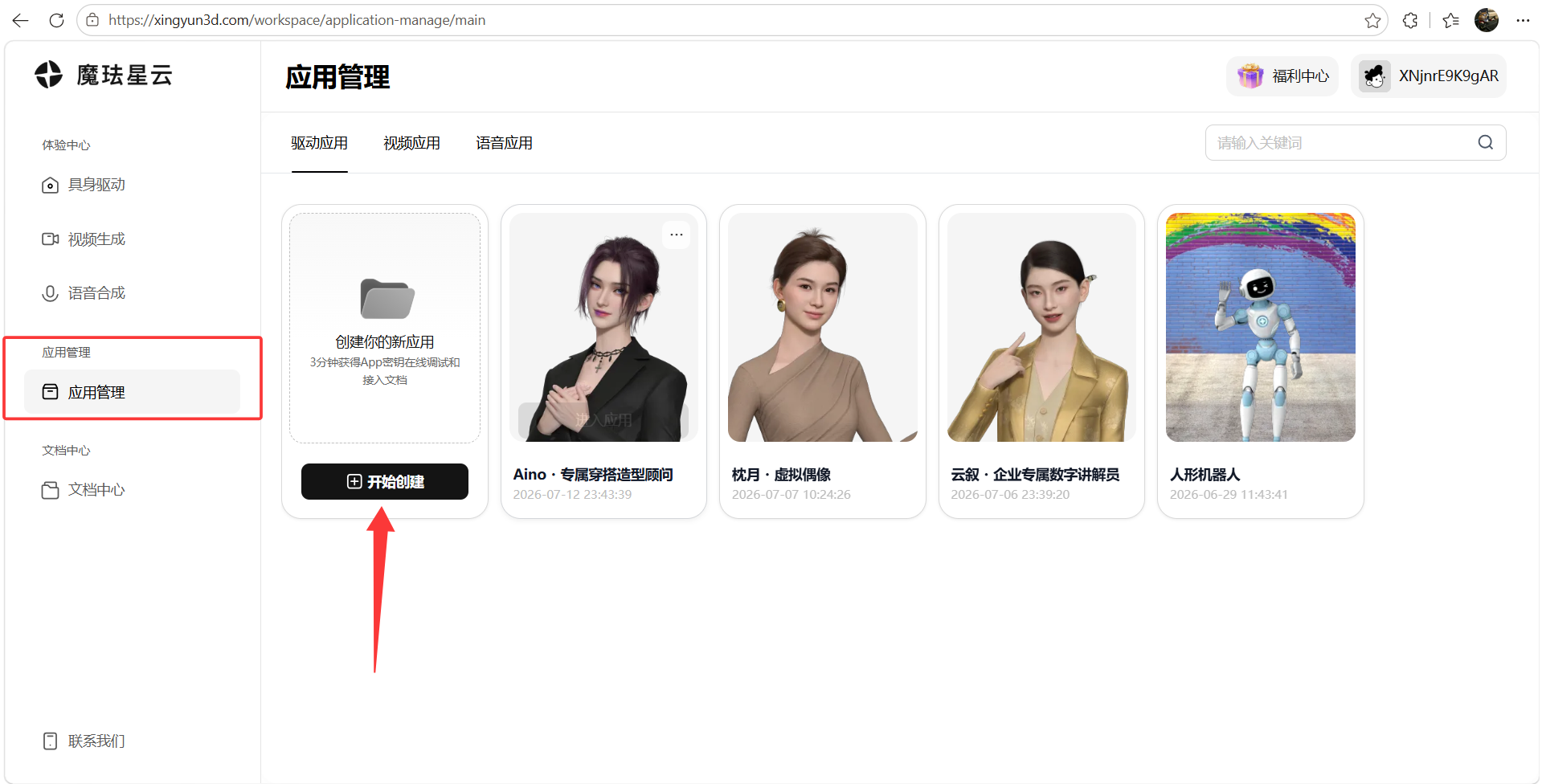
步骤二:创建新应用
进入「应用管理」页面,点击「开始创建」按钮,发起一个新的数字人应用。
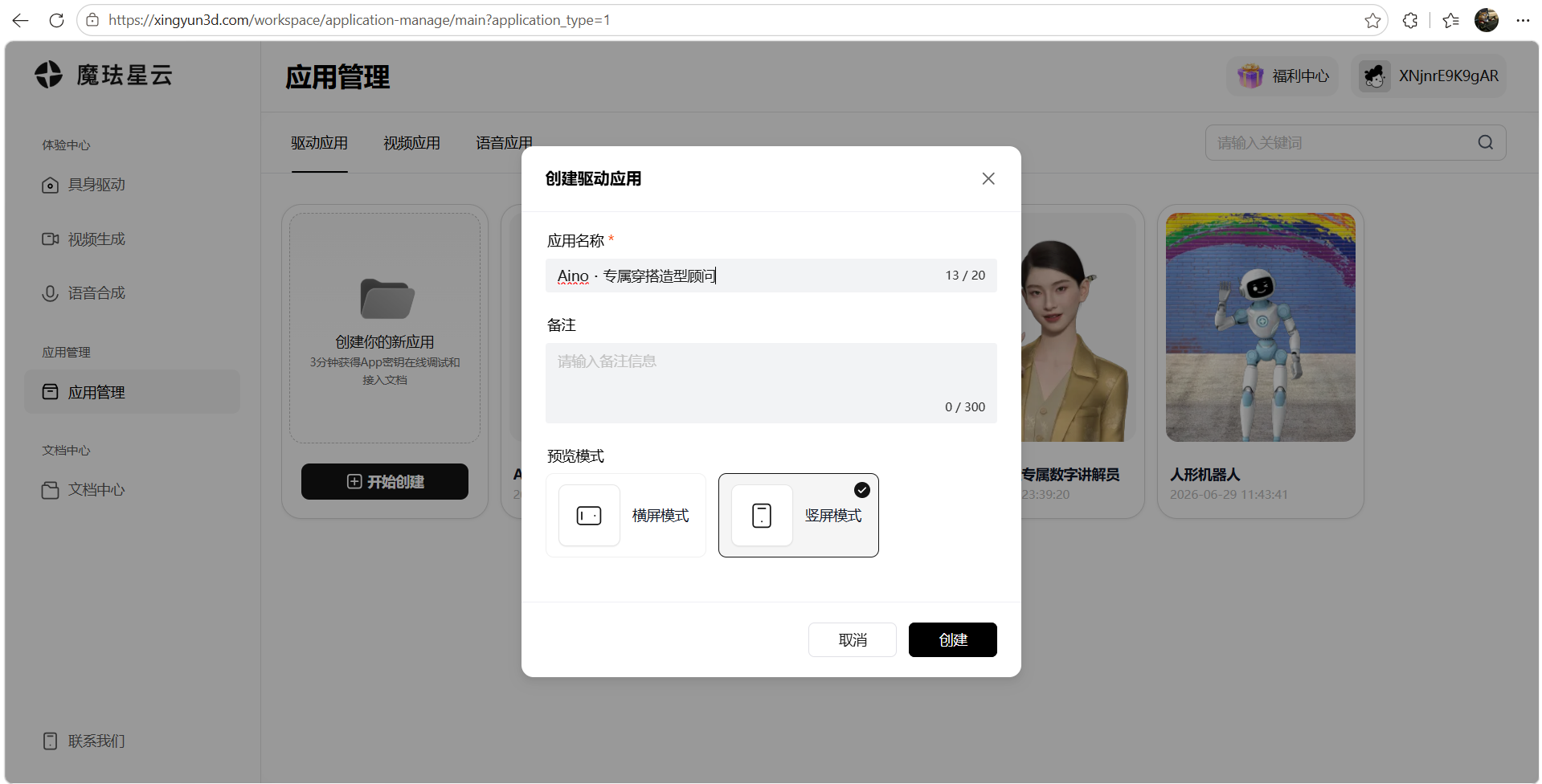
步骤三:配置应用基本信息
填写应用名称为「Aino・专属穿搭造型顾问」,并根据需要补充应用描述等基础信息。
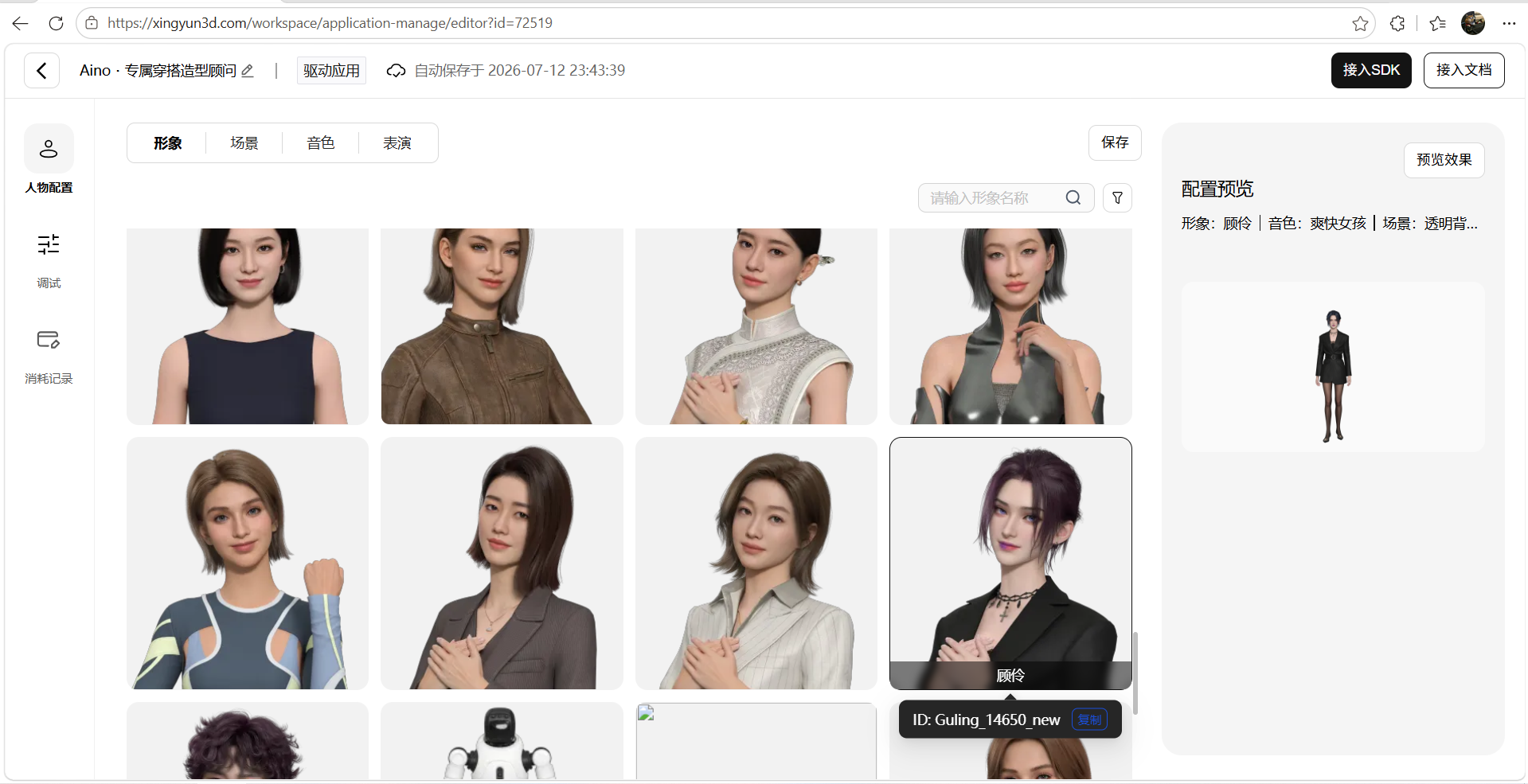
步骤四:形象配置
选择或上传合适的数字人形象,配置外观参数。本项目中 Aino 采用时尚风格的数字人形象,与穿搭顾问定位匹配。
步骤五:场景配置
根据实际需求配置应用场景。由于本项目需要将数字人嵌入电商网页,建议选择「透明背景」模式,以便数字人能够无缝叠加在网页内容之上。
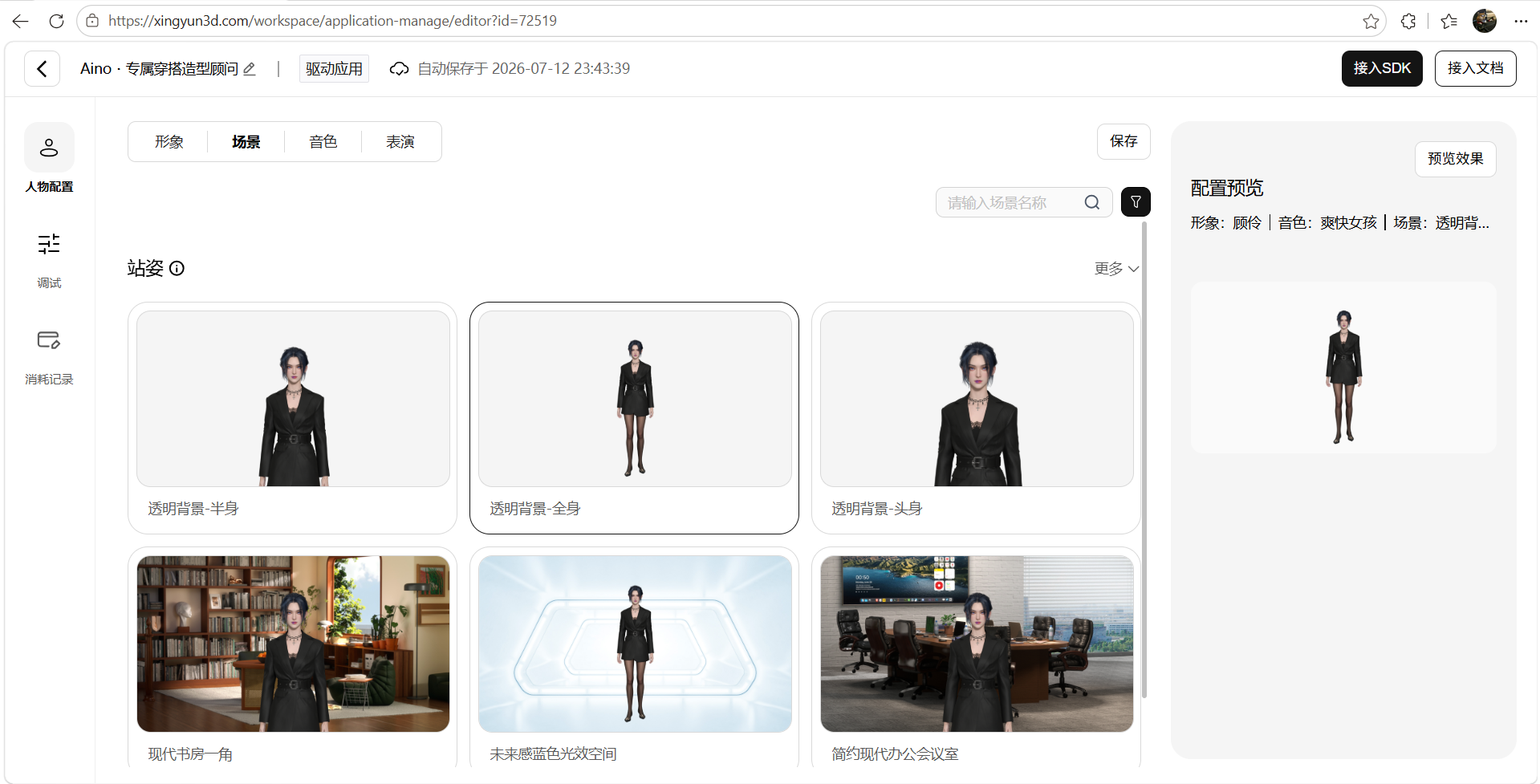
步骤六:音色配置
为 Aino 选择合适的语音音色。作为穿搭顾问,建议选择自然亲和的女声音色,提升用户的交互体验。
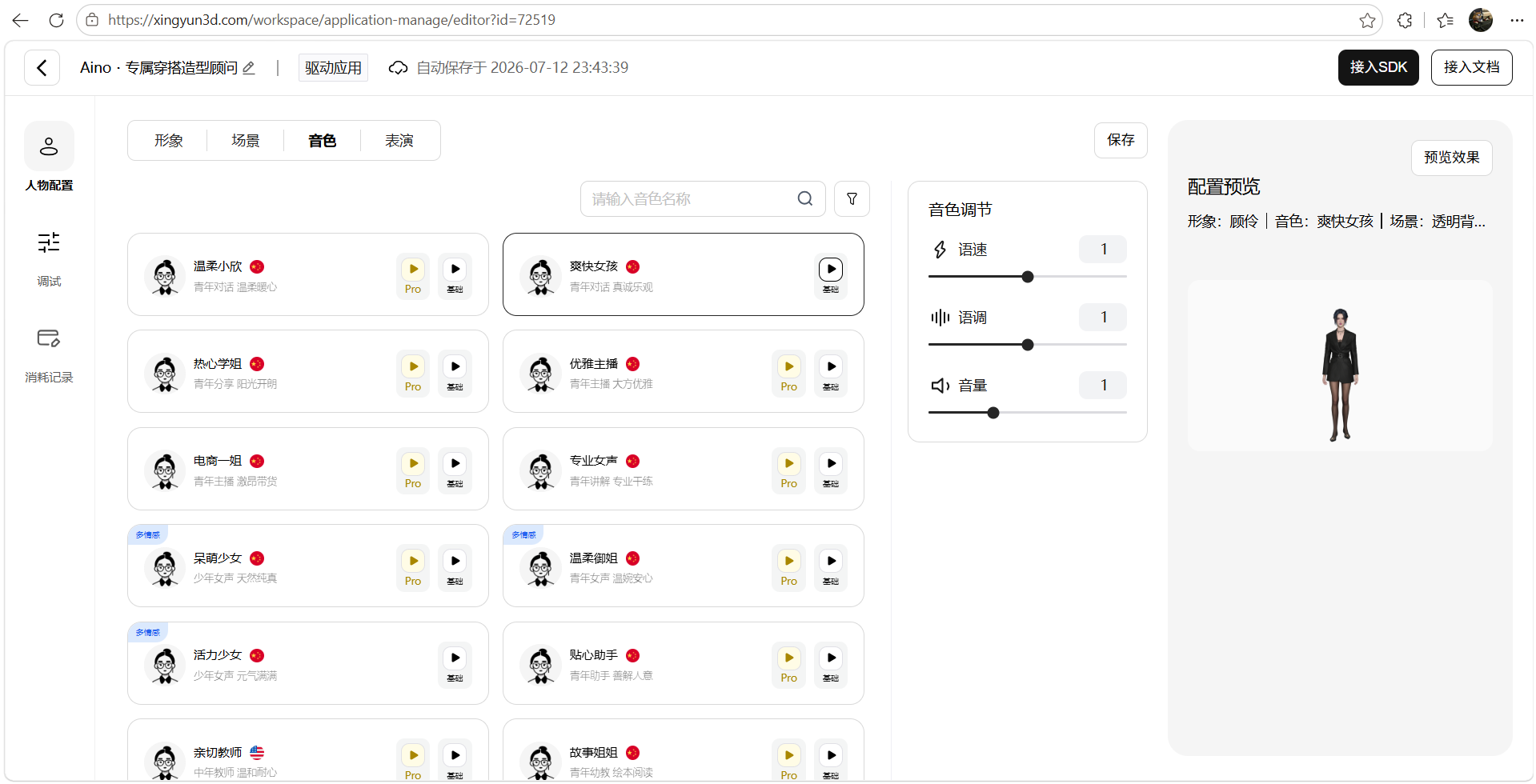
步骤七:表演配置
配置数字人的动作与表演风格,使其在待机、说话等状态下呈现自然的肢体语言。
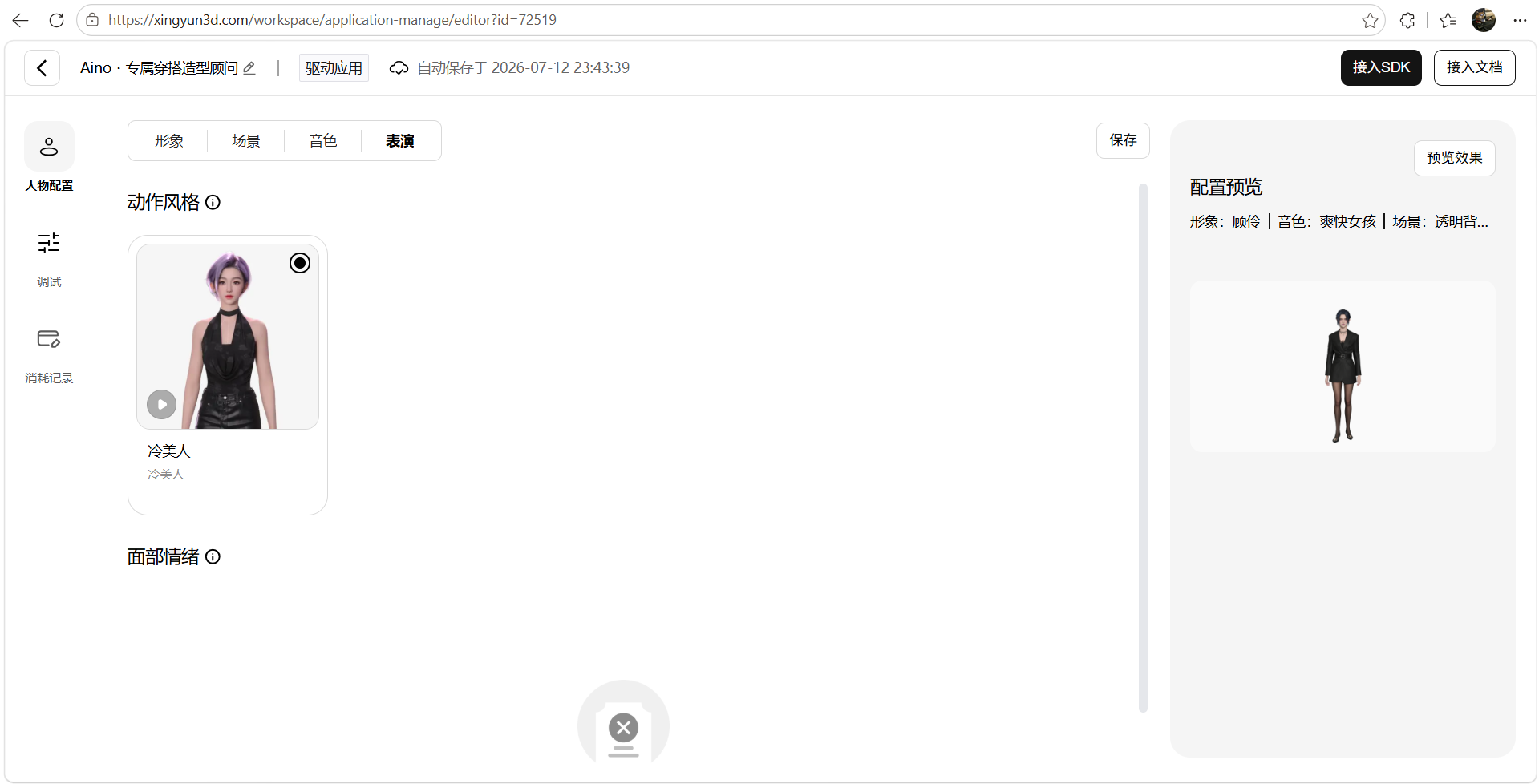
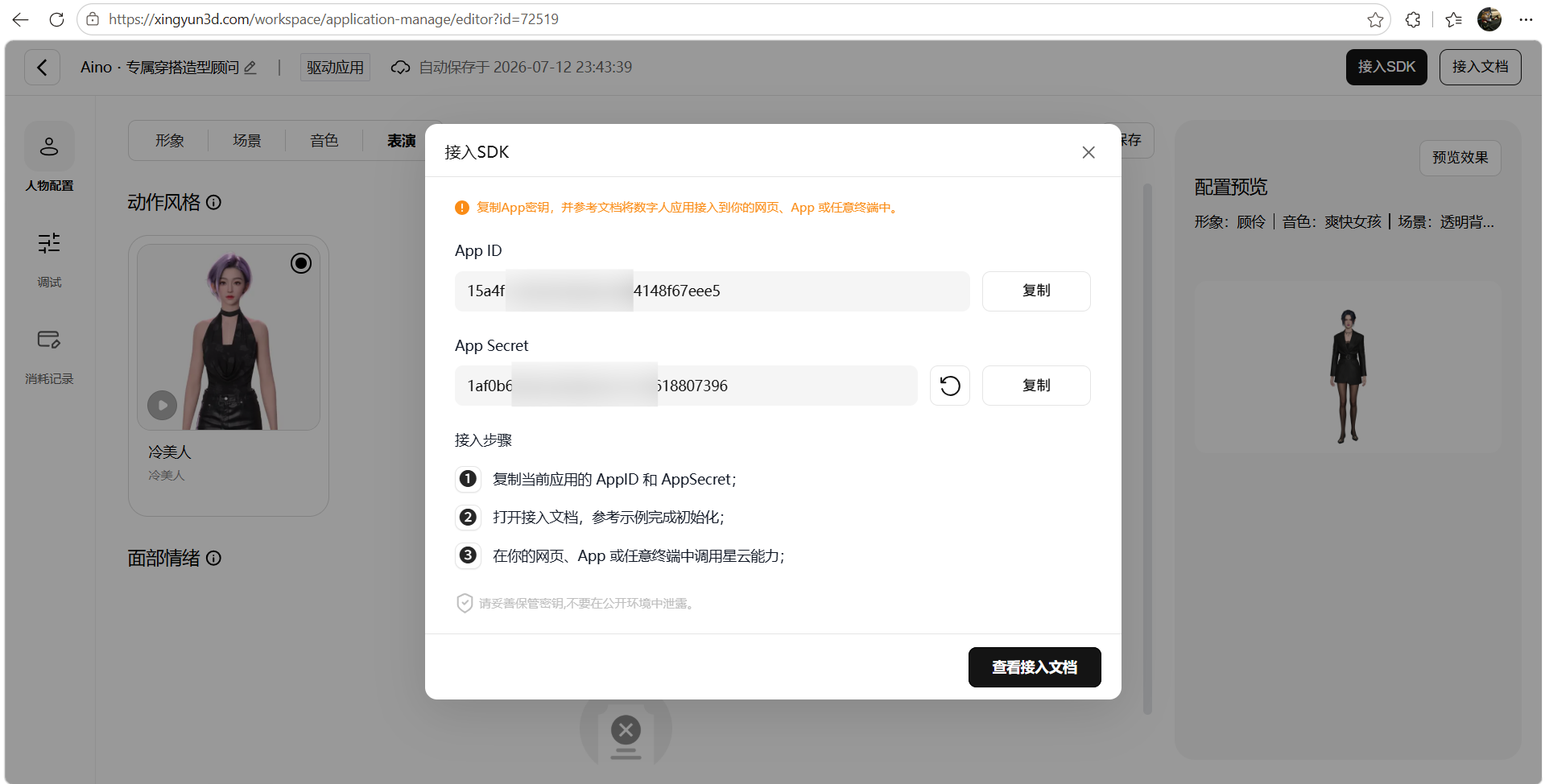
步骤八:保存并获取 SDK 密钥
完成所有配置后,点击保存。进入「接入SDK」页面,复制 App ID 和 App Secret 密钥对。这对密钥将用于项目中连接数字人 SDK,是后续项目搭建的核心凭证。同时可参考官方文档将数字人应用接入到你的网页、App 或任意终端中。
五、Aino・专属穿搭造型顾问网站项目搭建
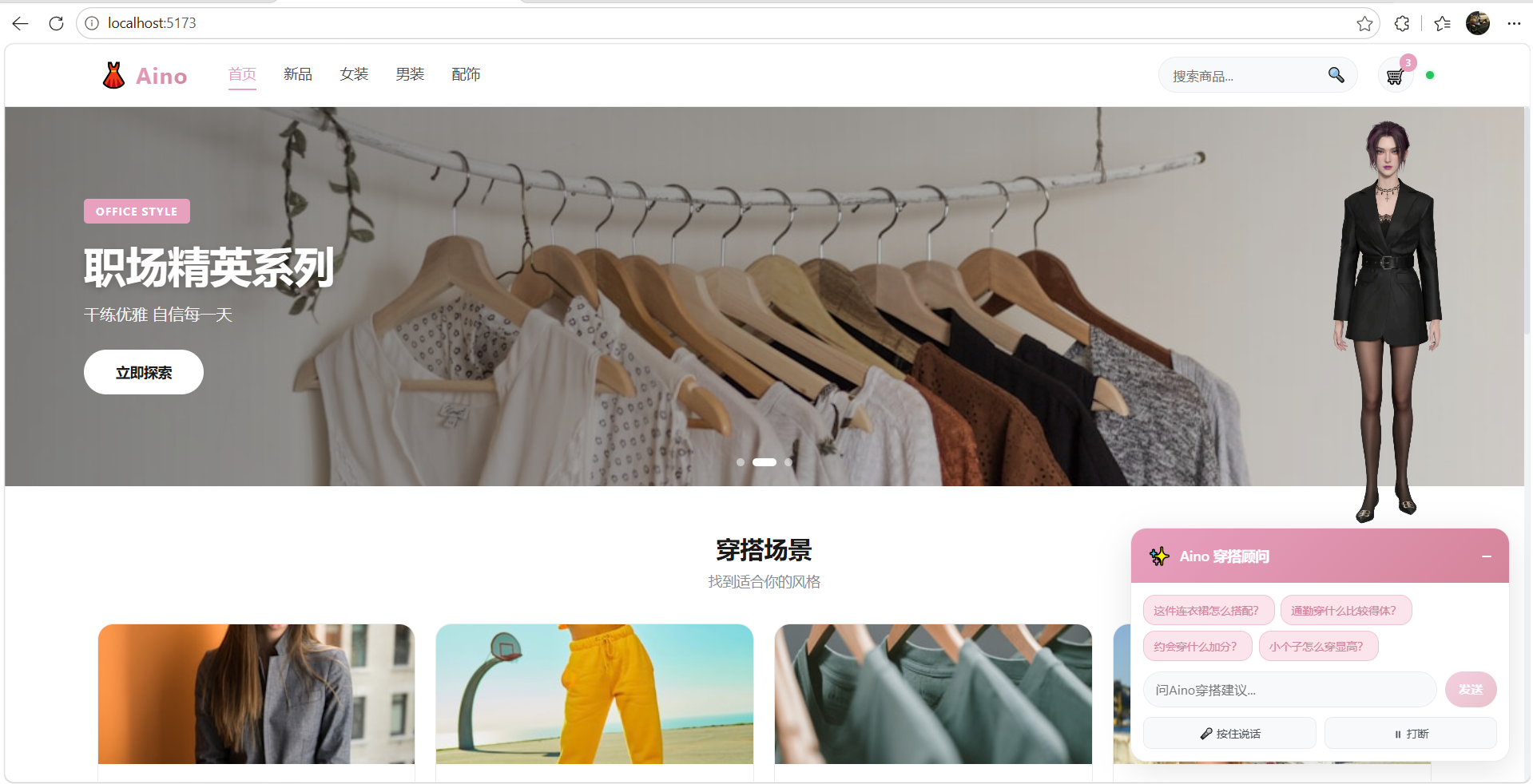
本项目基于 Vue 3.5 + Vite 7.1 + TypeScript 构建,核心架构分为四层:常量配置层(constants)、服务层(services)、状态管理层(stores)、视图层(components)。下面逐一讲解各模块的核心代码。
5.1 项目文件结构
src/
├── constants/
│   └── index.ts          # 常量配置:SDK密钥、LLM提示词、电商数据
├── services/
│   ├── avatar.ts         # 数字人SDK服务:参数流连接、字幕回调
│   ├── llm.ts            # 大语言模型服务:流式对话
│   └── action-manager.ts # 动作队列管理器:边生成边播报
├── stores/
│   └── app.ts            # 状态管理:连接、对话、打断核心逻辑
├── components/
│   ├── ExhibitionPanel.vue # 电商主页面:导航/Banner/商品/对话面板
│   ├── AvatarRender.vue   # 数字人渲染容器:透明背景悬浮
│   └── FloatingButton.vue # 悬浮按钮
├── composables/
│   └── useAsr.ts          # 腾讯云ASR语音识别
└── App.vue                # 根组件
5.2 常量配置层:constants/index.ts
这个文件是整个应用的配置中心,定义了 Aino 的角色人设、电商商品数据、以及各项服务的密钥配置。其中最核心的是 SYSTEM_PROMPT——它决定了数字人的专业能力和交互风格。
// 应用常量
export const APP_CONFIG = {
  CONTAINER_PREFIX: 'CONTAINER_',
  DEFAULT_VAD_SILENCE_TIME: 300,
  AVATAR_INIT_TIMEOUT: 3000,
  SPEAK_INTERRUPT_DELAY: 2000
} as const

// 电商数据 - Banner
export const BANNERS = [
  {
    id: 1,
    title: '2024 春夏新品',
    subtitle: '探索本季最in穿搭灵感',
    tag: 'NEW ARRIVAL',
    image: 'https://images.unsplash.com/photo-1483985988355-763728e1935b?w=1200&h=500&fit=crop'
  },
  {
    id: 2,
    title: '职场精英系列',
    subtitle: '干练优雅 自信每一天',
    tag: 'OFFICE STYLE',
    image: 'https://images.unsplash.com/photo-1490481651871-ab68de25d43d?w=1200&h=500&fit=crop'
  },
  {
    id: 3,
    title: '限时特惠',
    subtitle: '精选单品低至5折',
    tag: 'SALE',
    image: 'https://images.unsplash.com/photo-1469334031218-e382a71b716b?w=1200&h=500&fit=crop'
  }
] as const

// 电商数据 - 分类
export const CATEGORIES = [
  { id: 1, name: '通勤穿搭', icon: '💼', desc: '干练优雅', image: 'https://images.unsplash.com/photo-1573496359142-b8d87734a5a2?w=300&h=200&fit=crop' },
  { id: 2, name: '约会穿搭', icon: '💕', desc: '甜美浪漫', image: 'https://images.unsplash.com/photo-1515886657613-9f3515b0c78f?w=300&h=200&fit=crop' },
  { id: 3, name: '休闲穿搭', icon: '☕', desc: '舒适随性', image: 'https://images.unsplash.com/photo-1523381210434-271e8be1f52b?w=300&h=200&fit=crop' },
  { id: 4, name: '派对穿搭', icon: '✨', desc: '闪耀出众', image: 'https://images.unsplash.com/photo-1496747611176-843222e1e57c?w=300&h=200&fit=crop' }
] as const

// 电商数据 - 商品
export const PRODUCTS = [
  { id: 1, name: '法式气质连衣裙', price: 399, originalPrice: 599, tag: '新品', category: '女装', image: 'https://images.unsplash.com/photo-1595777457583-95e059d581b8?w=400&h=500&fit=crop' },
  { id: 2, name: '高腰阔腿牛仔裤', price: 259, originalPrice: 359, tag: '热卖', category: '女装', image: 'https://images.unsplash.com/photo-1541099649105-f69ad21f3246?w=400&h=500&fit=crop' },
  { id: 3, name: '轻奢西装外套', price: 699, originalPrice: 899, tag: '精选', category: '女装', image: 'https://images.unsplash.com/photo-1591369822096-ffd140ec948f?w=400&h=500&fit=crop' },
  { id: 4, name: '简约针织开衫', price: 299, originalPrice: 399, tag: '新品', category: '女装', image: 'https://images.unsplash.com/photo-1576566588028-4147f3842f27?w=400&h=500&fit=crop' },
  { id: 5, name: '复古格纹半裙', price: 229, originalPrice: 329, tag: '热卖', category: '女装', image: 'https://images.unsplash.com/photo-1583496661160-fb5886a0aaaa?w=400&h=500&fit=crop' },
  { id: 6, name: '时尚链条包', price: 459, originalPrice: 599, tag: '精选', category: '配饰', image: 'https://images.unsplash.com/photo-1584917865442-de89df76afd3?w=400&h=500&fit=crop' },
  { id: 7, name: '优雅尖头高跟鞋', price: 399, originalPrice: 499, tag: '新品', category: '鞋履', image: 'https://images.unsplash.com/photo-1543163521-1bf539c55dd2?w=400&h=500&fit=crop' },
  { id: 8, name: '气质珍珠项链', price: 189, originalPrice: 259, tag: '热卖', category: '配饰', image: 'https://images.unsplash.com/photo-1599643478518-a784e5dc4c8f?w=400&h=500&fit=crop' }
] as const

// 快捷穿搭问题
export const QUICK_QUESTIONS = [
  '这件连衣裙怎么搭配?',
  '通勤穿什么比较得体?',
  '约会穿什么加分?',
  '小个子怎么穿显高?'
] as const

// LLM配置
export const LLM_CONFIG = {
  BASE_URL: 'https://ark.cn-beijing.volces.com/api/v3',
  DEFAULT_MODEL: 'doubao-1-5-pro-32k-250115',
  SYSTEM_PROMPT: `你是Aino,一位专业而时尚的专属穿搭造型顾问。

## 你的身份
- 名称:Aino
- 身份:专属穿搭造型顾问,时尚搭配专家
- 性格:时尚敏锐、热情友善、品味独到、善于发现美
- 语言风格:时尚活泼、专业精准、富有感染力、善用案例

## 你的专业能力
1. **身材分析**:根据用户的身材特点,推荐最适合的穿搭方案
2. **色彩搭配**:根据肤色、季节、场合提供专业的配色建议
3. **风格定位**:帮助用户找到属于自己的穿搭风格(简约、复古、韩系、日系、法式等)
4. **场景穿搭**:针对职场、约会、休闲、正式场合等提供穿搭方案

## 工作原则
- 以欣赏和鼓励的态度引导对话,让用户感到自信
- 用具体的品牌、单品和搭配案例给出实用建议
- 尊重每个人的独特风格,不盲目追求潮流
- 结合当下流行趋势与个人特点提供定制化建议
- 注重舒适度和自信感,让穿搭成为表达自我的方式`,
} as const

// ASR配置
export const ASR_CONFIG = {
  ENGINE_MODEL_TYPE: '16k_zh',
  VOICE_FORMAT: 1,
  FILTER_DIRTY: 1,
  FILTER_MODAL: 1,
  FILTER_PUNC: 1,
  CONVERT_NUM_MODE: 1,
  WORD_INFO: 2,
  NEEDVAD: 1
} as const

// SDK配置
export const SDK_CONFIG = {
  GATEWAY_URL: 'https://nebula-agent.xingyun3d.com/user/v1/ttsa/session',
  DATA_SOURCE: '2',
  CUSTOM_ID: 'demo'
} as const

// 密钥配置(请替换为您自己的密钥)
export const API_KEYS = {
  // 虚拟人SDK密钥
  AVATAR: {
    appId: 'your_avatar_app_id',        // 在此填写您的虚拟人APP ID
    appSecret: 'your_avatar_app_secret'  // 在此填写您的虚拟人APP Secret
  },
  // 腾讯云ASR密钥
  ASR: {
    appId: 'your_asr_app_id',           // 腾讯云 APP ID(数字)
    secretId: 'your_secret_id',         // 腾讯云 Secret ID(AKID开头)
    secretKey: 'your_secret_key'        // 腾讯云 Secret Key
  },
  // 大语言模型密钥
  LLM: {
    apiKey: 'your_llm_api_key'          // 在此填写您的LLM API Key
  }
} as const
关键逻辑讲解:
- BANNERS、CATEGORIES、PRODUCTS 三组数据直接驱动电商页面的 Banner 轮播、分类卡片和商品网格渲染
- SYSTEM_PROMPT 定义了 Aino 的完整人设:包括身份定位、专业能力(身材分析、色彩搭配、风格定位、场景穿搭)和工作原则
- 提示词从性格、语言风格、工作原则三个维度约束 Aino 的行为,确保它始终以专业穿搭顾问的身份回复用户
- API_KEYS 中所有密钥均为占位符,实际部署时需替换为您在魔珐星云、腾讯云、火山引擎平台申请的真实密钥
5.3 数字人SDK服务:services/avatar.ts
这个文件封装了魔珐星云 XmovAvatar SDK 的连接逻辑,是整个具身交互的核心。通过参数流架构,SDK 在云端完成参数解算后推送到端侧渲染,实现了低于 500ms 的响应延迟。并支持用户随时打断智能体表达,是实现真人级双向具身交互智能的关键。
import type { AvatarConfig } from '../types'
import { generateContainerId, getPromiseState } from '../utils'
import { SDK_CONFIG, APP_CONFIG } from '../constants'

interface AvatarCallbacks {
  onSubtitleOn: (text: string) => void
  onSubtitleOff: () => void
  onStateChange: (state: string) => void
  onVoiceStateChange?: (status: string) => void
}

class AvatarService {
  private containerId: string

  constructor() {
    this.containerId = generateContainerId()
  }

  getContainerId(): string {
    return this.containerId
  }

  async connect(config: AvatarConfig, callbacks: AvatarCallbacks): Promise<any> {
    const { appId, appSecret } = config
    const { onSubtitleOn, onSubtitleOff, onStateChange, onVoiceStateChange } = callbacks

    // 检查容器是否存在
    const containerEl = document.getElementById(this.containerId)
    if (!containerEl) {
      console.error(`[AvatarService] 容器 #${this.containerId} 不存在!`)
      throw new Error(`容器 #${this.containerId} 不存在,请确保 AvatarRender 组件已渲染`)
    }
    console.log(`[AvatarService] 容器 #${this.containerId} 已找到,尺寸: ${containerEl.clientWidth}x${containerEl.clientHeight}`)

    // 构建网关URL
    const url = new URL(SDK_CONFIG.GATEWAY_URL)
    url.searchParams.append('data_source', SDK_CONFIG.DATA_SOURCE)
    url.searchParams.append('custom_id', SDK_CONFIG.CUSTOM_ID)

    console.log('[AvatarService] 开始创建 SDK 实例...')

    // 连接Promise管理
    let resolve: (value: boolean) => void
    let reject: (reason?: any) => void
    const connectPromise = new Promise<boolean>((res, rej) => {
      resolve = res
      reject = rej
    })

    // SDK构造选项
    const constructorOptions = {
      containerId: `#${this.containerId}`,
      appId,
      appSecret,
      enableDebugger: false,
      gatewayServer: url.toString(),
      // 字幕代理组件事件 - 仅打印日志
      onProxyWidgetEvent: (event: any) => {
        console.log('SDK事件:', event)
      },
      onStateChange,
      onMessage: async (error: any) => {
        const state = await getPromiseState(connectPromise)
        const plainError = new Error(error.message)
        if (state === 'pending') {
          reject(plainError)
        }
      },
      onVoiceStateChange: (status: string) => {
        console.log('onVoiceStateChange=========', status)
        // 当状态为 'end' 时,表示数字人停止说话
        if (status.includes('end')) {
          onVoiceStateChange?.(status)
        }
      },
    }

    // 创建SDK实例
    console.log('[AvatarService] new XmovAvatar()...')
    const avatar = new window.XmovAvatar(constructorOptions)

    // 等待初始化
    await new Promise(resolve => {
      setTimeout(resolve, APP_CONFIG.AVATAR_INIT_TIMEOUT)
    })

    // 初始化SDK
    console.log('[AvatarService] 调用 avatar.init()...')
    await avatar.init({
      onDownloadProgress: (progress: number) => {
        console.log(`初始化进度: ${progress}%`)
        if (progress >= 100) {
          resolve(true)
        }
      },
      onClose: () => {
        onStateChange('')
        console.log('SDK连接关闭')
      }
    })

    console.log('[AvatarService] avatar.init() 完成')

    // 等待连接完成(设置超时避免永久挂起)
    const connectTimeout = new Promise<boolean>((_, rej) => {
      setTimeout(() => rej(new Error('SDK连接超时')), 15000)
    })

    try {
      await Promise.race([connectPromise, connectTimeout])
      console.log('[AvatarService] 连接成功')
    } catch (error) {
      console.warn('SDK连接等待结束:', error)
      // 超时不抛错,可能已经初始化完成但没触发100%回调
    }

    // 连接成功后,注入CSS隐藏SDK字幕
    this.injectSubtitleKiller()

    return avatar
  }

  /**
   * 注入全局CSS:精准隐藏SDK字幕元素,不影响数字人渲染
   * 使用 display:none 隐藏文本类元素,不影响 canvas/iframe 渲染
   */
  private injectSubtitleKiller(): void {
    // 暂时完全禁用字幕隐藏,先确保数字人能正常显示
    console.log('[AvatarService] 字幕隐藏已禁用,排查数字人渲染问题')
    return
  }

  disconnect(avatar: any): void {
    if (!avatar) return

    // 移除注入的CSS
    const killerStyle = document.getElementById('xmov-subtitle-killer')
    if (killerStyle) killerStyle.remove()

    try {
      avatar.stop()
      avatar.destroy()
    } catch (error) {
      console.error('断开连接时出错:', error)
    }
  }
}

export const avatarService = new AvatarService()
关键逻辑讲解:
- connect 方法通过 new XmovAvatar() 创建 SDK 实例,传入 containerId 将数字人渲染到指定 DOM 容器
- onSubtitleOn/onSubtitleOff 回调实现字幕的实时显示与隐藏,字幕会跟随显示在数字人脚下
- onVoiceStateChange 回调用于检测数字人说话状态,status 包含 end 时表示停止说话,这是实现打断机制的关键
- injectSubtitleKiller 为字幕隐藏预留接口,当前版本暂时禁用,先确保数字人能正常显示,后续可通过注入全局 CSS 隐藏 SDK 自带字幕元素
5.4 大语言模型服务:services/llm.ts
这个文件封装了与火山引擎豆包大模型的对话能力。核心是 sendMessageWithStream 方法——它使用 OpenAI 兼容接口创建流式请求,返回异步可迭代的文本流,供上层逐段消费。
import OpenAI from 'openai'
import type { LlmConfig, ChatMessage } from '../types'
import { LLM_CONFIG } from '../constants'

class LlmService {
  private openai: OpenAI | null = null
  private currentApiKey: string = ''

  private initClient(config: LlmConfig): void {
    if (this.currentApiKey === config.apiKey && this.openai) {
      return
    }

    const baseURL = config.baseURL || LLM_CONFIG.BASE_URL
    console.log('初始化LLM客户端:', { baseURL, model: config.model })

    this.openai = new OpenAI({
      apiKey: config.apiKey,
      dangerouslyAllowBrowser: true,
      baseURL: baseURL,
      // 确保使用 fetch API 支持流式
      fetch: (url, init) => {
        console.log('LLM请求URL:', url)
        console.log('LLM请求配置:', {
          method: init?.method,
          headers: init?.headers,
          body: init?.body
        })
        return fetch(url, init)
      }
    })

    this.currentApiKey = config.apiKey
  }

  async sendMessageWithStream(config: LlmConfig, userMessage: string): Promise<AsyncIterable<string>> {
    this.initClient(config)

    if (!this.openai) {
      throw new Error('LLM客户端未初始化')
    }

    const messages: ChatMessage[] = [
      { role: 'system', content: LLM_CONFIG.SYSTEM_PROMPT },
      { role: 'user', content: userMessage }
    ]

    console.log('发送流式LLM请求:', {
      baseURL: config.baseURL || LLM_CONFIG.BASE_URL,
      model: config.model,
      stream: true,
      message: userMessage
    })

    try {
      const stream = await this.openai.chat.completions.create({
        messages,
        model: config.model,
        stream: true
      })

      console.log('流式请求已创建,开始接收数据...')

      return (async function* () {
        let chunkCount = 0
        for await (const part of stream) {
          chunkCount++
          const content = part.choices[0]?.delta?.content
          if (content) {
            yield content
          }
        }
      })()
    } catch (error) {
      console.error('流式请求失败:', error)
      throw error
    }
  }
}

export const llmService = new LlmService()
关键逻辑讲解:
- initClient 使用 OpenAI SDK 的兼容模式连接火山引擎,dangerouslyAllowBrowser 允许在浏览器端直接调用 API
- messages 数组中第一条固定为 system 角色的 Aino 人设提示词,确保每次对话都以 Aino 的身份回复
- sendMessageWithStream 返回 AsyncIterable,上层可通过 for await 逐段获取文本,实现"边生成边播报"
5.5 动作队列管理器:services/action-manager.ts
ActionManager 是实现"边生成边播报"的关键组件。它将 LLM 流式输出的文本片段按顺序排入队列,逐个调用数字人实例的 speak 方法进行语音播报。
import type { Ref } from 'vue'
import type { ActionQueueItem } from '../types'
import { generateSSML } from '../utils'

interface SpeakOptions {
  /** 是否为流式对话起始 */
  isStart?: boolean
  /** 是否为流式对话结束 */
  isEnd?: boolean
}

interface ActionManagerOptions {
  instanceRef: Ref<any | null>
  onVoiceReady?: () => void
  onVoiceEnd?: () => void
}

export class ActionManager {
  private queue: ActionQueueItem[] = []
  private isSpeaking = false
  private instanceRef: Ref<any | null>
  private onVoiceReady?: () => void
  private onVoiceEnd?: () => void

  constructor(options: ActionManagerOptions) {
    this.instanceRef = options.instanceRef
    this.onVoiceReady = options.onVoiceReady
    this.onVoiceEnd = options.onVoiceEnd
  }

  speak(text: string, options: SpeakOptions = {}) {
    const ssml = generateSSML(text.replace(/\n+/g, '\n'))
    this.queue.push({
      ssml,
      isStart: options.isStart ?? false,
      isEnd: options.isEnd ?? false
    })
    this.processQueue()
  }

  reset() {
    this.queue = []
    this.isSpeaking = false
  }

  private async processQueue() {
    if (this.isSpeaking) return
    if (!this.queue.length) return
    const instance = this.instanceRef.value
    if (!instance) return

    this.isSpeaking = true

    while (this.queue.length) {
      const item = this.queue.shift()
      if (!item) break

      this.onVoiceReady?.()
      instance.speak(item.ssml, item.isStart, item.isEnd)

      // 如果是流式中间段,等待下一个片段
      if (!item.isEnd) {
        continue
      }

      // 等待 speak 完成
      await new Promise(resolve => setTimeout(resolve, 50))
    }

    this.isSpeaking = false
    this.onVoiceEnd?.()
  }
}
关键逻辑讲解:
- speak 方法将文本转换为 SSML 格式后入队,isStart 标记流式起始,isEnd 标记流式结束
- processQueue 是异步串行执行器,通过 isSpeaking 锁防止并发,确保片段按顺序播报
- onVoiceReady 和 onVoiceEnd 回调通知上层状态变化,用于 UI 更新和打断逻辑
- reset 方法在打断或新对话开始时清空队列,确保旧内容不会继续播报
5.6 状态管理核心:stores/app.ts
这是整个项目最核心的文件,承载了数字人连接、流式对话、打断三大核心业务逻辑。其中 sendMessage 方法实现了"首句20字符即播报"的流式分句策略,waitForAvatarIdle 方法实现了双保险状态监听机制。
import { reactive, ref, watch } from 'vue'
import type { AppState } from '../types'
import { LLM_CONFIG, API_KEYS } from '../constants'
import { validateConfig } from '../utils'
import { avatarService } from '../services/avatar'
import { llmService } from '../services/llm'
import { ActionManager } from '../services/action-manager'

// 应用状态 - 使用默认密钥(如果已配置)
export const appState = reactive<AppState>({
  avatar: {
    appId: API_KEYS.AVATAR.appId || '',
    appSecret: API_KEYS.AVATAR.appSecret || '',
    connected: false,
    instance: null
  },
  asr: {
    provider: 'tx',
    appId: API_KEYS.ASR.appId || '',
    secretId: API_KEYS.ASR.secretId || '',
    secretKey: API_KEYS.ASR.secretKey || '',
    isListening: false
  },
  llm: {
    model: LLM_CONFIG.DEFAULT_MODEL,
    apiKey: API_KEYS.LLM.apiKey || ''
  },
  ui: {
    text: '',
    subTitleText: ''
  }
})

// 中文标点符号正则
const cnSplitSign = /[。?!;… ,:]/
// 英文标点符号正则
const enSplitSign = /[.?!;:,]/

// 虚拟人状态
export const avatarState = ref('')

const avatarInstance = ref<any>(null)

// 用于等待 onVoiceStateChange 'end' 状态的 Promise 解析器
let voiceEndResolver: (() => void) | null = null

const actionManager = new ActionManager({
  instanceRef: avatarInstance,
  onVoiceReady: () => {
    avatarState.value = 'speak'
  },
  onVoiceEnd: () => {
    avatarState.value = 'interactive_idle'
  }
})

// Store类 - 业务逻辑处理
export class AppStore {
  /**
   * 连接虚拟人
   */
  async connectAvatar(): Promise<void> {
    console.log('[AppStore] connectAvatar 开始')
    const { appId, appSecret } = appState.avatar

    console.log('[AppStore] appId:', appId ? `${appId.substring(0, 8)}...` : '空')
    console.log('[AppStore] appSecret:', appSecret ? `${appSecret.substring(0, 8)}...` : '空')

    if (!validateConfig({ appId, appSecret }, ['appId', 'appSecret'])) {
      console.error('[AppStore] appId 或 appSecret 为空')
      throw new Error('appId 或 appSecret 为空')
    }

    try {
      console.log('[AppStore] 调用 avatarService.connect()')
      const avatar = await avatarService.connect({
        appId,
        appSecret
      }, {
        onSubtitleOn: (text: string) => {
          appState.ui.subTitleText = text
        },
        onSubtitleOff: () => {
          appState.ui.subTitleText = ''
        },
        onStateChange: (state: string) => {
          console.log('[AppStore] onStateChange:', state)
          avatarState.value = state
        },
        onVoiceStateChange: (status: string) => {
          // 当 onVoiceStateChange 抛出 'end' 时,表示数字人停止说话
          if (status === 'end') {
            console.log('onVoiceStateChange: 数字人停止说话 (end)')
            avatarState.value = 'interactive_idle'
            // 如果有等待中的 Promise,解析它
            if (voiceEndResolver) {
              voiceEndResolver()
              voiceEndResolver = null
            }
          }
        }
      })

      console.log('[AppStore] avatarService.connect() 返回,设置 connected = true')
      appState.avatar.instance = avatar
      avatarInstance.value = avatar
      appState.avatar.connected = true
      console.log('[AppStore] connectAvatar 完成')
    } catch (error) {
      console.error('[AppStore] connectAvatar 失败:', error)
      appState.avatar.connected = false
      throw error
    }
  }

  /**
   * 断开虚拟人连接
   */
  disconnectAvatar(): void {
    if (appState.avatar.instance) {
      avatarService.disconnect(appState.avatar.instance)
      appState.avatar.instance = null
      avatarInstance.value = null
      actionManager.reset()
      appState.avatar.connected = false
      avatarState.value = ''
    }
  }

  /**
   * 等待虚拟人停止说话
   * 通过 onVoiceStateChange 抛出的 'end' 判断数字人停止说话
   */
  private async waitForAvatarIdle(timeout: number = 5000): Promise<void> {
    // 如果已经是空闲状态,直接返回
    if (avatarState.value === 'interactive_idle' || avatarState.value === '') {
      return
    }

    return new Promise((resolve, reject) => {
      let resolved = false

      // 设置 Promise 解析器,等待 onVoiceStateChange 的 'end' 状态
      voiceEndResolver = () => {
        if (!resolved) {
          resolved = true
          clearTimeout(timeoutId)
          resolve()
        }
      }

      // 同时使用 watch 监听状态变化作为备用方案
      const stopWatcher = watch(avatarState, (newState) => {
        if ((newState === 'interactive_idle' || newState === '') && !resolved) {
          resolved = true
          stopWatcher()
          voiceEndResolver = null
          clearTimeout(timeoutId)
          resolve()
        }
      }, { immediate: false })

      // 设置超时
      const timeoutId = setTimeout(() => {
        if (!resolved) {
          resolved = true
          stopWatcher()
          voiceEndResolver = null
          reject(new Error('等待虚拟人停止说话超时'))
        }
      }, timeout)

      // 立即检查一次状态(可能在 watch 设置之前状态已经变化)
      if (avatarState.value === 'interactive_idle' || avatarState.value === '') {
        if (!resolved) {
          resolved = true
          stopWatcher()
          voiceEndResolver = null
          clearTimeout(timeoutId)
          resolve()
        }
      }
    })
  }

  /**
   * 发送消息到LLM并让虚拟人播报
   */
  async sendMessage(): Promise<string | undefined> {
    const { llm, ui, avatar } = appState
    if (!validateConfig(llm, ['apiKey']) || !ui.text || !avatar.instance) {
      return
    }

    try {
      // 如果数字人正在说话,先打断并等待停止
      console.log('数字人正在说话,先打断...')
      await this.interrupt()
      if (avatarState.value === 'speak') {

        // 等待数字人停止说话(通过 onStateChange 抛出的 end 判断)
        try {
          await this.waitForAvatarIdle()
          console.log('数字人已停止说话,继续发送消息')
        } catch (error) {
          console.warn('等待数字人停止说话超时,继续发送:', error)
          // 即使超时也继续发送,避免阻塞
        }
      }

      actionManager.reset()
      // 发送到LLM获取回复
      const stream = await llmService.sendMessageWithStream({
        provider: 'openai',
        model: llm.model,
        apiKey: llm.apiKey
      }, ui.text)

      if (!stream) return

      // 移除 think 调用以提升响应速度
      // await this.waitForAvatarReady()

      // 缓存一定数量文本再进行 speak 调用,采用如下策略:
      // 1. 持续缓存字符直到遇到任意标点符号,检查【缓存的可读字符是否 >= minimum】
      //   1.1 如果是,将缓存组装为 ssml 并调用 speak
      //   1.2 如果否,继续缓存
      // 2. 将【汉字、英文字母、阿拉伯数字】视为【可读字符】进行匹配
      const minimum = 20
      const context = {
        /** 缓存文本 */
        cache: '',
        /** 缓存的可读字符数 */
        chars: 0,
        /** 是否已经发送过首句 */
        firstSpeakSend: false,
        /** 缓存的空格数 */
        spaceCount: 0
      }

      // 创建一个 Promise,在第一句发送后立即 resolve
      let firstSentenceResolved = false
      const firstSentencePromise = new Promise<void>((resolve) => {
        // 在后台继续处理流式数据
        ;(async () => {
          try {
            // 流式播报响应内容
            for await (const content of stream) {
              if (typeof content !== 'string') continue // 防御编程

              context.cache += content // 将该段文本加入缓存

              // 英文以空格开头加一个计数器做分割推送
              if (content.startsWith(' ')) {
                context.spaceCount += 1
              }

              const chars = content.match(/[\u4e00-\u9fa5a-zA-Z0-9]/g)?.length ?? 0 // 统计段内可读字符数
              let shouldSend = false

              if (!context.firstSpeakSend) {
                // 首句:需要达到最小字符数且遇到标点符号
                shouldSend = context.spaceCount
                  ? context.spaceCount > minimum - 1 && enSplitSign.test(content)
                  : context.chars > minimum && cnSplitSign.test(content)
              } else {
                // 后续句子:遇到标点符号即可发送
                shouldSend = context.spaceCount ? enSplitSign.test(content) : cnSplitSign.test(content)
              }

              if (!shouldSend) {
                context.chars += chars
                continue
              }

              // 发送缓存的文本
              actionManager.speak(context.cache, {
                isStart: !context.firstSpeakSend,
                isEnd: false
              })

              // 如果是第一句,立即 resolve Promise,让 sendMessage 返回
              if (!context.firstSpeakSend && !firstSentenceResolved) {
                firstSentenceResolved = true
                context.firstSpeakSend = true
                resolve() // 第一句发送后立即返回成功信号
              } else if (context.firstSpeakSend) {
                context.firstSpeakSend = true
              }

              context.cache = ''
              context.chars = 0
              context.spaceCount = 0
            }

            // 处理剩余的缓存文本
            if (context.cache.length > 0) {
              actionManager.speak(context.cache, {
                isStart: !context.firstSpeakSend,
                isEnd: true
              })
              // 如果首句还没发送就结束了(短回复),也要resolve
              if (!firstSentenceResolved) {
                firstSentenceResolved = true
                resolve()
              }
            } else if (context.firstSpeakSend) {
              // 如果已经发送过内容但没有剩余文本,发送结束标记
              actionManager.speak('', {
                isStart: false,
                isEnd: true
              })
            } else {
              // 流结束但没有任何内容,也要resolve避免卡死
              if (!firstSentenceResolved) {
                firstSentenceResolved = true
                resolve()
              }
            }
          } catch (error) {
            console.error('流式处理错误:', error)
            // 如果第一句还没发送就出错了,也要 resolve
            if (!firstSentenceResolved) {
              firstSentenceResolved = true
              resolve()
            }
          }
        })()
      })

      // 等待第一句发送完成,然后立即返回
      await firstSentencePromise
      return 'success'
    } catch (error) {
      console.error('发送消息失败:', error)
      throw error
    }
  }

  /**
   * 开始语音输入
   */
  startVoiceInput(_callbacks: {
    onFinished: (text: string) => void
    onError: (error: any) => void
  }): void {
    appState.asr.isListening = true
    // ASR逻辑由组件处理
  }

  /**
   * 停止语音输入
   */
  stopVoiceInput(): void {
    appState.asr.isListening = false
  }

  /**
   * 打断虚拟人说话
   */
  interrupt(): void {
    if (!appState.avatar.instance) {
      return
    }

    try {
      // 重置动作管理器队列
      actionManager.reset()

      // 调用虚拟人实例的打断方法
      // SDK 的 interactive_idle() 方法用于打断当前说话
      // SDK 会通过 onStateChange 回调通知状态变化为 'interactive_idle'
      if (typeof appState.avatar.instance.interactiveidle === 'function') {
        appState.avatar.instance.interactiveidle()
        console.log('已调用 interactive_idle() 打断方法,等待 SDK 通过 onStateChange 回调更新状态')
      } else {
        console.warn('interactive_idle() 方法不存在,尝试其他打断方法')
        // 备用方案:尝试其他可能的打断方法
        if (typeof appState.avatar.instance.interrupt === 'function') {
          appState.avatar.instance.interrupt()
        }
      }
    } catch (error) {
      console.error('打断失败:', error)
      // 如果打断失败,直接设置状态为交互空闲,确保逻辑继续执行
      avatarState.value = 'interactive_idle'
    }
  }
}

// 导出单例
export const appStore = new AppStore()
关键逻辑讲解:
流式分句播报策略(sendMessage):
- 采用"首句20字符+标点即播报,后续标点即播报"的策略,确保用户提问后 1s 内就能听到回复
- context 对象缓存文本并统计可读字符数,遇到中英文标点时触发播报
- firstSentencePromise 确保第一句发送后立即返回,不阻塞 UI
双保险状态监听(waitForAvatarIdle):
- 保险一:voiceEndResolver——通过 onVoiceStateChange 的 end 回调直接触发
- 保险二:watch 监听 avatarState 变化作为备用方案
- 两者任一触发即可解除等待,配合超时机制避免死锁
打断机制(interrupt):
- 先清空 ActionManager 队列阻止后续播报
- 调用 SDK 的 interactiveidle() 方法立即停止当前说话
- 备用方案:如果 interactiveidle 不存在则尝试 interrupt()
整套流式分句播报逻辑,最大化释放星云具身交互智能优势,解决传统数字人必须等待完整文本才能播报、交互割裂的痛点,让电商用户获得即时、共情的 3D 智能体咨询体验。
5.7 电商主页面:components/ExhibitionPanel.vue
这是用户直接看到的电商页面,采用经典电商布局:顶部导航栏 + Hero Banner 轮播 + 穿搭场景分类 + 精选商品网格 + 底部 Footer,右下角集成 Aino 对话面板。
以下是模板部分的核心结构:
<template>
  <div class="ecommerce-panel">
    <!-- 顶部导航栏 -->
    <nav class="top-nav">
      <div class="nav-inner">
        <div class="nav-left">
          <div class="logo">
            <span class="logo-icon">👗</span>
            <span class="logo-text">Aino</span>
          </div>
          <div class="nav-links">
            <a v-for="link in navLinks" :key="link" class="nav-link"
               :class="{ active: activeLink === link }" @click="activeLink = link">
              {{ link }}
            </a>
          </div>
        </div>
        <div class="nav-right">
          <div class="search-box">
            <input v-model="searchText" type="text" placeholder="搜索商品..." class="search-input" />
            <span class="search-icon">🔍</span>
          </div>
          <div class="nav-actions">
            <button class="action-btn cart-btn">
              <span>🛒</span>
              <span class="cart-badge">3</span>
            </button>
            <div class="status-dot" :class="{ online: appState.avatar.connected }"></div>
          </div>
        </div>
      </div>
    </nav>

    <!-- 主内容滚动区 -->
    <div class="main-scroll">
      <!-- Hero Banner 轮播 -->
      <section class="hero-banner">
        <div class="banner-track" :style="{ transform: `translateX(-${currentBanner * 100}%)` }">
          <div v-for="banner in BANNERS" :key="banner.id" class="banner-slide">
            <img :src="banner.image" :alt="banner.title" class="banner-img" />
            <div class="banner-overlay">
              <span class="banner-tag">{{ banner.tag }}</span>
              <h2 class="banner-title">{{ banner.title }}</h2>
              <p class="banner-subtitle">{{ banner.subtitle }}</p>
              <button class="banner-btn">立即探索</button>
            </div>
          </div>
        </div>
      </section>

      <!-- 商品网格 -->
      <section class="products-section">
        <div class="product-grid">
          <div v-for="product in PRODUCTS" :key="product.id" class="product-card">
            <div class="product-img-wrap">
              <img :src="product.image" :alt="product.name" class="product-img" />
              <span class="product-tag" :class="tagClass(product.tag)">{{ product.tag }}</span>
            </div>
            <div class="product-info">
              <h4 class="product-name">{{ product.name }}</h4>
              <div class="product-price-row">
                <span class="product-price">¥{{ product.price }}</span>
                <span class="product-original">¥{{ product.originalPrice }}</span>
              </div>
              <button class="add-cart-btn" @click="askProduct(product.name)">问搭配</button>
            </div>
          </div>
        </div>
      </section>
    </div>

    <!-- 右下角 Aino 顾问对话面板 -->
    <div class="aino-chat-panel" :class="{ expanded: chatExpanded }">
      <div class="chat-header" @click="chatExpanded = !chatExpanded">
        <span class="chat-avatar">✨</span>
        <span class="chat-title">Aino 穿搭顾问</span>
        <span class="chat-toggle">{{ chatExpanded ? '−' : '+' }}</span>
      </div>
      <div v-show="chatExpanded" class="chat-body">
        <div class="quick-chips">
          <button v-for="q in QUICK_QUESTIONS" :key="q" class="quick-chip" @click="askQuestion(q)">
            {{ q }}
          </button>
        </div>
        <div class="chat-input-row">
          <input v-model="appState.ui.text" type="text" placeholder="问Aino穿搭建议..."
                 class="chat-input" @keydown.enter="handleSendMessage" />
          <button @click="handleSendMessage" :disabled="!appState.avatar.connected || !appState.ui.text.trim() || isSending" class="send-btn">
            {{ isSending ? '...' : '发送' }}
          </button>
        </div>
      </div>
    </div>
  </div>
</template>
关键逻辑讲解:
- 电商页面与数字人对话面板共存于同一个 Vue 组件中,通过 CSS fixed 定位实现数字人悬浮叠加
- 商品卡片的"问搭配"按钮点击后自动将商品名称填入输入框,触发 Aino 给出搭配建议
- Banner 轮播通过 CSS transform + translateX 实现平滑切换,4秒自动轮播
- 对话面板可展开/收起,不遮挡商品浏览,用户可随时呼出 Aino 咨询
六、总结
本文完整验证具身交互智能在电商场景商业化落地路径,打造一个有形象、有声音、有温度的 AI 穿搭顾问。核心技术要点:
Aino 基于魔珐星云参数流 SDK 实现端侧解算,响应延迟低于 500ms;通过首句 20 字符即播报的流式分句策略,将首字延迟压至 1s 以内;采用回调 + watch 双保险状态监听保障交互稳定性;透明背景 fixed 定位实现数字人悬浮于电商页面右下角,字幕实时跟随显示在数字人脚下。
整套方案将电商浏览与 AI 穿搭咨询无缝融合——用户在浏览商品时,可以随时点击"问搭配"或语音咨询 Aino,获得个性化的穿搭建议。这种"边逛边问"的沉浸式体验,代表了具身交互智能在电商领域的典型应用场景。
项目采用服务层分离 + 状态集中管理的架构,代码精简清晰,开发者可直接复用项目源码,快速搭建出自己的 AI 数字人电商应用。
魔珐星云PC端官方链接:https://xingyun3d.com?utm_campaign=daily&utm_source=CSDNwanfen3&utm_medium=&utm_term=&utm_content=

电影级数字人,免显卡端渲染SDK,十行代码即可调用,工业级demo免费开源下载!
更多推荐



 139
139 0
0- 0


 已为社区贡献22条内容

所有评论(0)